YASB (Yet Another Status Bar) is a highly configurable status bar for Windows, written in Python, with support for many widgets, easy theming, and deep customization.
## 📋 Installation
For detailed installation instructions and system requirements, visit the [installation docs](https://github.com/amnweb/yasb/wiki/Installation).
But to get started quickly, choose one of the installation methods below:
Download .msi from GitHub
Go to the YASB GitHub releases, click Assets to reveal the downloads, and choose the installer that matches your architecture and install scope. For most devices, that's the x64 per-user installer.
WinGet
Download YASB from WinGet. Updating YASB via winget will respect the current YASB installation scope. To install YASB, run the following command from the command line / PowerShell:
*User scope installer [default]*
```powershell
winget install AmN.yasb
```
*Machine-wide scope installer*
```powershell
winget install --scope machine AmN.yasb
```
Scoop
Download YASB from Scoop. Updating YASB via Scoop will respect the current YASB installation scope. To install YASB using Scoop, run the following command from the command line / PowerShell:
*Install YASB using Scoop*
```powershell
scoop bucket add extras
scoop install extras/yasb
```
Chocolatey
Download YASB from Chocolatey. Updating YASB via Chocolatey will respect the current YASB installation scope. To install YASB using Chocolatey, run the following command from the command line / PowerShell:
*Install YASB using Chocolatey*
```powershell
choco install yasb
```
## 💻 Demo
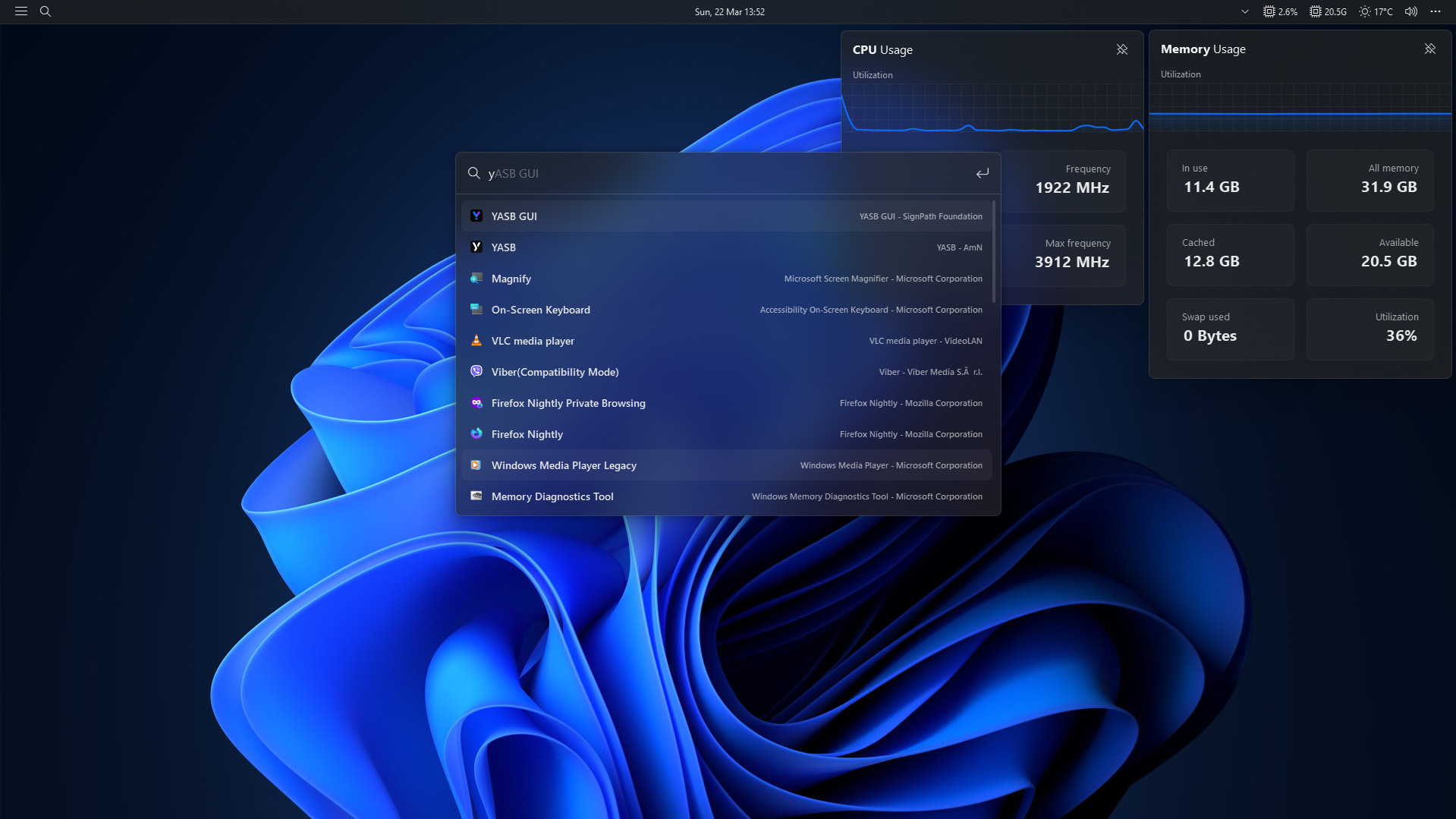
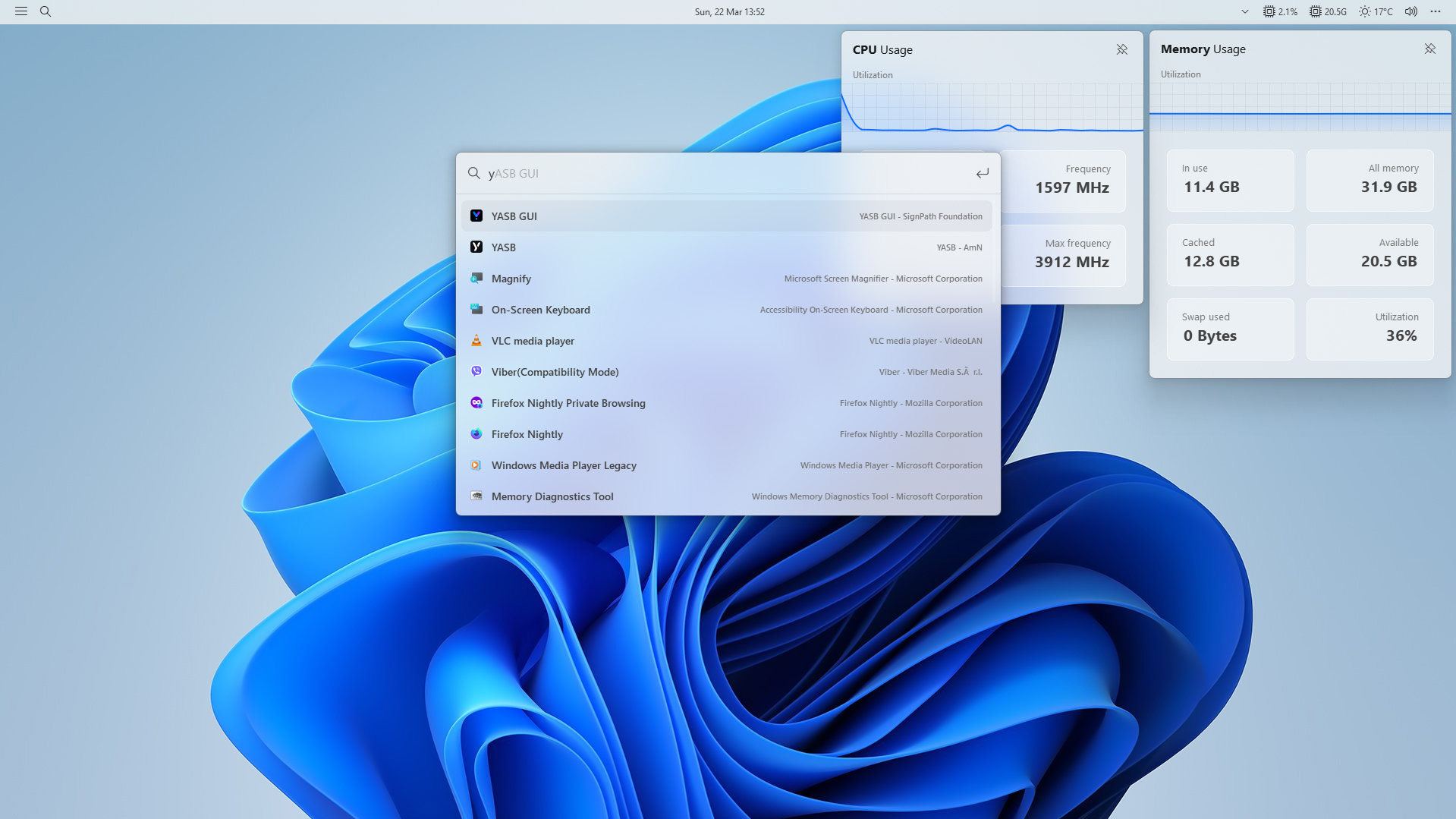
## 🛠️ List of currently available widgets in YASB.
| Widget | Description |
| --- | --- |
| [Active Windows Title](https://github.com/amnweb/yasb/wiki/(Widget)-Active-Windows-Title) | Displays the title of the currently active window. |
| [Applications](https://github.com/amnweb/yasb/wiki/(Widget)-Applications) | Shows a list of predefined applications. |
| [Ai Chat](https://github.com/amnweb/yasb/wiki/(Widget)-Ai-Chat) | A chat widget that allows you to interact with AI models. |
| [Battery](https://github.com/amnweb/yasb/wiki/(Widget)-Battery) | Displays the current battery status. |
| [Bluetooth](https://github.com/amnweb/yasb/wiki/(Widget)-Bluetooth) | Shows the current Bluetooth status and connected devices. |
| [Brightness](https://github.com/amnweb/yasb/wiki/(Widget)-Brightness) | Displays and change the current brightness level. |
| [Cava](https://github.com/amnweb/yasb/wiki/(Widget)-Cava) | Displays audio visualizer using Cava. |
| [Copilot](https://github.com/amnweb/yasb/wiki/(Widget)-Copilot) | GitHub Copilot usage with a detailed menu showing statistics |
| [CPU](https://github.com/amnweb/yasb/wiki/(Widget)-CPU) | Shows the current CPU usage and information. |
| [Clock](https://github.com/amnweb/yasb/wiki/(Widget)-Clock) | Displays the current time and date, with customizable formats. |
| [Custom](https://github.com/amnweb/yasb/wiki/(Widget)-Custom) | Create a custom widget. |
| [Github](https://github.com/amnweb/yasb/wiki/(Widget)-Github) | Shows notifications from GitHub. |
| [GlazeWM Binding Mode](https://github.com/amnweb/yasb/wiki/(Widget)-GlazeWM-Binding-Mode) | GlazeWM binding mode widget. |
| [GlazeWM Tiling Direction](https://github.com/amnweb/yasb/wiki/(Widget)-GlazeWM-Tiling-Direction) | GlazeWM tiling direction widget. |
| [GlazeWM Workspaces](https://github.com/amnweb/yasb/wiki/(Widget)-GlazeWM-Workspaces) | GlazeWM workspaces widget. |
| [Glucose Monitor](https://github.com/amnweb/yasb/wiki/(Widget)-Glucose-Monitor) | Nightscout CGM Widget. |
| [Grouper](https://github.com/amnweb/yasb/wiki/(Widget)-Grouper) | Groups multiple widgets together in a container. |
| [GPU](https://github.com/amnweb/yasb/wiki/(Widget)-GPU) | Displays GPU utilization, temperature, and memory usage. |
| [Home](https://github.com/amnweb/yasb/wiki/(Widget)-Home) | A customizable home widget menu. |
| [Disk](https://github.com/amnweb/yasb/wiki/(Widget)-Disk) | Displays disk usage information. |
| [Language](https://github.com/amnweb/yasb/wiki/(Widget)-Language) | Shows the current input language and allows switching between languages. |
| [Launchpad](https://github.com/amnweb/yasb/wiki/(Widget)-Launchpad) | A customizable launchpad for quick access to applications. |
| [Libre Hardware Monitor](https://github.com/amnweb/yasb/wiki/(Widget)-Libre-HW-Monitor) | Connects to Libre Hardware Monitor to get sensor data. |
| [Media](https://github.com/amnweb/yasb/wiki/(Widget)-Media) | Displays media controls and information. |
| [Memory](https://github.com/amnweb/yasb/wiki/(Widget)-Memory) | Shows current memory usage and information. |
| [Microphone](https://github.com/amnweb/yasb/wiki/(Widget)-Microphone) | Displays the current microphone status. |
| [Notifications](https://github.com/amnweb/yasb/wiki/(Widget)-Notifications) | Shows the number of notifications from Windows. |
| [Notes](https://github.com/amnweb/yasb/wiki/(Widget)-Notes) | A simple notes widget that allows you to add, delete, and view notes. |
| [OBS](https://github.com/amnweb/yasb/wiki/(Widget)-Obs) | Integrates with OBS Studio to show various streaming information. |
| [Open Meteo](https://github.com/amnweb/yasb/wiki/(Widget)-Open-Meteo) | Displays weather information using the Open Meteo API. |
| [Power Plan](https://github.com/amnweb/yasb/wiki/(Widget)-Power-Plan) | Displays the current power plan and allows switching between plans. |
| [Server Monitor](https://github.com/amnweb/yasb/wiki/(Widget)-Server-Monitor) | Monitors server status. |
| [Systray](https://github.com/amnweb/yasb/wiki/(Widget)-Systray) | Displays system tray icons. |
| [Traffic](https://github.com/amnweb/yasb/wiki/(Widget)-Traffic) | Displays network traffic information. |
| [Todo](https://github.com/amnweb/yasb/wiki/(Widget)-Todo) | Organizes your tasks and to-do lists. |
| [Taskbar](https://github.com/amnweb/yasb/wiki/(Widget)-Taskbar) | A customizable taskbar for launching applications. |
| [Pomodoro](https://github.com/amnweb/yasb/wiki/(Widget)-Pomodoro) | A Pomodoro timer widget. |
| [Power Menu](https://github.com/amnweb/yasb/wiki/(Widget)-Power-Menu) | A menu for power options. |
| [Quick Launch](https://github.com/amnweb/yasb/wiki/(Widget)-Quick-Launch) | A powerful and customizable quick launcher widget, supporting many different plugins. |
| [Recycle Bin](https://github.com/amnweb/yasb/wiki/(Widget)-Recycle-Bin) | Shows the status of the recycle bin. |
| [Update Checker](https://github.com/amnweb/yasb/wiki/(Widget)-Update-Check) | Checks for available updates using Windows Update and Winget. |
| [Visual Studio Code](https://github.com/amnweb/yasb/wiki/(Widget)-VSCode) | Shows recently opened folders in Visual Studio Code. |
| [Volume](https://github.com/amnweb/yasb/wiki/(Widget)-Volume) | Shows and controls the system volume. |
| [Wallpapers](https://github.com/amnweb/yasb/wiki/(Widget)-Wallpapers) | Wallpapers manager widget. |
| [Weather](https://github.com/amnweb/yasb/wiki/(Widget)-Weather) | Displays current weather information. |
| [WiFi](https://github.com/amnweb/yasb/wiki/(Widget)-WiFi) | Shows the current WiFi status and available networks. |
| [WHKD](https://github.com/amnweb/yasb/wiki/(Widget)-Whkd) | Shows the current hotkey binding mode of WHKD. |
| [Windows-Desktops](https://github.com/amnweb/yasb/wiki/(Widget)-Windows-Desktops) | Windows virtual desktops widget. |
| [Window Controls](https://github.com/amnweb/yasb/wiki/(Widget)-Window-Controls) | Window Controls widget provides buttons for minimizing, maximizing/restoring, and closing the focused window. |
| [Komorebi Control](https://github.com/amnweb/yasb/wiki/(Widget)-Komorebi-Control) | Komorebi control widget. |
| [Komorebi Layout](https://github.com/amnweb/yasb/wiki/(Widget)-Komorebi-Layout) | Shows the current layout of Komorebi. |
| [Komorebi Stack](https://github.com/amnweb/yasb/wiki/(Widget)-Komorebi-Stack) | Shows windows in the current Komorebi stack. |
| [Komorebi Workspaces](https://github.com/amnweb/yasb/wiki/(Widget)-Komorebi-Workspaces) | Komorebi workspaces widget. |
## 🤝 Contributors
Thanks to our amazing contributors!
[](https://github.com/amnweb/yasb/graphs/contributors)
## 🔑 Code Signing Policy
Free code signing provided by [SignPath.io](https://about.signpath.io/), certificate by [SignPath Foundation](https://signpath.org/)
