# pi-browser-harness
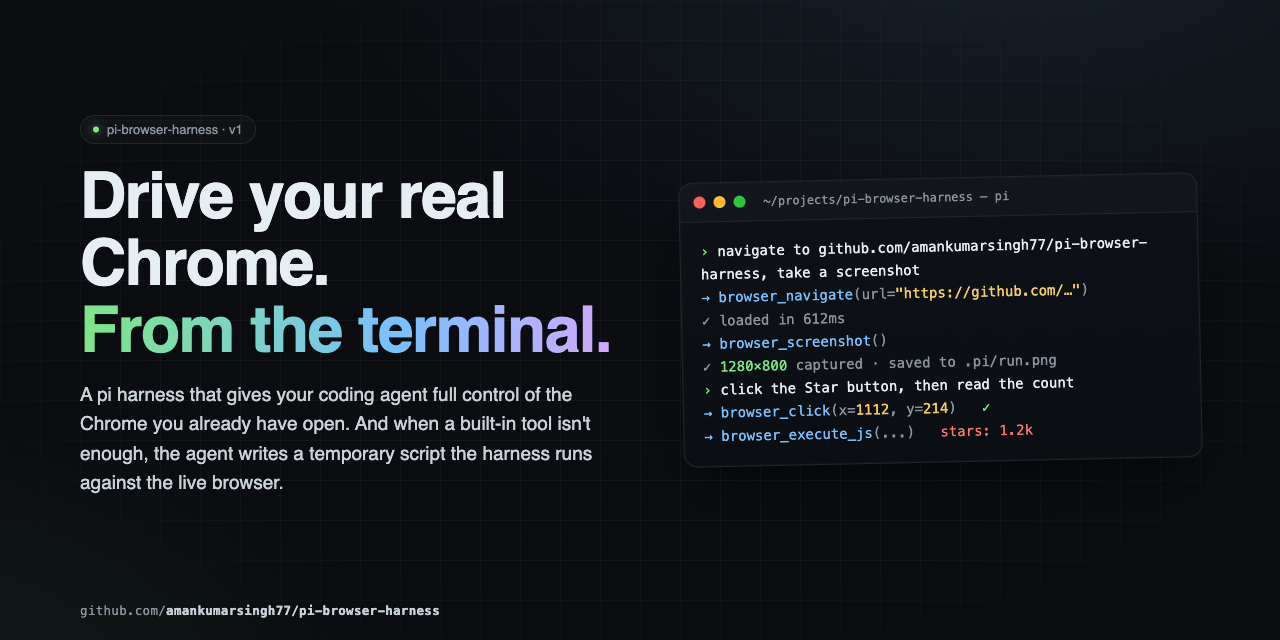
![pi-browser-harness](https://raw.githubusercontent.com/amankumarsingh77/pi-browser-harness/main/assets/hero.png)

**Browser control for [pi](https://github.com/badlogic/pi-mono) agents, in the Chrome you're already using.**

Your profile, your logins, your cookies. The agent reads pages as an accessibility tree with stable
element handles, fills forms that React won't revert, captures network traffic and console errors,
searches the web, and drops to raw CDP when the tools run out. 38 tools over a single CDP connection —
no MCP hop, no second browser, no extra API keys.

---

## How it compares

| | **pi-browser-harness** | Playwright MCP | Puppeteer MCP | Stagehand |
|---|---|---|---|---|
| **Browser** | Your running Chrome — real profile, live sessions | Launches a clean instance | Launches a clean instance | Launches a clean instance |
| **Element targeting** | AX-tree refs (`[eN]`) that re-resolve at action time; coordinate and selector fallbacks | Selectors / AX locators | CSS selectors | LLM-inferred selectors |
| **Input dispatch** | Compositor-level CDP input — works through iframes, shadow DOM, cross-origin frames | DOM-level | DOM-level | DOM-level |
| **Framework-safe writes** | `browser_fill` writes via the native setter and fires bubbling events, so controlled inputs keep the value | Native fill | Manual | Native fill |
| **Transport** | Native pi extension, in-process | MCP / JSON-RPC round trip | MCP / JSON-RPC round trip | In-process + its own LLM calls |
| **Extra credentials** | None | None | None | Its own model API key |
| **Concurrency** | Reads run in parallel; mutations auto-serialize through a shared mutex | Sequential | Sequential | Sequential |
| **Isolation** | Dedicated Chrome window per session; refuses tabs it didn't open | N/A (own browser) | N/A | N/A |
| **Terminal output** | Inline screenshots and `Ctrl+O`-expandable tool results | Plain text | Plain text | Plain text |
| **Escape hatch** | `browser_run_script` — raw CDP + full Node in one call | — | — | — |

<sub>Reflects each project's default configuration. Corrections welcome via PR.</sub>

**The short version:** if you live in pi and want an agent driving the same Chrome you're already
signed into, this is the one that fits.

---

## Install

```bash
pi install npm:pi-browser-harness
```

Then enable remote debugging in your browser — either open `chrome://inspect/#remote-debugging`
(or `brave://inspect`, `edge://inspect`), tick **Discover network targets**, and click **Allow** —
or relaunch the browser with `--remote-debugging-port=9222`.

Finally, run `/browser-setup` in pi to connect. It's a one-time step — the connection survives across
pi sessions and reconnects on its own when Chrome restarts.

The first time you connect, you'll be asked which browser profile the agent should work in:

```
Select the browser profile the agent should use
    Work (work@example.com)
  ✓ Personal (personal@example.com)
    Testing (test@example.com)
    — Clear selection (use whichever window is focused) —
```

That choice is saved to `~/.pi/agent/browser-harness.json` and reused by every project until you
change it with `/browser-profile`. It decides which logins, cookies, and extensions the agent works
with, so pinning it keeps runs reproducible. Skip the prompt and the harness behaves as it always
did: tabs open in whichever profile currently has focus.

**Requires:** pi (latest) · Node.js ≥ 22 · Chrome, Chromium, Brave, or Edge

---

## The mental model

Interaction is **ref-first**. `browser_snapshot` returns the accessibility tree, and every
interactive element carries a stable ref (`[eN]`) plus click coordinates `@(x,y)`:

```
[e7]  textbox  "Email"          @(412,288)
[e9]  combobox "Country"        @(412,344)
[e12] button   "Create account" @(456,412)
```

Pass the ref — not the coordinates — to `browser_click`, `browser_fill`, `browser_select_option`,
`browser_focus`, `browser_upload_file`, or `browser_dispatch_key`. Refs are keyed to element
identity, so they re-resolve position at action time and survive the re-renders that SPA forms
trigger on every keystroke. Coordinates go stale the moment the layout reflows.

Three things follow from that:

- **Never screenshot to find a click target.** The snapshot already has refs and coordinates.
- **Mutating calls append a "Page changes" diff.** Read it to confirm the step landed — a panel
  closed, a new `[eN]` appeared — instead of taking a screenshot to check.
- **`"ref is stale"` means the page changed.** Re-snapshot for fresh refs; don't retry blindly.

### Which tool answers your question

| You need to know… | Reach for |
|---|---|
| What's on the page, what's clickable | `browser_snapshot` — the default |
| One element's text, value, or geometry | `browser_execute_js` — one round trip |
| An article's readable content | `browser_read_page` |
| Why nothing happened after an action | `browser_console` |
| What the page requested over the network | `browser_network_requests` |
| Whether something *rendered* correctly | `browser_screenshot` — last resort, pixels only |

---

## Tools

### Reading the page

| Tool | Purpose |
|---|---|
| `browser_snapshot` | **Default.** Accessibility tree with `[eN]` refs and `@(x,y)` per interactive element. Optional `includeScreenshot`. |
| `browser_execute_js` | Surgical DOM reads — text, attributes, `getBoundingClientRect()`. Cheapest precise read. |
| `browser_page_info` | URL, title, viewport, scroll position — or the pending JS dialog, if one is blocking. |
| `browser_console` | JS errors and console output. Pass `sinceSeq` from the previous `nextCursor` to see only what an action caused. |
| `browser_screenshot` | PNG/JPEG capture. For verifying visual rendering only. |

### Web research

| Tool | Purpose |
|---|---|
| `browser_web_search` | Query → ranked `{title, url, snippet, rank}`, by scraping a real Google SERP in your Chrome. No API key. Links only. |
| `browser_read_page` | Reader mode. A `url` (opened and closed in its own tab) or an owned `targetId` → clean article text, boilerplate stripped. |

Both run in isolated tabs and never disturb your current page.

### Interacting

| Tool | Purpose |
|---|---|
| `browser_click` | Click by `ref` (preferred) or viewport `x`/`y`. Compositor-level, so iframes and shadow DOM work. |
| `browser_fill` | Set an input, textarea, or contenteditable. Fires bubbling `input`/`change`, returns the value written. |
| `browser_select_option` | Choose in a native `<select>` by value, label, or index. Returns available options on no match. |
| `browser_focus` | Deterministic `.focus()` — no coordinate accuracy needed. |
| `browser_type` | Type into the focused element. For keystroke-sensitive widgets; prefer `browser_fill` otherwise. |
| `browser_press_key` | Press a key with an optional modifier bitfield. |
| `browser_dispatch_key` | Synthetic DOM `KeyboardEvent` on one element, for pages that ignore raw CDP keys. |
| `browser_scroll` | Scroll by delta. W3C wheel convention: positive `deltaY` = down. |
| `browser_drag_and_drop` | Drag between two coordinate pairs. |

### Navigation and tabs

| Tool | Purpose |
|---|---|
| `browser_navigate` | Go to a URL in the current tab. |
| `browser_new_tab` / `browser_open_urls` | Open one tab, or many URLs in parallel. |
| `browser_go_back` / `browser_go_forward` / `browser_reload` | History. |
| `browser_list_tabs` / `browser_current_tab` | List tabs (`scope:"owned"` by default) and inspect the attached one. |
| `browser_switch_tab` / `browser_close_tab` | Switch or close — owned tabs only. |

### Waiting and dialogs

| Tool | Purpose |
|---|---|
| `browser_wait_for` | Wait until a selector appears (or disappears with `gone:true`), or text shows up. **Prefer this over sleeping.** |
| `browser_wait_for_load` | Wait for `document.readyState === "complete"`. |
| `browser_wait` | Fixed delay, in seconds. |
| `browser_handle_dialog` | Accept or dismiss `alert` / `confirm` / `prompt`. |

### Network

| Tool | Purpose |
|---|---|
| `browser_network_requests` | Requests captured on the current tab since attach. Filter by URL, method, status, resource type, or recency; optional response bodies. |
| `browser_http_get` | Plain GET outside the browser. Much faster than navigate-then-read for JSON APIs — but no JS rendering. |

### Files and viewport

| Tool | Purpose |
|---|---|
| `browser_upload_file` | Set files on a file input, with a DataTransfer fallback for stubborn pages. |
| `browser_download` | Set the download directory and suppress the save-as prompt. |
| `browser_print_to_pdf` | Print the page to PDF via `Page.printToPDF`. |
| `browser_viewport_resize` | Override viewport size and device pixel ratio for responsive checks. |

### Escape hatches

| Tool | Purpose |
|---|---|
| `browser_run_script` | Run a temporary script with raw CDP and full Node access. See [Extending](#extending). |
| `browser_setup` | Agent-callable setup. Idempotent — how the agent recovers from `not initialized` on its own. |

`browser_snapshot`, `browser_network_requests`, `browser_console`, `browser_execute_js`,
`browser_web_search`, and `browser_read_page` ship custom TUI rendering: compact by default,
full output on **`Ctrl+O`** (`app.tools.expand`). The model always receives the complete result
regardless of render state.

---

## Recipes

### Fill a form on an SPA

Wait, snapshot once, then act by ref. No screenshots anywhere in this loop.

```
browser_wait_for({ selector: "#email" })
browser_snapshot()                                  // → [e7] textbox, [e9] combobox, [e12] button
browser_fill({ ref: "e7", value: "a@b.com" })
browser_select_option({ ref: "e9", label: "India" })
browser_click({ ref: "e12" })                       // re-resolves position even after reflow
```

Each mutating call returns a "Page changes" diff — that's your confirmation the step landed.

### Extract data

```js
// One value
browser_execute_js({ expression: "document.querySelector('.price').innerText" })

// Structured
browser_execute_js({ expression: `JSON.stringify(
  Array.from(document.querySelectorAll('.result')).map(el => ({
    title: el.querySelector('h3')?.textContent,
    link:  el.querySelector('a')?.href,
  }))
)` })

// Skip the browser entirely for a JSON endpoint
browser_http_get({ url: "https://api.github.com/repos/amankumarsingh77/pi-browser-harness" })
```

### Debug a failing page

```
browser_click({ ref: "e12" })
browser_console({ levels: ["error", "warn"] })      // did JS throw?
browser_network_requests({                          // did a request 4xx/5xx?
  urlPattern: "/api/",
  statusFilter: { min: 400 },
  includeResponseBodies: true
})
```

### Search, then read

```
browser_web_search({ query: "chrome devtools protocol overview", limit: 5 })
browser_read_page({ url: "<the best result's url>" })
```

For a question that needs several sources synthesized into a **cited report**, use
`/deep-research <question>`. It decomposes the question, fans out one isolated
`web-search-researcher` subagent per sub-question, loops for coverage under a hard ceiling, and
writes a Markdown report where every claim carries a source link. The skill also auto-triggers on
research-shaped requests without the command.

### Keyboard modifiers

Modifiers are a bitfield: `1` Alt · `2` Ctrl · `4` Meta/Cmd · `8` Shift.

```
browser_press_key({ key: "c", modifiers: 2 })    // Ctrl+C
browser_press_key({ key: "T", modifiers: 10 })   // Ctrl+Shift+T
```

---

## Concurrency and isolation

**Parallel reads, serialized writes.** Observation tools run concurrently with each other and with
mutations. Mutations (`click`, `fill`, `type`, `scroll`, `navigate`, `switch_tab`, …) pass through a
shared async mutex and FIFO-queue automatically, so emitting several in one turn is safe.

```
browser_snapshot() + browser_network_requests({ sinceMs: 5000 }) + browser_http_get({ url: "..." })
```

**Tab ownership.** On first attach the harness opens a dedicated Chrome window and only operates
inside it. `browser_list_tabs` defaults to `scope:"owned"` (pass `scope:"all"` for a read-only view
of your other tabs); `browser_switch_tab` and `browser_close_tab` refuse anything this session
didn't open. Owned tabs are closed at session shutdown, so nothing stale accumulates in your browser.

---

## Extending

When the built-in tools can't express a workflow, write a script and run it. It executes inside the
harness process with a live CDP handle — far faster than chaining tool calls.

```js
write("<tmpdir>/scrape.js", `
  const results = [];
  for (const url of params.urls) {
    await daemon.session().call("Page.navigate", { url });
    await new Promise(r => setTimeout(r, 2000));
    results.push({ url, title: await daemon.evaluateJs("document.title") });
  }
  return { content: [{ type: "text", text: JSON.stringify(results, null, 2) }] };
`)

browser_run_script({ path: "<tmpdir>/scrape.js", params: { urls: [...] } })
```

**Bindings:** `params`, `daemon`, `require`, `signal`, `onUpdate`, `ctx`, `console`, `fetch`,
`JSON`, `Buffer`, `setTimeout`, `clearTimeout`.

`daemon` exposes `evaluateJs`, `pageInfo`, `listTabs`, `switchTab`, `newTab`, `closeTab`, `current`,
`status`, and `session()` for raw CDP (`call` · `callOnTarget` · `callBrowser` · `takeDialog`).

Scripts must live under the OS temp dir, the cwd, or `BH_SCRIPT_DIR`, and every call carries a
mandatory timeout (60s default, 600s max). They land on disk first, so they're reviewable and
re-runnable.

---

## Commands, flags, and environment

| Command | Purpose |
|---|---|
| `/browser-setup` | Connect pi to your browser. Run once; idempotent. |
| `/browser-profile` | Pick which browser profile the agent works in. Remembered across sessions. |
| `/browser-status` | Connection state, selected profile, and current page. |
| `/deep-research <question>` | Multi-source web research → cited Markdown report. |
| `/browser-reload-daemon` | Force a client restart. Rarely needed — the transport reconnects on its own. |

| Flag / variable | Effect |
|---|---|
| `--browser-namespace <name>` | Override the session namespace (default: auto-generated). |
| `--browser-debug-clicks` | Save annotated click screenshots for debugging. |
| `BU_CDP_WS` | Attach to a remote browser by WebSocket URL instead of discovering a local one. |
| `BU_CDP_PORTS` | Extra ports to probe during CDP discovery, beyond 9222. |
| `BH_SCRIPT_DIR` | Additional directory `browser_run_script` will accept paths from. |

---

## Anti-patterns

- **Don't launch your own browser.** You're attached to the user's real Chrome.
- **Don't type credentials.** Hit an auth wall — stop and ask.
- **Don't screenshot to understand a page, find coordinates, or read a value.** `browser_snapshot`
  and `browser_execute_js` are cheaper and exact.
- **Don't guess CSS selectors** when a snapshot ref exists.
- **Don't sleep to wait.** `browser_wait_for` is deterministic; `browser_wait` is a last resort.
- **Don't ignore dialogs.** They freeze the page's JS thread — `browser_page_info` reports them,
  `browser_handle_dialog` clears them.

---

## Architecture

```
pi agent
   │  browser_* tools (in-process extension)
   ▼
pi-browser-harness  ──►  daemon (Unix socket / named pipe)  ──►  Chrome
                              CDP WebSocket
```

A long-lived daemon owns the CDP connection, so it outlives individual pi sessions — which is why
you only see Chrome's "Allow Remote Debugging" prompt once. `browser_run_script` executes in the
harness process with direct daemon and Node access.

---

## Troubleshooting

| Symptom | Fix |
|---|---|
| `DevToolsActivePort not found` | Open `chrome://inspect/#remote-debugging`, tick **Discover network targets**, click **Allow**. Or relaunch with `--remote-debugging-port=9222`. |
| `No browser instance running` | Chrome/Brave/Edge isn't open, or only helper processes remain. Open the browser, then `/browser-setup`. |
| `Browser harness not initialized` | Run `/browser-setup` — or let the agent call `browser_setup` itself. |
| `ref is stale` | The page re-rendered. Re-run `browser_snapshot` for fresh refs. |
| Page looks loaded but content is missing | SPA still rendering. Use `browser_wait_for({ selector })`, not a fixed sleep. |
| Click did nothing | Check `browser_console` for a thrown error, then `browser_network_requests` for a failed call. |
| Actions all hang | A JS dialog is blocking. `browser_page_info` reports it; `browser_handle_dialog` clears it. |
| No `[eN]` ref for your target | The element wasn't exposed as interactive. Fall back to a CSS `selector`, or `browser_execute_js` with `getBoundingClientRect()`. |
| Connected but the wrong browser responds | A stale `DevToolsActivePort` file. Quit every Chromium-family browser, reopen one, then `/browser-setup`. |
| Agent acts as the wrong account | No profile is pinned, so tabs open in whichever profile has focus. Run `/browser-profile` and pick one. |
| `couldn't open a window in "…" automatically` | The profile window couldn't be opened for you. Open that profile from the browser's profile menu, then retry — the harness never falls back to a different profile silently. |

---

## Security

This extension drives your real browser. The agent can read any page you're signed into, submit
forms, and act inside authenticated sessions. `browser_run_script` is full code execution in the pi
process with unrestricted `require` — **review any script before running it.** Scripts are
path-restricted and timeout-bounded, but that is a blast-radius limit, not a sandbox.

---

## Contributing

See [CONTRIBUTING.md](CONTRIBUTING.md) for setup, conventions, and the PR process.
Release history lives in [CHANGELOG.md](CHANGELOG.md).

## License

MIT — see [LICENSE](LICENSE).
