
English | 中文






🚀 Quickstart | 🏠 Home | 📚 Docs | 📊 Benchmarks | 🔎 DeepWiki | 🎮 Discord | 🐦 X (Twitter)
**Zvec** is an open-source, in-process vector database — lightweight, lightning-fast, and designed to embed directly into applications. Battle-tested within Alibaba Group, it delivers production-grade, low-latency and scalable similarity search with minimal setup. > [!Important] > 🚀 **v0.5.0 (June 12, 2026)** > > - **Full-Text Search (FTS)**: Native full-text search — attach an FTS index to any string field and query it with natural-language or structured expressions, no external search engine required. > - **Hybrid Retrieval**: Combine full-text and vector search in a single `MultiQuery` across dense vectors, sparse vectors, scalar filters, and text. > - **DiskANN Index**: New on-disk index that keeps the bulk of the index on disk, drastically cutting memory usage for large-scale datasets. > - **Ecosystem & Platforms**: New official [Go](https://github.com/zvec-ai/zvec-go) / [Rust](https://github.com/zvec-ai/zvec-rust) SDKs, the [Zvec Studio](https://github.com/zvec-ai/zvec-studio) visual tool, and RISC-V support. > > 👉 [Read the Release Notes](https://github.com/alibaba/zvec/releases/tag/v0.5.0) | [View Roadmap 📍](https://github.com/alibaba/zvec/issues/309) ## 💫 Features - **Blazing Fast**: Searches billions of vectors in milliseconds. - **Simple, Just Works**: [Install](#-installation) and start searching in seconds. Pure local, no servers, no config, no fuss. - **Dense + Sparse Vectors**: Support dense and sparse embeddings, multi-vector queries, and a rich selection of [vector index types](https://zvec.org/en/docs/db/concepts/vector-index/#vector-index-types) that scale from memory to disk. - **Full-Text Search (FTS)**: Native keyword-based full-text search — query string fields with natural-language or structured expressions. - **Hybrid Search**: Fuse vector similarity, full-text search, and structured filters in a single query for precise results. - **Durable Storage**: Write-ahead logging (WAL) guarantees persistence — data is never lost, even on process crash or power failure. - **Concurrent Access**: Multiple processes can read the same collection simultaneously; writes are single-process exclusive. - **Runs Anywhere**: As an in-process library, Zvec runs wherever your code runs — notebooks, servers, CLI tools, or even edge devices. ## 📦 Installation Zvec offers official SDKs across multiple languages: - **[Python](https://pypi.org/project/zvec/)**: `pip install zvec` (requires Python 3.10–3.14) - **[Node.js](https://www.npmjs.com/package/@zvec/zvec)**: `npm install @zvec/zvec` - **[Go](https://github.com/zvec-ai/zvec-go)**: High-performance Go bindings. - **[Rust](https://github.com/zvec-ai/zvec-rust)**: High-performance Rust bindings. - **[Dart/Flutter](https://pub.dev/packages/zvec)**: `flutter pub add zvec` Prefer a visual tool? Try **[Zvec Studio](https://github.com/zvec-ai/zvec-studio)** to browse data and debug queries — no code required. ### ✅ Supported Platforms - Linux (x86_64, ARM64) - macOS (ARM64) - Windows (x86_64) ### 🛠️ Building from Source If you prefer to build Zvec from source, please check the [Building from Source](https://zvec.org/en/docs/db/build/) guide. ## ⚡ One-Minute Example ```python import zvec # Define collection schema schema = zvec.CollectionSchema( name="example", vectors=zvec.VectorSchema("embedding", zvec.DataType.VECTOR_FP32, 4), ) # Create collection collection = zvec.create_and_open(path="./zvec_example", schema=schema) # Insert documents collection.insert([ zvec.Doc(id="doc_1", vectors={"embedding": [0.1, 0.2, 0.3, 0.4]}), zvec.Doc(id="doc_2", vectors={"embedding": [0.2, 0.3, 0.4, 0.1]}), ]) # Search by vector similarity results = collection.query( zvec.VectorQuery("embedding", vector=[0.4, 0.3, 0.3, 0.1]), topk=10 ) # Results: list of {'id': str, 'score': float, ...}, sorted by relevance print(results) ``` ## 📈 Performance at Scale Zvec delivers exceptional speed and efficiency, making it ideal for demanding production workloads.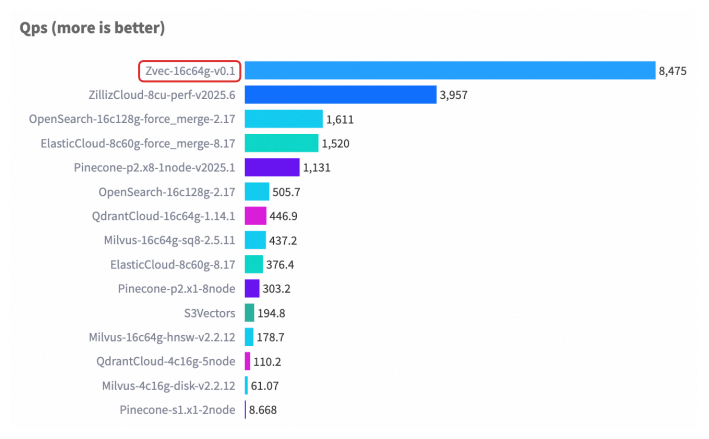 For detailed benchmark methodology, configurations, and complete results, please see our [Benchmarks documentation](https://zvec.org/en/docs/db/benchmarks/).
## 🤝 Join Our Community
For detailed benchmark methodology, configurations, and complete results, please see our [Benchmarks documentation](https://zvec.org/en/docs/db/benchmarks/).
## 🤝 Join Our Community
 |
|  | [](https://discord.gg/rKddFBBu9z) | [](
| [](https://discord.gg/rKddFBBu9z) | [](