# mermaid-skill — From Code to Image, Automatically

[![License: MIT](https://img.shields.io/badge/License-MIT-yellow.svg)](LICENSE)
[![GitHub stars](https://img.shields.io/github/stars/Agents365-ai/mermaid-skill?style=flat&logo=github)](https://github.com/Agents365-ai/mermaid-skill/stargazers)
[![GitHub forks](https://img.shields.io/github/forks/Agents365-ai/mermaid-skill?style=flat&logo=github)](https://github.com/Agents365-ai/mermaid-skill/network/members)
[![Latest Release](https://img.shields.io/github/v/release/Agents365-ai/mermaid-skill?logo=github)](https://github.com/Agents365-ai/mermaid-skill/releases/latest)
[![Last Commit](https://img.shields.io/github/last-commit/Agents365-ai/mermaid-skill?logo=github)](https://github.com/Agents365-ai/mermaid-skill/commits/main)

[![SkillsMP](https://img.shields.io/badge/SkillsMP-listed-1f6feb)](https://skillsmp.com/skills/agents365-ai-mermaid-skill-skills-mermaid-skill-skill-md)
[![ClawHub](https://img.shields.io/badge/ClawHub-listed-ff6b35)](https://clawhub.ai/agents365-ai/mermaid-pro-skill)
[![Claude Code Plugin](https://img.shields.io/badge/Claude%20Code-plugin-8a2be2)](https://github.com/Agents365-ai/365-skills)
[![Agent Skills](https://img.shields.io/badge/Agent%20Skills-compatible-2ea44f)](https://agentskills.io)
**English** · [中文](README_CN.md) · [📖 Online Docs](https://agents365-ai.github.io/mermaid-skill/)

A skill that turns natural-language requests into `.mmd` source, validates syntax before export, and renders to PNG / SVG / PDF via the `mmdc` CLI or the Kroki HTTP API. Works with **Claude Code, Cursor, Copilot, OpenClaw, Codex, Hermes**, and any agent compatible with the [Agent Skills](https://agentskills.io) format.

<p align="center">
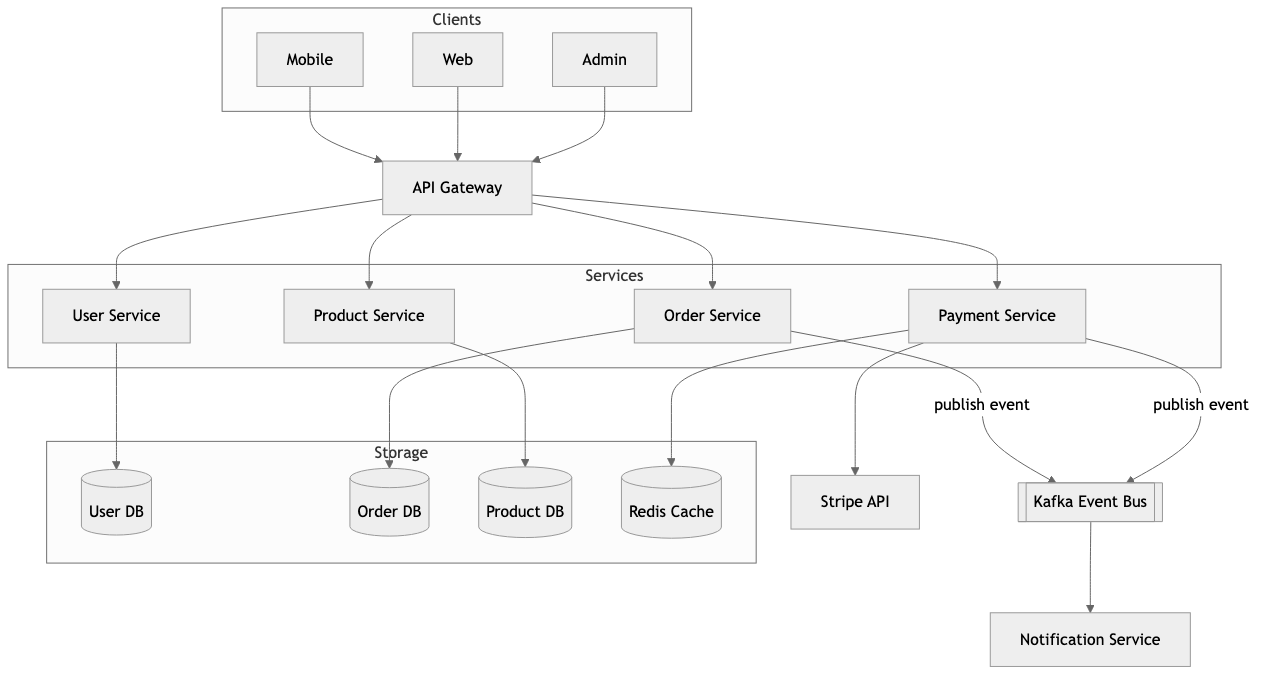
  <img src="assets/example.png" width="900" alt="Microservices architecture — generated from a single natural-language prompt">
</p>

## ✨ Highlights

- **11+ diagram types** — flowchart, sequence, class, ER, state, Gantt, pie, git graph, C4 context, mind map, and more, all with automatic layout (no x/y coordinates)
- **Validation-first workflow** — every `.mmd` is parsed before export, so broken syntax never leaks into a PNG
- **Vision self-check + review loop** — reads the exported PNG to catch readability/layout defects auto-layout can't prevent (clipped labels, cramped density, wrong orientation), auto-fixes (≤2 rounds), then iterates with you on feedback (≤5 rounds)
- **Two backends, one skill** — local `mmdc` for best quality, Kroki HTTP API as zero-install fallback (only `curl` required)
- **Text source = version-control friendly** — `.mmd` is plain text, diffs cleanly in PRs, and embeds directly in GitHub / GitLab READMEs
- **Proactive triggering** — auto-activates when discussing architecture, API flows, or state machines (English + Chinese keywords)
- **Multi-agent, zero-config** — one SKILL.md, no MCP server, no background daemon (the optional `npx` installer needs Node, the skill itself does not)

## 🖼️ Examples

> [!TIP]
> **The hero image above was generated from this single prompt:**

```
Create a microservices e-commerce architecture with Mobile/Web clients,
API Gateway, User/Order/Product/Payment services, and User DB / Order DB /
Product DB / Redis Cache
```

### More diagram types

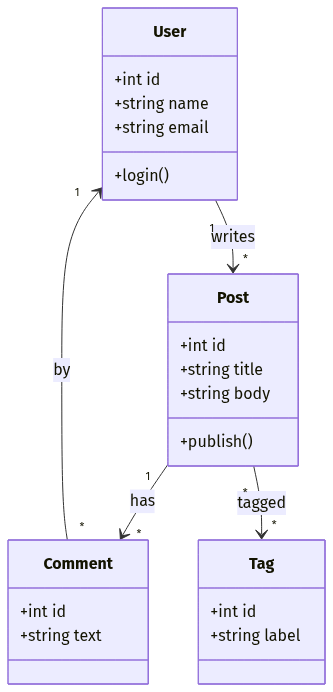
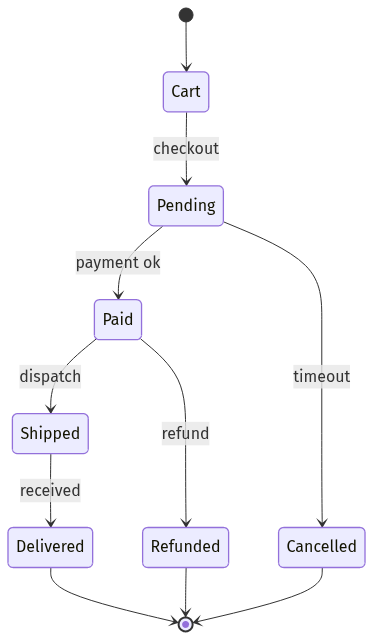
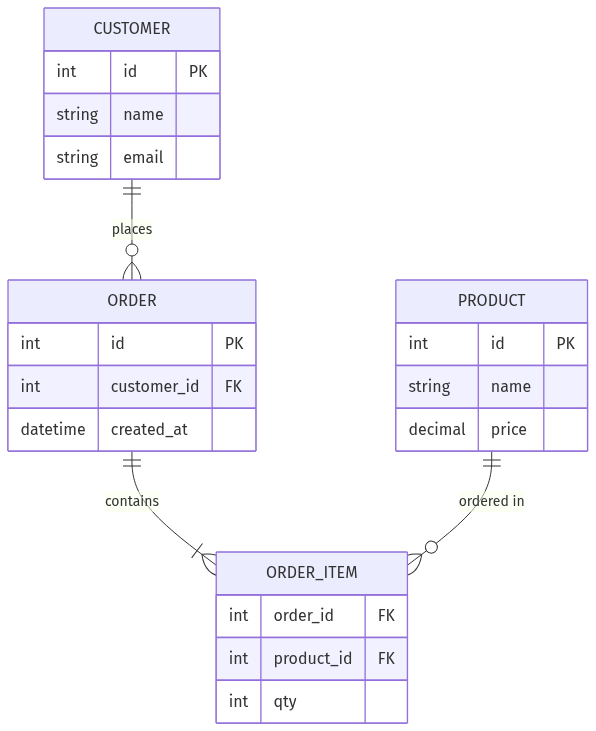
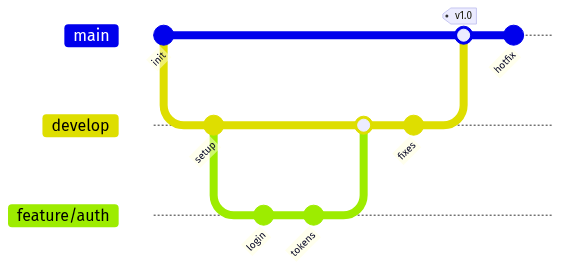
Mermaid auto-lays-out 11+ types — each of these was generated from a one-line prompt and run through the validate → export → self-check pipeline:

<table>
  <tr>
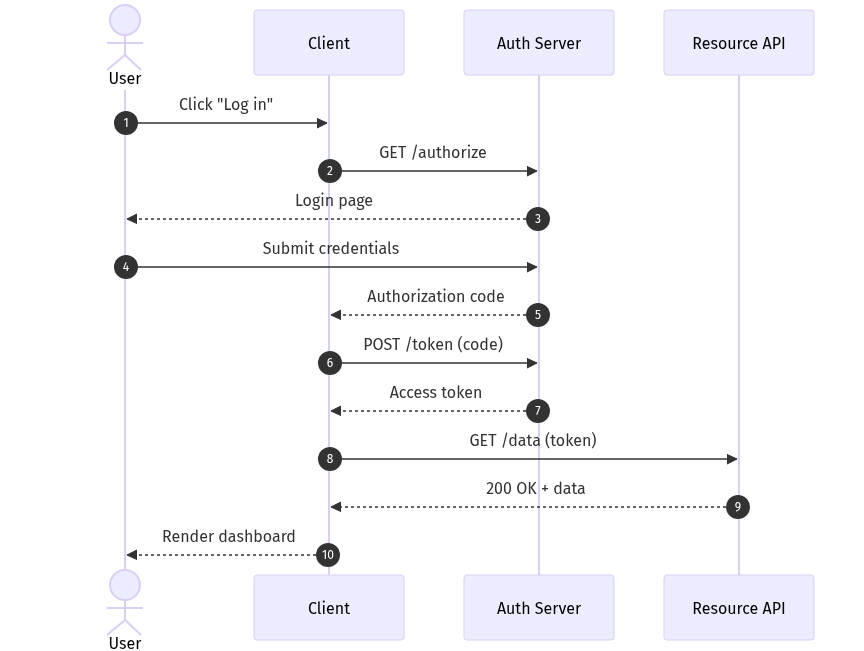
    <td align="center"><img src="assets/example-sequence.png" width="260" alt="OAuth login sequence diagram"><br><sub><b>Sequence</b> · auth flow</sub></td>
    <td align="center"><img src="assets/example-class.png" width="140" alt="Blog domain class diagram"><br><sub><b>Class</b> · domain model</sub></td>
    <td align="center"><img src="assets/example-state.png" width="150" alt="Order lifecycle state machine"><br><sub><b>State</b> · order lifecycle</sub></td>
  </tr>
  <tr>
    <td align="center"><img src="assets/example-er.png" width="240" alt="E-commerce ER diagram"><br><sub><b>ER</b> · e-commerce schema</sub></td>
    <td align="center"><img src="assets/example-gantt.png" width="300" alt="Product launch Gantt chart"><br><sub><b>Gantt</b> · launch plan</sub></td>
    <td align="center"><img src="assets/example-gitgraph.png" width="300" alt="Git branching strategy graph"><br><sub><b>Git graph</b> · branch strategy</sub></td>
  </tr>
</table>

Full feature matrix in [docs/features.md](docs/features.md). Source `.mmd` files for the hero, workflow, and gallery images live alongside their PNGs in [`assets/`](assets/) (`example-{sequence,class,state,er,gantt,gitgraph}.mmd`).

## 🚀 Installation

### 1. Pick an export backend

| Option | Command | When to use |
| --- | --- | --- |
| **A — Local `mmdc`** | `npm install -g @mermaid-js/mermaid-cli && mmdc --version` | Best quality, full theme control, offline use |
| **B — Kroki API** | `curl --version` | No install, no Node, CI/CD pipelines |

The skill probes `mmdc` first and falls back to Kroki automatically.

### 2. Install the skill

```bash
# Any agent (Claude Code, Cursor, Copilot, ...)
npx skills add Agents365-ai/365-skills -g
```

```text
# Claude Code plugin marketplace
> /plugin marketplace add Agents365-ai/365-skills
> /plugin install mermaid
```

```bash
# Manual install
git clone https://github.com/Agents365-ai/mermaid-skill.git \
  ~/.claude/skills/mermaid-skill
```

Also indexed on [SkillsMP](https://skillsmp.com/skills/agents365-ai-mermaid-skill-skills-mermaid-skill-skill-md) and [ClawHub](https://clawhub.ai/agents365-ai/mermaid-pro-skill).

**Updating:** `/plugin update mermaid` (Claude Code), `skills update mermaid-skill` (SkillsMP), `clawhub update mermaid-pro-skill` (OpenClaw), or `git pull` for manual installs.

## ⚡ Quick Start

After installation, just describe what you want — e.g. a JWT auth sequence:

```
Create a sequence diagram for JWT login: Client posts credentials to API
Gateway, gateway calls Auth Service, Auth Service reads the User DB,
verifies the password hash, and returns a signed JWT back through the
gateway to the client. Show the failure path for an invalid password too.
```

The skill picks the diagram type, writes the `.mmd` source, validates with `mmdc` (or Kroki), exports to your chosen format, and reports the output paths.

## 🧩 Supported Diagram Types

| Type | Keyword | Use for |
| --- | --- | --- |
| Flowchart | `flowchart TD/LR` | processes, pipelines, decision trees |
| Sequence | `sequenceDiagram` | API calls, auth flows, message passing |
| Class | `classDiagram` | OOP models, domain entities, inheritance |
| ER | `erDiagram` | database schemas, relationships |
| State | `stateDiagram-v2` | state machines, lifecycles |
| Gantt | `gantt` | project timelines, sprint plans |
| Pie | `pie` | proportions, distributions |
| Git Graph | `gitGraph` | branch strategies, GitFlow |
| C4 Context | `C4Context` | high-level architecture |
| Mind Map | `mindmap` | topic breakdowns, brainstorms |
| Journey | `journey` | user journeys |

Per-type syntax references live in [`skills/mermaid-skill/reference/`](skills/mermaid-skill/reference/) and full feature matrix in [docs/features.md](docs/features.md).

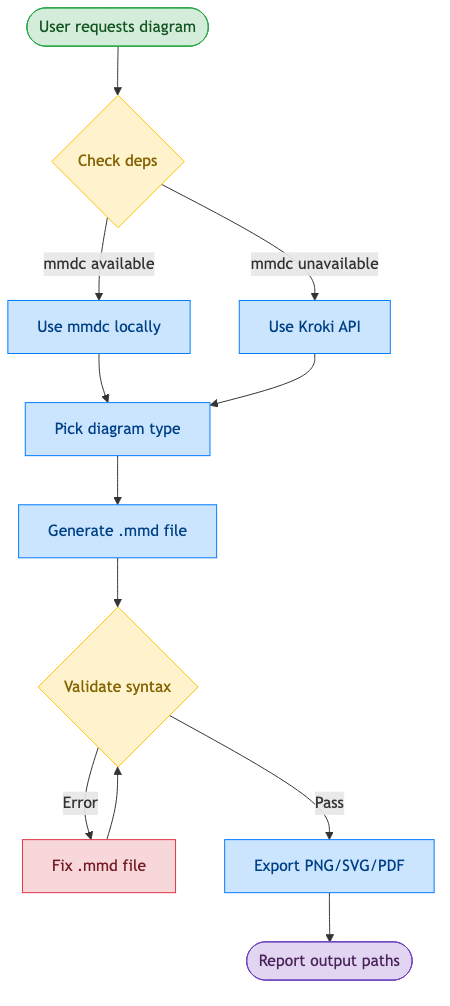
## 🔄 How it works

<p align="center">
  <img src="assets/workflow.png" width="700" alt="Validation-first workflow">
</p>

Behind the scenes: **check deps (`mmdc` or Kroki) → pick diagram type → write `.mmd` → validate syntax (fix & re-validate on error) → export PNG/SVG/PDF → vision self-check the render and auto-fix readability/layout defects (≤2 rounds) → review loop on your feedback (≤5 rounds) → report output paths**. Walkthrough in [docs/workflow.md](docs/workflow.md).

## 🆚 Comparison

### vs Native Agent (no skill)

| Feature | Native agent | mermaid-skill |
| --- | --- | --- |
| Writes Mermaid syntax | ✅ inline | ✅ guided by examples + reference files |
| Validation before export | ❌ exports broken `.mmd` silently | ✅ required step, retries on error |
| Self-check after export | ❌ never looks at the render | ✅ vision reads the PNG, auto-fixes layout/readability (≤2 rounds) |
| Iterative review loop | ❌ manual re-prompt | ✅ targeted `.mmd` edits, 5-round safety valve |
| Export to PNG / SVG / PDF | ❌ manual, you run `mmdc` yourself | ✅ automatic, one of two backends |
| Zero-install fallback | ❌ | ✅ Kroki API needs only `curl` |
| Proactive triggering | ❌ only when explicitly asked | ✅ auto-triggers on 3+ components, API flows, state machines |
| Bilingual triggers | ❌ English only | ✅ English + Chinese keywords |
| Diagram-type guidance | generic | ✅ 11+ type table with copy-paste templates |

## 🎯 When to use (and when not to)

**Good fit:**

- Diagrams-as-code — define in text, get automatic layout, version-control friendly, embeds straight into Markdown / README / docs
- Quick flowcharts, sequence, class, state, ER, gantt, and mindmaps from a text description
- When the source should live next to your code and re-render automatically

**Reach for a sibling skill instead when you need:**

- **Pixel-precise placement, custom layout, branded icons, or heavy styling** → [drawio-skill](https://github.com/Agents365-ai/drawio-skill)
- **A hand-drawn / sketchy aesthetic** → [excalidraw-skill](https://github.com/Agents365-ai/excalidraw-skill) or [tldraw-skill](https://github.com/Agents365-ai/tldraw-skill)
- **A freeform whiteboard or freehand drawing** → [tldraw-skill](https://github.com/Agents365-ai/tldraw-skill)
- **Strict, conventional UML notation** → [plantuml-skill](https://github.com/Agents365-ai/plantuml-skill)

## 🔗 Related Skills

Part of the [Agents365-ai diagram-skill family](https://github.com/Agents365-ai) — pick the right tool for the job:

| Skill | Style | Best for |
| --- | --- | --- |
| [drawio-skill](https://github.com/Agents365-ai/drawio-skill) | XML, manual layout control | Polished architecture diagrams, ML model figures |
| [excalidraw-skill](https://github.com/Agents365-ai/excalidraw-skill) | Hand-drawn / sketchy | Whiteboard mockups, informal diagrams |
| [plantuml-skill](https://github.com/Agents365-ai/plantuml-skill) | UML-focused | Class / sequence diagrams in CI pipelines |
| [tldraw-skill](https://github.com/Agents365-ai/tldraw-skill) | Whiteboard collaboration | Casual sketches, FigJam-style boards |

## ❤️ Support

If this skill helps you, consider supporting the author:

<table>
  <tr>
    <td align="center">
      <img src="https://raw.githubusercontent.com/Agents365-ai/images_payment/main/qrcode/wechat-pay.png" width="180" alt="WeChat Pay">
      <br>
      <b>WeChat Pay</b>
    </td>
    <td align="center">
      <img src="https://raw.githubusercontent.com/Agents365-ai/images_payment/main/qrcode/alipay.png" width="180" alt="Alipay">
      <br>
      <b>Alipay</b>
    </td>
    <td align="center">
      <img src="https://raw.githubusercontent.com/Agents365-ai/images_payment/main/qrcode/buymeacoffee.png" width="180" alt="Buy Me a Coffee">
      <br>
      <b>Buy Me a Coffee</b>
    </td>
    <td align="center">
      <img src="https://raw.githubusercontent.com/Agents365-ai/images_payment/main/awarding/award.gif" width="180" alt="Give a Reward">
      <br>
      <b>Give a Reward</b>
    </td>
  </tr>
</table>

## 👤 Author

**Agents365-ai**

- GitHub: <https://github.com/Agents365-ai>
- Bilibili: <https://space.bilibili.com/441831884>

## 📄 License

[MIT](LICENSE)