# Motrix

## A full-featured download manager
[](https://github.com/agalwood/Motrix/releases)   
English | [简体中文](./README-CN.md)
Motrix is a full-featured download manager that supports downloading HTTP, FTP, BitTorrent, Magnet, etc.
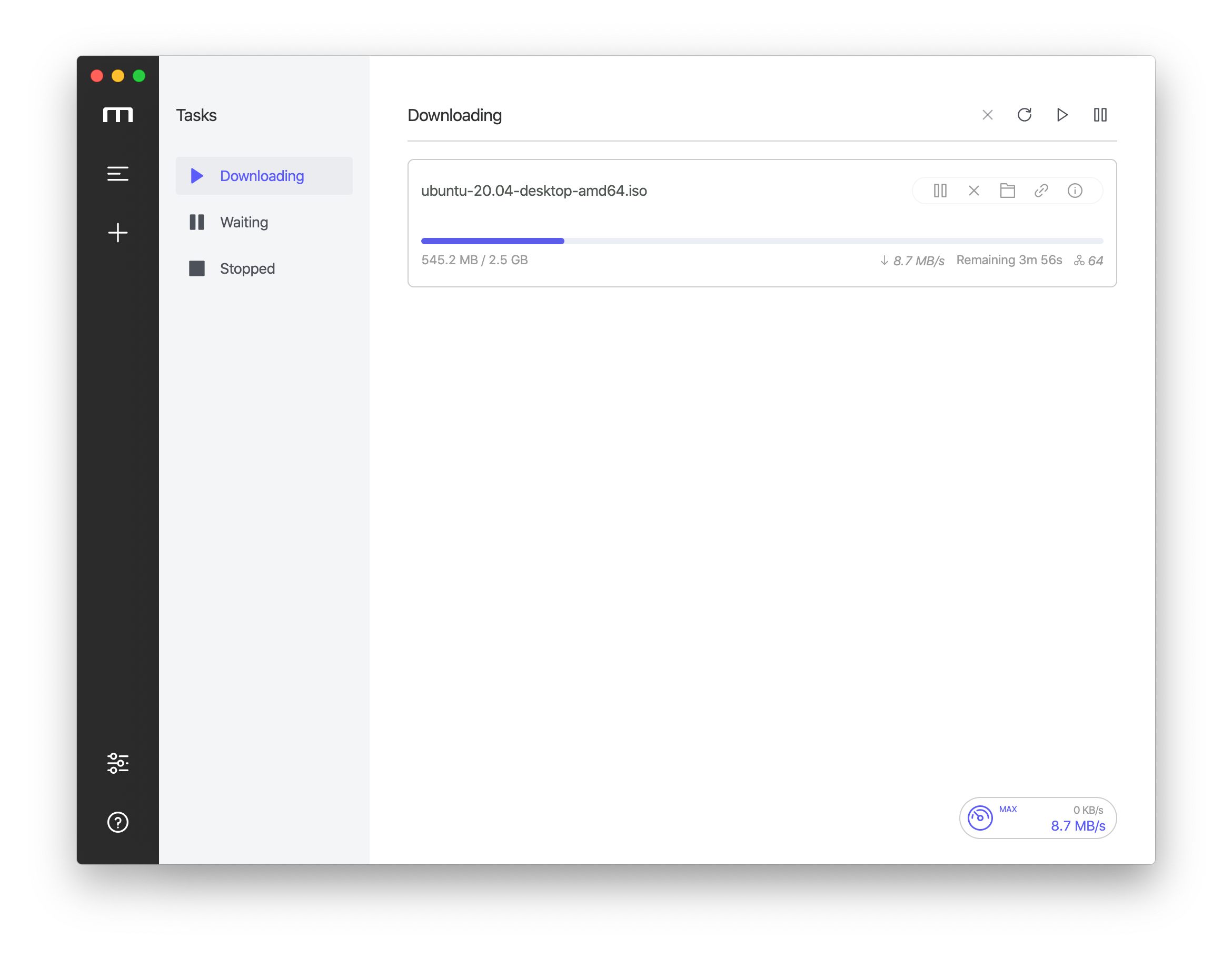
Motrix has a clean and easy to use interface. I hope you will like it 👻.
✈️ [Official Website](https://motrix.app) | 📖 [Manual](https://github.com/agalwood/Motrix/wiki)
## 💽 Installation
Download from [GitHub Releases](https://github.com/agalwood/Motrix/releases) and install it.
### Windows
It is recommended to install Motrix using the installation package (Motrix-Setup-x.y.z.exe) to ensure a complete experience, such as associating torrent files, capturing magnet links, etc.
If you use package management tools to manage applications on Windows, such as [Chocolatey](https://chocolatey.org), [scoop](https://github.com/lukesampson/scoop). You can use them to install Motrix.
#### Chocolatey
Thanks to [@Yato](https://github.com/iYato) for continuing to maintain the [Motrix Chocolatey](https://community.chocolatey.org/packages/motrix) package. To install motrix, run the following command from the `command line` or from `PowerShell`:
```bash
# Install
choco install motrix
# Upgrade
choco upgrade motrix
```
#### scoop
If you prefer the portable version, you can use [scoop](https://github.com/lukesampson/scoop) (need Windows 7+) to install Motrix.
```bash
scoop bucket add extras
scoop install motrix
```
### macOS
The macOS users can install Motrix using `brew`, thanks to [PR](https://github.com/Homebrew/homebrew-cask/pull/59494) of [@Mitscherlich](https://github.com/Mitscherlich).
```bash
brew update && brew install motrix
```
#### Auto Update
Since Motrix v1.8.0 and later versions changed the App BundleID ( `net.agalwood.Motrix` => `app.motrix.native` ), the automatic update of Motrix v1.6.11 will fail. [Motrix Install Assistant](https://github.com/motrixapp/motrix-install-assistant) will help you install the latest Motrix application.
### Linux
You can download the `AppImage` (for all Linux distributions) or `snap` to install Motrix, see [GitHub/release](https://github.com/agalwood/Motrix/releases) for more Linux installation package formats.
Motrix may need to run with `sudo` for the first time in Linux because there is no permission to create the download session file (`/var/cache/aria2.session`).
If you want to build from source code, please read the **Build** section.
#### AppImage
The latest version of Motrix AppImage requires you to manually perform desktop integration. Please check the documentation of [AppImageLauncher](https://github.com/TheAssassin/AppImageLauncher) .
> Desktop Integration
> Since electron-builder 21 desktop integration is not a part of produced AppImage file.
> [AppImageLauncher](https://github.com/TheAssassin/AppImageLauncher) is the recommended way to integrate AppImages.
Deepin 20 Beta users failed to install Motrix, please follow the steps below:
Open the `Terminal`, paste and run the following command to install Motrix again.
```bash
sudo apt --fix-broken install
```
#### Snap
Motrix has been listed on [Snapcraft](https://snapcraft.io/motrix) , Ubuntu users recommend downloading from the Snap Store.
Tips for v1.5.10
The tray may not display the indicator normally, which makes it inconvenient to exit the application.
Please unchecked Preferences--Basic Settings--Hide App Menu (Windows & Linux Only), click Save & Apply. Then click "Exit" in the File menu to exit the application.
Please update to v1.5.12 and above, you can use the keyboard shortcut Ctrl + q to quickly exit the application.
#### AUR
For Arch Linux users, Motrix is available in [aur](https://aur.archlinux.org/packages/motrix/), thanks to the maintainer [@weearc](https://github.com/weearc).
Run the following command to install:
```bash
yay -S motrix
```
#### Flatpak
Thanks to the [PR](https://github.com/flathub/flathub/pull/2334) of [@proletarius101](https://github.com/proletarius101), Motrix has been listed [Flathub](https://flathub.org/apps/details/net.agalwood.Motrix), Linux users who like the Flatpak can try it.
```bash
# Install
flatpak install flathub net.agalwood.Motrix
# Run
flatpak run net.agalwood.Motrix
```
## ✨ Features
- 🕹 Simple and clear user interface
- 🦄 Supports BitTorrent & Magnet
- ☑️ BitTorrent selective download
- 📡 Update tracker list every day automatically
- 🔌 UPnP & NAT-PMP Port Mapping
- 🎛 Up to 10 concurrent download tasks
- 🚀 Supports 64 threads in a single task
- 🚥 Supports speed limit
- 🕶 Mock User-Agent
- 🔔 Download completed Notification
- 💻 Ready for Touch Bar (Mac only)
- 🤖 Resident system tray for quick operation
- 📟 Tray speed meter displays real-time speed (Mac only)
- 🌑 Dark mode
- 🗑 Delete related files when removing tasks (optional)
- 🌍 I18n, [View supported languages](#-internationalization).
- 🛠 More features in development
## 🖥 User Interface
## ⌨️ Development
### Clone Code
```bash
git clone git@github.com:agalwood/Motrix.git
```
### Install Dependencies
```bash
cd Motrix
yarn
```
> Error: Electron failed to install correctly, please delete node_modules/electron and try installing again
`Electron` failed to install correctly, please refer to https://github.com/electron/electron/issues/8466#issuecomment-571425574
### Dev Mode
```bash
yarn run dev
```
### Build Release
```bash
yarn run build
```
#### Build for Apple Silicon
```bash
yarn run build:applesilicon
```
After building, the application will be found in the project's `release` directory.
## 🛠 Technology Stack
- [Electron](https://electronjs.org/)
- [Vue](https://vuejs.org/) + [VueX](https://vuex.vuejs.org/) + [Element](https://element.eleme.io)
- [Aria2](https://aria2.github.io/)
## ☑️ TODO
Development Roadmap see: [Trello](https://trello.com/b/qNUzA0bv/motrix)
## 🤝 Contribute [](http://makeapullrequest.com)
If you are interested in participating in joint development, PR and Forks are welcome!
## 🌍 Internationalization
Translations into versions for other languages are welcome 🧐! Please read the [translation guide](./CONTRIBUTING.md#-translation-guide) before starting translations.
| Key | Name | Status |
|-------|:--------------------|:-------------|
| ar | Arabic | ✔️ [@hadialqattan](https://github.com/hadialqattan), [@AhmedElTabarani](https://github.com/AhmedElTabarani) |
| bg | Българският език | ✔️ [@null-none](https://github.com/null-none) |
| ca | Català | ✔️ [@marcizhu](https://github.com/marcizhu) |
| de | Deutsch | ✔️ [@Schloemicher](https://github.com/Schloemicher) |
| el | Ελληνικά | ✔️ [@Likecinema](https://github.com/Likecinema) |
| en-US | English | ✔️ |
| es | Español | ✔️ [@Chofito](https://github.com/Chofito)|
| fa | فارسی | ✔️ [@Nima-Ra](https://github.com/Nima-Ra) |
| fr | Français | ✔️ [@gpatarin](https://github.com/gpatarin) |
| hu | Hungarian | ✔️ [@zalnaRs](https://github.com/zalnaRs) |
| id | Indonesia | ✔️ [@aarestu](https://github.com/aarestu) |
| it | Italiano | ✔️ [@blackcat-917](https://github.com/blackcat-917) |
| ja | 日本語 | ✔️ [@hbkrkzk](https://github.com/hbkrkzk) |
| ko | 한국어 | ✔️ [@KOZ39](https://github.com/KOZ39) |
| nb | Norsk Bokmål | ✔️ [@rubjo](https://github.com/rubjo) |
| nl | Nederlands | ✔️ [@nickbouwhuis](https://github.com/nickbouwhuis) |
| pl | Polski | ✔️ [@KanarekLife](https://github.com/KanarekLife) |
| pt-BR | Portuguese (Brazil) | ✔️ [@andrenoberto](https://github.com/andrenoberto) |
| ro | Română | ✔️ [@alyn3d](https://github.com/alyn3d) |
| ru | Русский | ✔️ [@bladeaweb](https://github.com/bladeaweb) |
| th | แบบไทย | ✔️ [@nxanywhere](https://github.com/nxanywhere) |
| tr | Türkçe | ✔️ [@abdullah](https://github.com/abdullah) |
| uk | Українська | ✔️ [@bladeaweb](https://github.com/bladeaweb) |
| vi | Tiếng Việt | ✔️ [@duythanhvn](https://github.com/duythanhvn) |
| zh-CN | 简体中文 | ✔️ |
| zh-TW | 繁體中文 | ✔️ [@Yukaii](https://github.com/Yukaii) [@5idereal](https://github.com/5idereal) |
## 📜 License
[MIT](https://opensource.org/licenses/MIT) Copyright (c) 2018-present Dr_rOot