# 🦙 LaMa: Resolution-robust Large Mask Inpainting with Fourier Convolutions
by Roman Suvorov, Elizaveta Logacheva, Anton Mashikhin,
Anastasia Remizova, Arsenii Ashukha, Aleksei Silvestrov, Naejin Kong, Harshith Goka, Kiwoong Park, Victor Lempitsky.
🔥🔥🔥
LaMa generalizes surprisingly well to much higher resolutions (~2k❗️) than it saw during training (256x256), and achieves the excellent performance even in challenging scenarios, e.g. completion of periodic structures.
[[Project page](https://advimman.github.io/lama-project/)] [[arXiv](https://arxiv.org/abs/2109.07161)] [[Supplementary](https://ashukha.com/projects/lama_21/lama_supmat_2021.pdf)] [[BibTeX](https://senya-ashukha.github.io/projects/lama_21/paper.txt)] [[Casual GAN Papers Summary](https://www.casualganpapers.com/large-masks-fourier-convolutions-inpainting/LaMa-explained.html)]

Try out in Google Colab
All yandex dist links went bad, you can download the model from the https://drive.google.com/drive/folders/1B2x7eQDgecTL0oh3LSIBDGj0fTxs6Ips?usp=sharing
# LaMa development
(Feel free to share your paper by creating an issue)
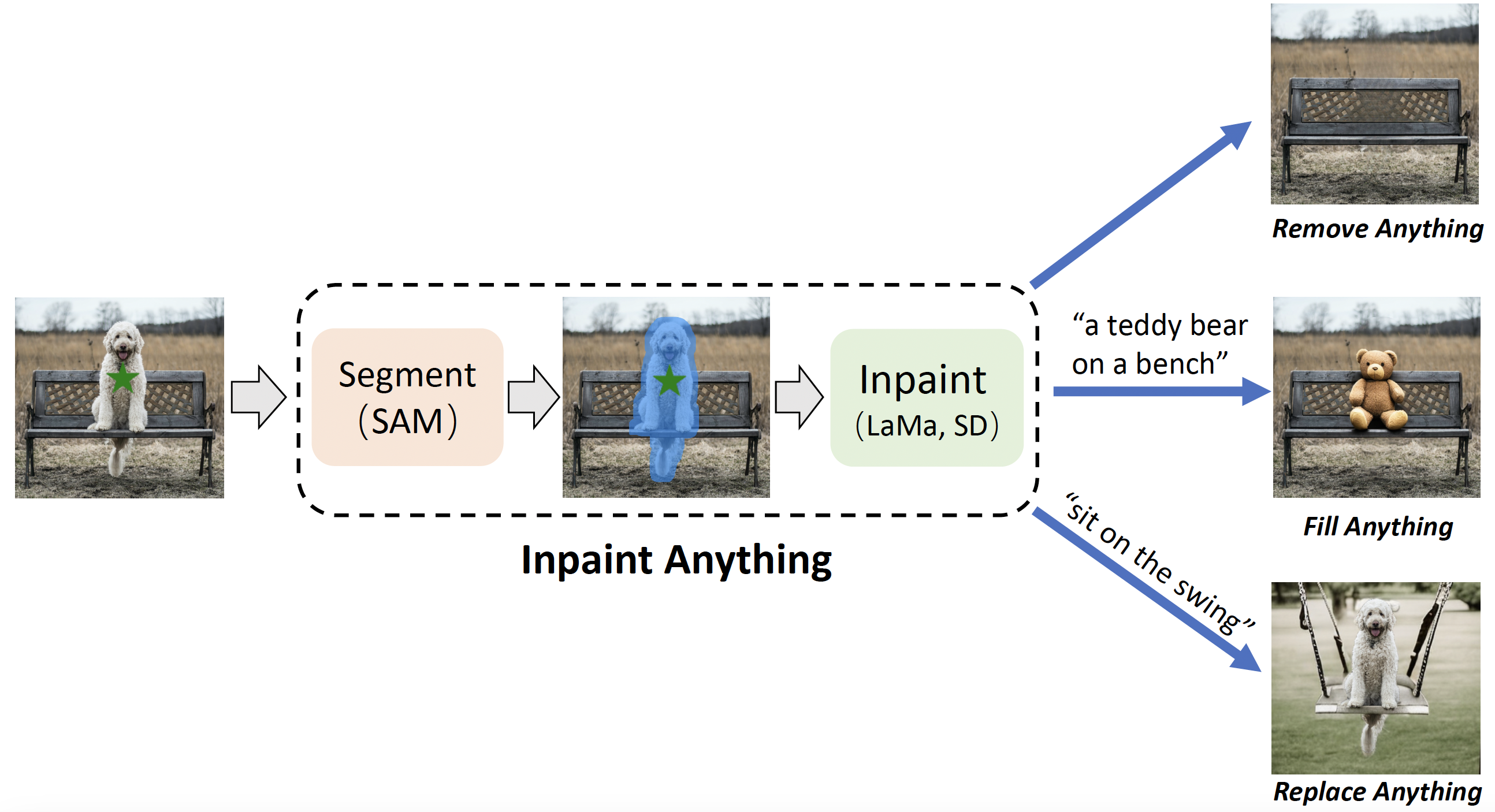
- https://github.com/geekyutao/Inpaint-Anything --- Inpaint Anything: Segment Anything Meets Image Inpainting
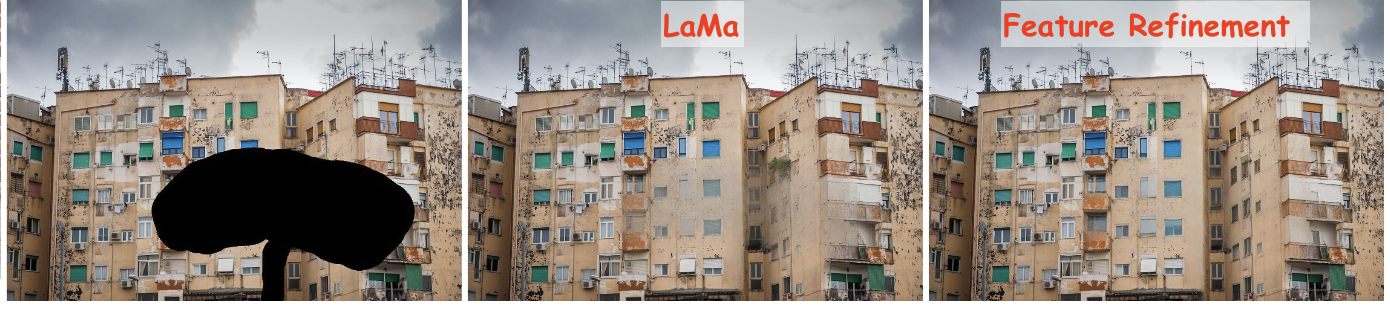
- [Feature Refinement to Improve High Resolution Image Inpainting](https://arxiv.org/abs/2206.13644) / [video](https://www.youtube.com/watch?v=gEukhOheWgE) / code https://github.com/advimman/lama/pull/112 / by Geomagical Labs ([geomagical.com](geomagical.com))
# Non-official 3rd party apps:
(Feel free to share your app/implementation/demo by creating an issue)
- https://github.com/enesmsahin/simple-lama-inpainting - a simple pip package for LaMa inpainting.
- https://github.com/mallman/CoreMLaMa - Apple's Core ML model format
- [https://cleanup.pictures](https://cleanup.pictures/) - a simple interactive object removal tool by [@cyrildiagne](https://twitter.com/cyrildiagne)
- [lama-cleaner](https://github.com/Sanster/lama-cleaner) by [@Sanster](https://github.com/Sanster/lama-cleaner) is a self-host version of [https://cleanup.pictures](https://cleanup.pictures/)
- Integrated to [Huggingface Spaces](https://huggingface.co/spaces) with [Gradio](https://github.com/gradio-app/gradio). See demo: [](https://huggingface.co/spaces/akhaliq/lama) by [@AK391](https://github.com/AK391)
- Telegram bot [@MagicEraserBot](https://t.me/MagicEraserBot) by [@Moldoteck](https://github.com/Moldoteck), [code](https://github.com/Moldoteck/MagicEraser)
- [Auto-LaMa](https://github.com/andy971022/auto-lama) = DE:TR object detection + LaMa inpainting by [@andy971022](https://github.com/andy971022)
- [LAMA-Magic-Eraser-Local](https://github.com/zhaoyun0071/LAMA-Magic-Eraser-Local) = a standalone inpainting application built with PyQt5 by [@zhaoyun0071](https://github.com/zhaoyun0071)
- [Hama](https://www.hama.app/) - object removal with a smart brush which simplifies mask drawing.
- [ModelScope](https://www.modelscope.cn/models/damo/cv_fft_inpainting_lama/summary) = the largest Model Community in Chinese by [@chenbinghui1](https://github.com/chenbinghui1).
- [LaMa with MaskDINO](https://github.com/qwopqwop200/lama-with-maskdino) = MaskDINO object detection + LaMa inpainting with refinement by [@qwopqwop200](https://github.com/qwopqwop200).
- [CoreMLaMa](https://github.com/mallman/CoreMLaMa) - a script to convert Lama Cleaner's port of LaMa to Apple's Core ML model format.
# Environment setup
❗️❗️❗️ All yandex dist links went bad, you can download the model from the [google drive](https://drive.google.com/drive/folders/1B2x7eQDgecTL0oh3LSIBDGj0fTxs6Ips?usp=sharing) ❗️❗️❗️
Clone the repo:
`git clone https://github.com/advimman/lama.git`
There are three options of an environment:
1. Python virtualenv:
```
virtualenv inpenv --python=/usr/bin/python3
source inpenv/bin/activate
pip install torch==1.8.0 torchvision==0.9.0
cd lama
pip install -r requirements.txt
```
2. Conda
```
% Install conda for Linux, for other OS download miniconda at https://docs.conda.io/en/latest/miniconda.html
wget https://repo.anaconda.com/miniconda/Miniconda3-latest-Linux-x86_64.sh
bash Miniconda3-latest-Linux-x86_64.sh -b -p $HOME/miniconda
$HOME/miniconda/bin/conda init bash
cd lama
conda env create -f conda_env.yml
conda activate lama
conda install pytorch torchvision torchaudio cudatoolkit=10.2 -c pytorch -y
pip install pytorch-lightning==1.2.9
```
3. Docker: No actions are needed 🎉.
# Inference
Run
```
cd lama
export TORCH_HOME=$(pwd) && export PYTHONPATH=$(pwd)
```
**1. Download pre-trained models**
The best model (Places2, Places Challenge):
```
curl -LJO https://huggingface.co/smartywu/big-lama/resolve/main/big-lama.zip
unzip big-lama.zip
```
All models (Places & CelebA-HQ):
```
download [https://drive.google.com/drive/folders/1B2x7eQDgecTL0oh3LSIBDGj0fTxs6Ips?usp=drive_link]
unzip lama-models.zip
```
**2. Prepare images and masks**
Download test images:
```
unzip LaMa_test_images.zip
```
OR prepare your data:
1) Create masks named as `[images_name]_maskXXX[image_suffix]`, put images and masks in the same folder.
- You can use the [script](https://github.com/advimman/lama/blob/main/bin/gen_mask_dataset.py) for random masks generation.
- Check the format of the files:
```
image1_mask001.png
image1.png
image2_mask001.png
image2.png
```
2) Specify `image_suffix`, e.g. `.png` or `.jpg` or `_input.jpg` in `configs/prediction/default.yaml`.
**3. Predict**
On the host machine:
python3 bin/predict.py model.path=$(pwd)/big-lama indir=$(pwd)/LaMa_test_images outdir=$(pwd)/output
**OR** in the docker
The following command will pull the docker image from Docker Hub and execute the prediction script
```
bash docker/2_predict.sh $(pwd)/big-lama $(pwd)/LaMa_test_images $(pwd)/output device=cpu
```
Docker cuda:
```
bash docker/2_predict_with_gpu.sh $(pwd)/big-lama $(pwd)/LaMa_test_images $(pwd)/output
```
**4. Predict with Refinement**
On the host machine:
python3 bin/predict.py refine=True model.path=$(pwd)/big-lama indir=$(pwd)/LaMa_test_images outdir=$(pwd)/output
# Train and Eval
Make sure you run:
```
cd lama
export TORCH_HOME=$(pwd) && export PYTHONPATH=$(pwd)
```
Then download models for _perceptual loss_:
mkdir -p ade20k/ade20k-resnet50dilated-ppm_deepsup/
wget -P ade20k/ade20k-resnet50dilated-ppm_deepsup/ http://sceneparsing.csail.mit.edu/model/pytorch/ade20k-resnet50dilated-ppm_deepsup/encoder_epoch_20.pth
## Places
⚠️ NB: FID/SSIM/LPIPS metric values for Places that we see in LaMa paper are computed on 30000 images that we produce in evaluation section below.
For more details on evaluation data check [[Section 3. Dataset splits in Supplementary](https://ashukha.com/projects/lama_21/lama_supmat_2021.pdf#subsection.3.1)] ⚠️
On the host machine:
# Download data from http://places2.csail.mit.edu/download.html
# Places365-Standard: Train(105GB)/Test(19GB)/Val(2.1GB) from High-resolution images section
wget http://data.csail.mit.edu/places/places365/train_large_places365standard.tar
wget http://data.csail.mit.edu/places/places365/val_large.tar
wget http://data.csail.mit.edu/places/places365/test_large.tar
# Unpack train/test/val data and create .yaml config for it
bash fetch_data/places_standard_train_prepare.sh
bash fetch_data/places_standard_test_val_prepare.sh
# Sample images for test and viz at the end of epoch
bash fetch_data/places_standard_test_val_sample.sh
bash fetch_data/places_standard_test_val_gen_masks.sh
# Run training
python3 bin/train.py -cn lama-fourier location=places_standard
# To evaluate trained model and report metrics as in our paper
# we need to sample previously unseen 30k images and generate masks for them
bash fetch_data/places_standard_evaluation_prepare_data.sh
# Infer model on thick/thin/medium masks in 256 and 512 and run evaluation
# like this:
python3 bin/predict.py \
model.path=$(pwd)/experiments/__lama-fourier_/ \
indir=$(pwd)/places_standard_dataset/evaluation/random_thick_512/ \
outdir=$(pwd)/inference/random_thick_512 model.checkpoint=last.ckpt
python3 bin/evaluate_predicts.py \
$(pwd)/configs/eval2_gpu.yaml \
$(pwd)/places_standard_dataset/evaluation/random_thick_512/ \
$(pwd)/inference/random_thick_512 \
$(pwd)/inference/random_thick_512_metrics.csv
Docker: TODO
## CelebA
On the host machine:
# Make shure you are in lama folder
cd lama
export TORCH_HOME=$(pwd) && export PYTHONPATH=$(pwd)
# Download CelebA-HQ dataset
# Download data256x256.zip from https://drive.google.com/drive/folders/11Vz0fqHS2rXDb5pprgTjpD7S2BAJhi1P
# unzip & split into train/test/visualization & create config for it
bash fetch_data/celebahq_dataset_prepare.sh
# generate masks for test and visual_test at the end of epoch
bash fetch_data/celebahq_gen_masks.sh
# Run training
python3 bin/train.py -cn lama-fourier-celeba data.batch_size=10
# Infer model on thick/thin/medium masks in 256 and run evaluation
# like this:
python3 bin/predict.py \
model.path=$(pwd)/experiments/__lama-fourier-celeba_/ \
indir=$(pwd)/celeba-hq-dataset/visual_test_256/random_thick_256/ \
outdir=$(pwd)/inference/celeba_random_thick_256 model.checkpoint=last.ckpt
Docker: TODO
## Places Challenge
On the host machine:
# This script downloads multiple .tar files in parallel and unpacks them
# Places365-Challenge: Train(476GB) from High-resolution images (to train Big-Lama)
bash places_challenge_train_download.sh
TODO: prepare
TODO: train
TODO: eval
Docker: TODO
## Create your data
Please check bash scripts for data preparation and mask generation from CelebaHQ section,
if you stuck at one of the following steps.
On the host machine:
# Make shure you are in lama folder
cd lama
export TORCH_HOME=$(pwd) && export PYTHONPATH=$(pwd)
# You need to prepare following image folders:
$ ls my_dataset
train
val_source # 2000 or more images
visual_test_source # 100 or more images
eval_source # 2000 or more images
# LaMa generates random masks for the train data on the flight,
# but needs fixed masks for test and visual_test for consistency of evaluation.
# Suppose, we want to evaluate and pick best models
# on 512x512 val dataset with thick/thin/medium masks
# And your images have .jpg extention:
python3 bin/gen_mask_dataset.py \
$(pwd)/configs/data_gen/random__512.yaml \ # thick, thin, medium
my_dataset/val_source/ \
my_dataset/val/random__512.yaml \# thick, thin, medium
--ext jpg
# So the mask generator will:
# 1. resize and crop val images and save them as .png
# 2. generate masks
ls my_dataset/val/random_medium_512/
image1_crop000_mask000.png
image1_crop000.png
image2_crop000_mask000.png
image2_crop000.png
...
# Generate thick, thin, medium masks for visual_test folder:
python3 bin/gen_mask_dataset.py \
$(pwd)/configs/data_gen/random__512.yaml \ #thick, thin, medium
my_dataset/visual_test_source/ \
my_dataset/visual_test/random__512/ \ #thick, thin, medium
--ext jpg
ls my_dataset/visual_test/random_thick_512/
image1_crop000_mask000.png
image1_crop000.png
image2_crop000_mask000.png
image2_crop000.png
...
# Same process for eval_source image folder:
python3 bin/gen_mask_dataset.py \
$(pwd)/configs/data_gen/random__512.yaml \ #thick, thin, medium
my_dataset/eval_source/ \
my_dataset/eval/random__512/ \ #thick, thin, medium
--ext jpg
# Generate location config file which locate these folders:
touch my_dataset.yaml
echo "data_root_dir: $(pwd)/my_dataset/" >> my_dataset.yaml
echo "out_root_dir: $(pwd)/experiments/" >> my_dataset.yaml
echo "tb_dir: $(pwd)/tb_logs/" >> my_dataset.yaml
mv my_dataset.yaml ${PWD}/configs/training/location/
# Check data config for consistency with my_dataset folder structure:
$ cat ${PWD}/configs/training/data/abl-04-256-mh-dist
...
train:
indir: ${location.data_root_dir}/train
...
val:
indir: ${location.data_root_dir}/val
img_suffix: .png
visual_test:
indir: ${location.data_root_dir}/visual_test
img_suffix: .png
# Run training
python3 bin/train.py -cn lama-fourier location=my_dataset data.batch_size=10
# Evaluation: LaMa training procedure picks best few models according to
# scores on my_dataset/val/
# To evaluate one of your best models (i.e. at epoch=32)
# on previously unseen my_dataset/eval do the following
# for thin, thick and medium:
# infer:
python3 bin/predict.py \
model.path=$(pwd)/experiments/__lama-fourier_/ \
indir=$(pwd)/my_dataset/eval/random__512/ \
outdir=$(pwd)/inference/my_dataset/random__512 \
model.checkpoint=epoch32.ckpt
# metrics calculation:
python3 bin/evaluate_predicts.py \
$(pwd)/configs/eval2_gpu.yaml \
$(pwd)/my_dataset/eval/random__512/ \
$(pwd)/inference/my_dataset/random__512 \
$(pwd)/inference/my_dataset/random__512_metrics.csv
**OR** in the docker:
TODO: train
TODO: eval
# Hints
### Generate different kinds of masks
The following command will execute a script that generates random masks.
bash docker/1_generate_masks_from_raw_images.sh \
configs/data_gen/random_medium_512.yaml \
/directory_with_input_images \
/directory_where_to_store_images_and_masks \
--ext png
The test data generation command stores images in the format,
which is suitable for [prediction](#prediction).
The table below describes which configs we used to generate different test sets from the paper.
Note that we *do not fix a random seed*, so the results will be slightly different each time.
| | Places 512x512 | CelebA 256x256 |
|--------|------------------------|------------------------|
| Narrow | random_thin_512.yaml | random_thin_256.yaml |
| Medium | random_medium_512.yaml | random_medium_256.yaml |
| Wide | random_thick_512.yaml | random_thick_256.yaml |
Feel free to change the config path (argument #1) to any other config in `configs/data_gen`
or adjust config files themselves.
### Override parameters in configs
Also you can override parameters in config like this:
python3 bin/train.py -cn data.batch_size=10 run_title=my-title
Where .yaml file extension is omitted
### Models options
Config names for models from paper (substitude into the training command):
* big-lama
* big-lama-regular
* lama-fourier
* lama-regular
* lama_small_train_masks
Which are seated in configs/training/folder
### Links
- All the data (models, test images, etc.) https://disk.yandex.ru/d/AmdeG-bIjmvSug
- Test images from the paper https://disk.yandex.ru/d/xKQJZeVRk5vLlQ
- The pre-trained models https://disk.yandex.ru/d/EgqaSnLohjuzAg
- The models for perceptual loss https://disk.yandex.ru/d/ncVmQlmT_kTemQ
- Our training logs are available at https://disk.yandex.ru/d/9Bt1wNSDS4jDkQ
### Training time & resources
TODO
## Acknowledgments
* Segmentation code and models if form [CSAILVision](https://github.com/CSAILVision/semantic-segmentation-pytorch).
* LPIPS metric is from [richzhang](https://github.com/richzhang/PerceptualSimilarity)
* SSIM is from [Po-Hsun-Su](https://github.com/Po-Hsun-Su/pytorch-ssim)
* FID is from [mseitzer](https://github.com/mseitzer/pytorch-fid)
## Citation
If you found this code helpful, please consider citing:
```
@article{suvorov2021resolution,
title={Resolution-robust Large Mask Inpainting with Fourier Convolutions},
author={Suvorov, Roman and Logacheva, Elizaveta and Mashikhin, Anton and Remizova, Anastasia and Ashukha, Arsenii and Silvestrov, Aleksei and Kong, Naejin and Goka, Harshith and Park, Kiwoong and Lempitsky, Victor},
journal={arXiv preprint arXiv:2109.07161},
year={2021}
}
```