<a id="top"></a>

<div align="right">
    <h6>
        <picture>
            <source type="image/svg+xml" media="(prefers-color-scheme: dark)" srcset="https://cdn.jsdelivr.net/gh/adamlui/ai-web-extensions@d11d2ee/assets/images/icons/earth/white/icon32.svg">
            <img height=14 src="https://cdn.jsdelivr.net/gh/adamlui/ai-web-extensions@d11d2ee/assets/images/icons/earth/black/icon32.svg">
        </picture>
        &nbsp;简体中文 |
        <a href="https://github.com/adamlui/youtube-classic/#readme">English</a> |
        <a href="https://github.com/adamlui/youtube-classic/tree/main/docs/zh-tw/#readme">繁体中文</a>
    </h6>
</div>

<div align="center">

<h1>
  <picture>
    <source media="(prefers-color-scheme: dark)" srcset="https://cdn.jsdelivr.net/gh/adamlui/youtube-classic@1c92f98/assets/images/logos/youtube-classic/darkmode/logo535x75.png">
    <img src="https://cdn.jsdelivr.net/gh/adamlui/youtube-classic@1c92f98/assets/images/logos/youtube-classic/lightmode/logo535x75.png">
  </picture>
</h1>

<a href="https://github.com/adamlui/youtube-classic/blob/main/docs/zh-cn/LICENSE.md">
    <img alt="[执照: MIT]" src="https://img.shields.io/badge/执照-MIT-f99b27.svg?logo=internetarchive&logoColor=white&style=for-the-badge"></a>
<a href="#">
    <img alt="[支持: Chrome/Firefox/Edge/Safari/Opera]" src="https://img.shields.io/badge/支持-Chrome/Firefox/Edge/Safari/Opera-989898.svg?logo=osf&logoColor=white&style=for-the-badge"></a>
<a href="https://www.codefactor.io/repository/github/adamlui/youtube-classic">
    <img alt="[CodeFactor 年级]" src="https://img.shields.io/codefactor/grade/github/adamlui/youtube-classic?logo=codefactor&logoColor=white&label=%E4%BB%A3%E7%A0%81%E8%B4%A8%E9%87%8F&style=for-the-badge"></a>
<a href="https://github.com/awesome-scripts/awesome-userscripts#youtube">
    <img src="https://img.shields.io/badge/提及于-Awesome-ff69b4?logo=awesomelists&logoColor=white&labelColor=464646&style=for-the-badge"></a>
<a href="https://sonarcloud.io/component_measures?metric=vulnerabilities&id=adamlui_youtube-classic">
    <img alt="[SonarCloud vulnerabilities]" src="https://img.shields.io/badge/dynamic/json?url=https%3A%2F%2Fsonarcloud.io%2Fapi%2Fmeasures%2Fcomponent%3Fcomponent%3Dadamlui_youtube-classic%26metricKeys%3Dvulnerabilities&query=%24.component.measures.0.value&style=for-the-badge&logo=sonar&logoColor=white&labelColor=464646&label=%E6%BC%8F%E6%B4%9E&color=ffef00"></a>
<a href="https://www.jsdelivr.com/package/gh/adamlui/youtube-classic?tab=stats">
    <img src="https://img.shields.io/jsdelivr/gh/hm/adamlui/youtube-classic?label=jsDelivr%20%E8%AF%B7%E6%B1%82&logo=jsdelivr&logoColor=white&color=2bbbd8&labelColor=464646&style=for-the-badge"></a>

<h3><b>YouTube 经典</b> 让 YouTube 重返经典美学的辉煌岁月</h3>

<a href="https://chromewebstore.google.com/detail/youtube-classic/keehjmmhefapnbammgjhdppfeekdiepk">
    <img alt="[Get for Chromium]" height=60 src="https://cdn.jsdelivr.net/gh/adamlui/ai-web-extensions@8841371/assets/images/badges/chrome-web-store/available-in-the-chrome-web-store-green-square-border-light-498x152.png"></a>
<a href="https://microsoftedge.microsoft.com/addons/detail/youtube-classic/gbdiffmdamghkpgfljpmoflcleedkdeg">
    <img alt="[获取 Edge 版本]" height=60 src="https://cdn.jsdelivr.net/gh/adamlui/ai-web-extensions@8841371/assets/images/badges/microsoft-store/get-it-from-microsoft-blue-square-border-light-457x157.png"></a>
<a href="https://addons.mozilla.org/zh-CN/firefox/addon/yt-classic/">
    <img alt="[获取 Firefox 版]" height=60 src="https://cdn.jsdelivr.net/gh/adamlui/ai-web-extensions@8841371/assets/images/badges/firefox/available-for-firefox/raspberry-border-334x128.png"></a>
<a href="https://scriptcat.org/script-show-page/6345">
    <img alt="[获取 Greasemonkey 版]" height=60 src="https://cdn.jsdelivr.net/gh/adamlui/ai-web-extensions@8841371/assets/images/badges/greasemonkey/install-userscript/zh-cn/badge729x262.png"></a>

</div>

<h2>功能介绍</h2>
<ul>
  <li><b>恢复“踩”数显示</b>，助你在观看前判断内容质量<br>
    （使用 Anarios 的 <a href="https://github.com/Anarios/return-youtube-dislike">Return YouTube Dislike</a>）
    <p><img width=400px src="https://assets.ytclassic.com/images/screenshots/dislike-counter.png"></li><br>
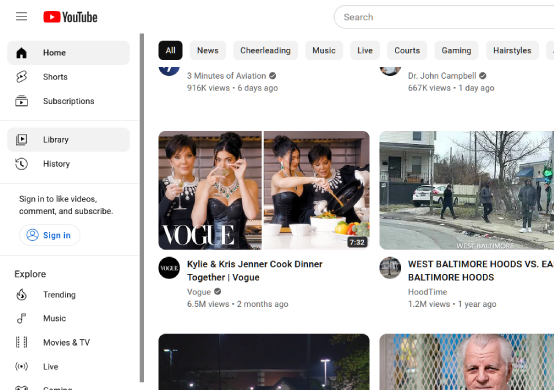
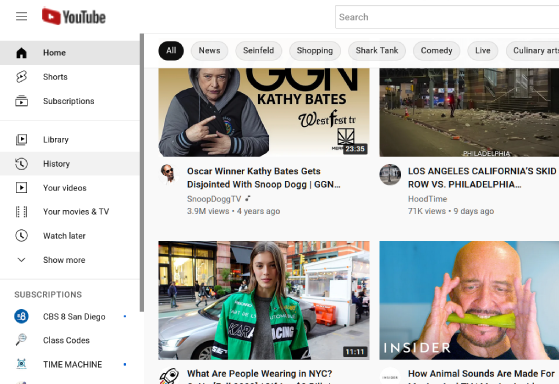
  <li><b>移除那些</b>看似纯粹为了“圆”而无处不在的圆角。<br>
    （基于 magma_craft 的 <a href="https://userstyles.world/style/7243/css-adjustments-fixes-for-non-rounded-youtube-design">非圆角 YouTube 设计</a> 演变而来）
    <p><i>&nbsp;前：</i><br>
      <img src="https://assets.ytclassic.com/images/screenshots/youtube-modern-ui.png">
    <p><i>&nbsp;后：</i><br>
      <img src="https://assets.ytclassic.com/images/screenshots/youtube-classic-ui.png"></li><br>
  <li><b>将 YouTube Shorts 重定向</b>至经典播放器，以提升使用体验
    <p><img width=555 height="auto" src="https://cdn.jsdelivr.net/gh/adamlui/youtube-classic@19ab985/assets/images/screenshots/shorts-redir.png"></li><br>
  <li><b>屏蔽搜索结果中的隐匿推荐</b>，从而呈现更精准的搜索结果</li><br>
  <li><b>精简冗余动画效果</b>，加快页面导航速度，助您更流畅地欣赏视频</li><br>
  <li><b>防止页面进入空闲休眠状态</b>，确保标签页持续活跃，实现无限自动播放</li><br>
  <li><b>拦截缩略图广告</b>，让您在浏览视频时界面更加整洁清爽
    <p><i>&nbsp;前：</i><br>
      <img width=535 height="auto" src="https://cdn.jsdelivr.net/gh/adamlui/youtube-classic@1c92f98/assets/images/screenshots/ad-block/before.png">
    <p><i>&nbsp;后：</i><br>
      <img width=535 height="auto" src="https://cdn.jsdelivr.net/gh/adamlui/youtube-classic@1c92f98/assets/images/screenshots/ad-block/after.png"></li><br>
</ul>

## 🚀 安装

### <a href="#" title="Chrome"><img height=16 src="https://cdn.jsdelivr.net/gh/adamlui/ai-web-extensions@d11d2ee/assets/images/icons/browsers/chrome/icon16.png"></a><a href="#" title="Edge"><img height=16 src="https://cdn.jsdelivr.net/gh/adamlui/ai-web-extensions@d11d2ee/assets/images/icons/browsers/edge/icon16.png"></a><a href="#" title="Firefox"><img height=17 src="https://cdn.jsdelivr.net/gh/adamlui/ai-web-extensions@d11d2ee/assets/images/icons/browsers/firefox/icon16.png"></a> 浏览器扩展：

1. 安装 YouTube Classic 扩展程序 ([Chrome](https://chromewebstore.google.com/detail/youtube-classic/keehjmmhefapnbammgjhdppfeekdiepk?utm_source=github&utm_medium=referral&utm_content=youtube-classic-readme), [Firefox](https://addons.mozilla.org/firefox/addon/yt-classic/?utm_source=github eadme))

2. 访问 [youtube.com](https://youtube.com)，界面焕然一新！

*专业提示：为了更便捷地访问扩展开关，(1) 点击 <img height=12 width=12 src="https://cdn.jsdelivr.net/gh/adamlui/ai-web-extensions@8841371/assets/images/icons/toolbar/chrome-puzzle-piece/gray.png"> 在浏览器工具栏中，（2）然后 <img height=12 width=12 src="https://cdn.jsdelivr.net/gh/adamlui/ai-web-extensions@8841371/assets/images/icons/toolbar/push-pin/blue.png"> 位于扩展名称旁。*

<div align="center">

<img width=268 src="https://cdn.jsdelivr.net/gh/adamlui/youtube-classic@c83b32f/assets/images/screenshots/chrome/pin-instructions/zh-cn.png">
<img width=295 src="https://cdn.jsdelivr.net/gh/adamlui/youtube-classic@c83b32f/assets/images/screenshots/chrome/toolbar-menu/zh-cn.png">

</div>

#

### <a href="#" title="Tampermonkey"><img height=17 src="https://cdn.jsdelivr.net/gh/adamlui/ai-web-extensions@d11d2ee/assets/images/icons/userscript-managers/tampermonkey/icon28.png"></a><a href="#" title="Violentmonkey"><img height=17.5 src="https://cdn.jsdelivr.net/gh/adamlui/ai-web-extensions@d11d2ee/assets/images/icons/userscript-managers/violentmonkey/icon25.png"></a><a href="#" title="ScriptCat"><img height=16 src="https://cdn.jsdelivr.net/gh/adamlui/ai-web-extensions@d11d2ee/assets/images/icons/userscript-managers/scriptcat/icon16.png"></a><a href="#" title="OrangeMonkey"><img height=16 src="https://cdn.jsdelivr.net/gh/adamlui/ai-web-extensions@d11d2ee/assets/images/icons/userscript-managers/orangemonkey/icon16.png"></a><a href="#" title="Stay"><img height=18 src="https://cdn.jsdelivr.net/gh/adamlui/ai-web-extensions@d11d2ee/assets/images/icons/userscript-managers/stay/icon32.png"></a><a href="#" title="Userscripts"><img height=17 src="https://cdn.jsdelivr.net/gh/adamlui/ai-web-extensions@d11d2ee/assets/images/icons/userscript-managers/userscripts/icon32.png"></a> Greasemonkey 用户脚本：

1. 安装一个用户脚本管理器，例如：
    - ScriptCat 为了 [Chrome](https://chromewebstore.google.com/detail/scriptcat/ndcooeababalnlpkfedmmbbbgkljhpjf), [Firefox](https://addons.mozilla.org/firefox/addon/scriptcat/) 或者 [Edge](https://microsoftedge.microsoft.com/addons/detail/scriptcat/liilgpjgabokdklappibcjfablkpcekh)
    - Violentmonkey 为了 [Firefox](https://addons.mozilla.org/firefox/addon/violentmonkey/) 或者 [Edge](https://microsoftedge.microsoft.com/addons/detail/eeagobfjdenkkddmbclomhiblgggliao)
    - OrangeMonkey 为了 [Chrome](https://chromewebstore.google.com/detail/orangemonkey/ekmeppjgajofkpiofbebgcbohbmfldaf)
    - Tampermonkey 为了 [Chrome](https://chromewebstore.google.com/detail/tampermonkey/dhdgffkkebhmkfjojejmpbldmpobfkfo), [Firefox](https://addons.mozilla.org/firefox/addon/tampermonkey/) 或者 [Edge](https://microsoftedge.microsoft.com/addons/detail/tampermonkey/iikmkjmpaadaobahmlepeloendndfphd)
    - [Stay](https://apps.apple.com/app/stay-for-safari/id1591620171) 或者 [Userscripts](https://apps.apple.com/app/userscripts/id1463298887) 为了 Safari

2. 安装 [YouTube Classic](https://scriptcat.org/zh-CN/script-show-page/6345) 用户脚本（将加载至上方已安装的管理器中）

3. 访问 [youtube.com](https://youtube.com)，界面焕然一新！

<br>

<div align="center">

<a href="https://chromewebstore.google.com/detail/youtube-classic/keehjmmhefapnbammgjhdppfeekdiepk">
    <img alt="[Get for Chromium]" height=60 src="https://cdn.jsdelivr.net/gh/adamlui/ai-web-extensions@8841371/assets/images/badges/chrome-web-store/available-in-the-chrome-web-store-green-square-border-light-498x152.png"></a>
<a href="https://microsoftedge.microsoft.com/addons/detail/youtube-classic/gbdiffmdamghkpgfljpmoflcleedkdeg">
    <img alt="[获取 Edge 版本]" height=60 src="https://cdn.jsdelivr.net/gh/adamlui/ai-web-extensions@8841371/assets/images/badges/microsoft-store/get-it-from-microsoft-blue-square-border-light-457x157.png"></a>
<a href="https://addons.mozilla.org/zh-CN/firefox/addon/yt-classic/">
    <img alt="[获取 Firefox 版]" height=60 src="https://cdn.jsdelivr.net/gh/adamlui/ai-web-extensions@8841371/assets/images/badges/firefox/available-for-firefox/raspberry-border-334x128.png"></a>
<a href="https://scriptcat.org/script-show-page/6345">
    <img alt="[获取 Greasemonkey 版]" height=60 src="https://cdn.jsdelivr.net/gh/adamlui/ai-web-extensions@8841371/assets/images/badges/greasemonkey/install-userscript/zh-cn/badge729x262.png"></a>

</div>

<br>

<img height=10px width="100%" src="https://cdn.jsdelivr.net/gh/adamlui/userscripts@6b4fcd2/assets/images/separators/gradient-aqua.png">

[<picture><source media="(prefers-color-scheme: dark)" srcset="https://cdn.jsdelivr.net/gh/adamlui/userscripts@511d533/assets/images/icons/home/white/icon32x27.png"><img height=13 src="https://cdn.jsdelivr.net/gh/adamlui/userscripts@511d533/assets/images/icons/home/dark-gray/icon32x27.png"></picture>][userscripts]
[**联系作者**][userscripts] /
<a href="#top">返回顶部 ↑</a>

[userscripts]: https://github.com/adamlui/userscripts/tree/master/docs/zh-cn/#readme