<a id="top"></a>

<div align="center">

<h1><picture><source media="(prefers-color-scheme: dark)" srcset="https://cdn.jsdelivr.net/gh/adamlui/youtube-classic@1c92f98/assets/images/logos/youtube-classic/darkmode/logo535x75.png"><img src="https://cdn.jsdelivr.net/gh/adamlui/youtube-classic@1c92f98/assets/images/logos/youtube-classic/lightmode/logo535x75.png"></picture></h1>

<a href="https://github.com/adamlui/youtube-classic/blob/main/chromium/docs/LICENSE.md">
    <img alt="[License: MIT]" src="https://img.shields.io/badge/License-MIT-f99b27.svg?logo=internetarchive&logoColor=white&style=for-the-badge"></a>
<a href="https://chromewebstore.google.com/detail/youtube-classic/keehjmmhefapnbammgjhdppfeekdiepk">
    <img src="https://img.shields.io/chrome-web-store/v/keehjmmhefapnbammgjhdppfeekdiepk?label=Latest+Release&logo=googlechrome&logoColor=white&labelColor=464646&color=58E886&style=for-the-badge"></a>
<a href="https://www.codefactor.io/repository/github/adamlui/youtube-classic">
    <img alt="[CodeFactor grade]" src="https://img.shields.io/codefactor/grade/github/adamlui/youtube-classic?logo=codefactor&logoColor=white&label=Code%20Quality&color=b3ff68&style=for-the-badge"></a>
<a href="https://sonarcloud.io/component_measures?metric=vulnerabilities&id=adamlui_youtube-classic">
    <img alt="[SonarCloud vulnerabilities]" src="https://img.shields.io/badge/dynamic/json?url=https%3A%2F%2Fsonarcloud.io%2Fapi%2Fmeasures%2Fcomponent%3Fcomponent%3Dadamlui_youtube-classic%26metricKeys%3Dvulnerabilities&query=%24.component.measures.0.value&style=for-the-badge&logo=sonar&logoColor=white&labelColor=464646&label=Vulnerabilities&color=ffef00"></a>
<br><br>

<h3><b>YouTube Classic</b> restores YouTube back to its glory days of classic aesthetics</h3>

<a href="https://chromewebstore.google.com/detail/youtube-classic/keehjmmhefapnbammgjhdppfeekdiepk">
    <img alt="[Get for Chromium]" height=60 src="https://cdn.jsdelivr.net/gh/adamlui/ai-web-extensions@8841371/assets/images/badges/chrome-web-store/available-in-the-chrome-web-store-green-square-border-light-498x152.png"></a>
<a href="https://microsoftedge.microsoft.com/addons/detail/youtube-classic/gbdiffmdamghkpgfljpmoflcleedkdeg">
    <img alt="[Get for Edge]" height=60 src="https://cdn.jsdelivr.net/gh/adamlui/ai-web-extensions@8841371/assets/images/badges/microsoft-store/get-it-from-microsoft-blue-square-border-light-457x157.png"></a>

</div>

<h2>What it does</h2>
<ul>
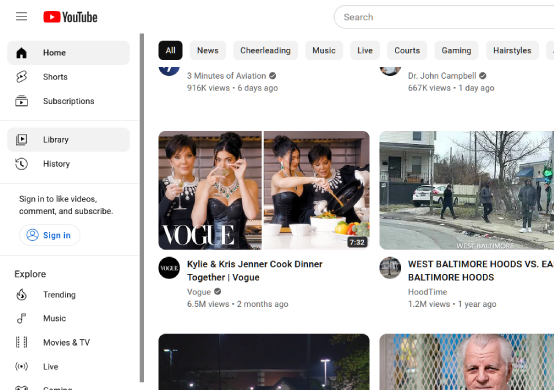
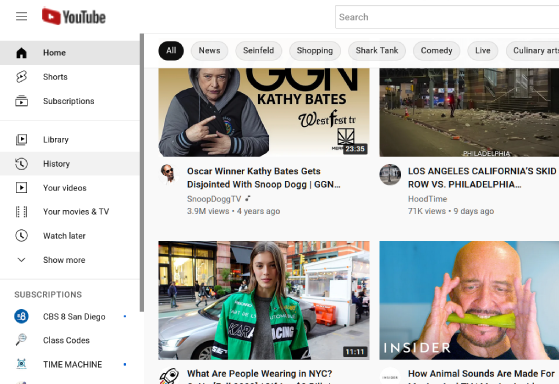
  <li><b>Removes rounded corners</b> that seemingly abound for the sake of being round<br>
    (evolved from magma_craft's <a href="https://userstyles.world/style/7243/css-adjustments-fixes-for-non-rounded-youtube-design">Non-Rounded YouTube Design</a>)
    <p><i>&nbsp;Before:</i><br>
      <img src="https://assets.ytclassic.com/images/screenshots/youtube-modern-ui.png">
    <p><i>&nbsp;After:</i><br>
      <img src="https://assets.ytclassic.com/images/screenshots/youtube-classic-ui.png"></li><br>
  <li><b>Redirects YouTube Shorts</b> to classic player for increased usability
    <p><img width=555 height="auto" src="https://cdn.jsdelivr.net/gh/adamlui/youtube-classic@19ab985/assets/images/screenshots/shorts-redir.png"></li><br>
  <li><b>Hides sneaky recommendations</b> from search for more accurate results</li><br>
  <li><b>Reduces excessive animations</b> for faster navigation thus enjoyment of videos</li><br>
  <li><b>Prevents idling</b> to keep tabs from falling asleep for infinite auto-play</li><br>
  <li><b>Blocks thumbnail ads</b> for less clutter when browsing videos
    <p><i>&nbsp;Before:</i><br><br>
      <img width=535 height="auto" src="https://cdn.jsdelivr.net/gh/adamlui/youtube-classic@1c92f98/assets/images/screenshots/ad-block/before.png">
    <p><i>&nbsp;After:</i><br><br>
      <img width=535 height="auto" src="https://cdn.jsdelivr.net/gh/adamlui/youtube-classic@1c92f98/assets/images/screenshots/ad-block/after.png"></li><br>
</ul>

## 🚀 Installation

1. Install **YouTube Classic** from the [Chrome Web Store](https://chromewebstore.google.com/detail/youtube-classic/keehjmmhefapnbammgjhdppfeekdiepk?utm_source=github&utm_medium=referral&utm_content=youtube-classic-readme)

2. Visit [youtube.com](https://youtube.com) & UI is transformed!

*Pro tip: For easier access to extension toggles, (1) click <img height=12 width=12 src="https://cdn.jsdelivr.net/gh/adamlui/ai-web-extensions@8841371/assets/images/icons/toolbar/chrome-puzzle-piece/gray.png"> in the browser's toolbar, (2) then <img height=12 width=12 src="https://cdn.jsdelivr.net/gh/adamlui/ai-web-extensions@8841371/assets/images/icons/toolbar/push-pin/blue.png"> next to extension name.*

<div align="center">

<img width=268 src="https://cdn.jsdelivr.net/gh/adamlui/youtube-classic@c83b32f/assets/images/screenshots/chrome/pin-instructions/en.png">
<img width=295 src="https://cdn.jsdelivr.net/gh/adamlui/youtube-classic@c83b32f/assets/images/screenshots/chrome/toolbar-menu/en.png">

</div>

<br><br>

<div align="center">

<a href="https://chromewebstore.google.com/detail/youtube-classic/keehjmmhefapnbammgjhdppfeekdiepk">
    <img alt="[Get for Chromium]" height=60 src="https://cdn.jsdelivr.net/gh/adamlui/ai-web-extensions@8841371/assets/images/badges/chrome-web-store/available-in-the-chrome-web-store-green-square-border-light-498x152.png"></a>
<a href="https://microsoftedge.microsoft.com/addons/detail/youtube-classic/gbdiffmdamghkpgfljpmoflcleedkdeg">
    <img alt="[Get for Edge]" height=60 src="https://cdn.jsdelivr.net/gh/adamlui/ai-web-extensions@8841371/assets/images/badges/microsoft-store/get-it-from-microsoft-blue-square-border-light-457x157.png"></a>

</div>

<br>

<img height=10px width="100%" src="https://cdn.jsdelivr.net/gh/adamlui/userscripts@6b4fcd2/assets/images/separators/gradient-aqua.png">

[**More extensions**](https://github.com/adamlui/ai-web-extensions/#readme) / [Back to top ↑](#top)