<a id="top"></a>

<div align="right">
    <h6>
        <picture>
            <source type="image/svg+xml" media="(prefers-color-scheme: dark)" srcset="https://assets.chatgptinfinity.com/images/icons/earth/white/icon32.svg">
            <img height=14 src="https://assets.chatgptinfinity.com/images/icons/earth/black/icon32.svg">
        </picture>
        &nbsp;简体中文 |
        <a href="../#readme">English</a> |
        <a href="../ja/#readme">日本語</a>
    </h6>
</div>

<img src="https://assets.chatgptinfinity.com/images/tiles/marquee/tile-1400x560.png">

<div align="center">

<a href="#">
    <img height=31 src="https://img.shields.io/badge/%E7%94%A8%E6%88%B7-150,000+-blue?logo=weightsandbiases&logoColor=white&labelColor=464646&style=for-the-badge"></a>
<a href="https://chrome.chatgptinfinity.com/?utm_source=github&utm_medium=referral&utm_content=featured-by-google-shield">
    <img alt="[由 Google 推荐]" height=31 src="https://img.shields.io/badge/%E7%B2%BE%E9%80%89%E8%80%85-Google-8afc25?logo=googlechrome&logoColor=white&labelColor=464646&style=for-the-badge"></a>
<a href="https://edge.chatgptinfinity.com">
    <img alt="[Microsoft Edge]" height=31 src="https://img.shields.io/badge/%E2%98%85%E2%98%85%E2%98%85%E2%98%85%E2%98%85-8afc25?logo=data:image/svg%2bxml;base64,PHN2ZyByb2xlPSJpbWciIHZpZXdCb3g9IjAgMCAyNCAyNCIgeG1sbnM9Imh0dHA6Ly93d3cudzMub3JnLzIwMDAvc3ZnIj48cGF0aCBmaWxsPSJ3aGl0ZSIgZD0iTTIxLjg2IDE3Ljg2cS4xNCAwIC4yNS4xMi4xLjEzLjEuMjV0LS4xMS4zM2wtLjMyLjQ2LS40My41My0uNDQuNXEtLjIxLjI1LS4zOC40MmwtLjIyLjIzcS0uNTguNTMtMS4zNCAxLjA0LS43Ni41MS0xLjYuOTEtLjg2LjQtMS43NC42NHQtMS42Ny4yNHEtLjkgMC0xLjY5LS4yOC0uOC0uMjgtMS40OC0uNzgtLjY4LS41LTEuMjItMS4xNy0uNTMtLjY2LS45Mi0xLjQ0LS4zOC0uNzctLjU4LTEuNi0uMi0uODMtLjItMS42NyAwLTEgLjMyLTEuOTYuMzMtLjk3Ljg3LTEuOC4xNC45NS41NSAxLjc3LjQxLjgyIDEuMDIgMS41LjYuNjggMS4zOCAxLjIxLjc4LjU0IDEuNjQuOS44Ni4zNiAxLjc3LjU2LjkyLjIgMS44LjIgMS4xMiAwIDIuMTgtLjI0IDEuMDYtLjIzIDIuMDYtLjcybC4yLS4xLjItLjA1em0tMTUuNS0xLjI3cTAgMS4xLjI3IDIuMTUuMjcgMS4wNi43OCAyLjAzLjUxLjk2IDEuMjQgMS43Ny43NC44MiAxLjY2IDEuNC0xLjQ3LS4yLTIuOC0uNzQtMS4zMy0uNTUtMi40OC0xLjM3LTEuMTUtLjgzLTIuMDgtMS45LS45Mi0xLjA3LTEuNTgtMi4zM1QuMzYgMTQuOTRRMCAxMy41NCAwIDEyLjA2cTAtLjgxLjMyLTEuNDkuMzEtLjY4LjgzLTEuMjMuNTMtLjU1IDEuMi0uOTYuNjYtLjQgMS4zNS0uNjYuNzQtLjI3IDEuNS0uMzkuNzgtLjEyIDEuNTUtLjEyLjcgMCAxLjQyLjEuNzIuMTIgMS40LjM1LjY4LjIzIDEuMzIuNTcuNjMuMzUgMS4xNi44My0uMzUgMC0uNy4wNy0uMzMuMDctLjY1LjIzdi0uMDJxLS42My4yOC0xLjIuNzQtLjU3LjQ2LTEuMDUgMS4wNC0uNDguNTgtLjg3IDEuMjYtLjM4LjY3LS42NSAxLjM5LS4yNy43MS0uNDIgMS40NC0uMTUuNzItLjE1IDEuMzh6TTExLjk2LjA2cTEuNyAwIDMuMzMuMzkgMS42My4zOCAzLjA3IDEuMTUgMS40My43NyAyLjYyIDEuOTMgMS4xOCAxLjE2IDEuOTggMi43LjQ5Ljk0Ljc2IDEuOTYuMjggMSAuMjggMi4wOCAwIC44OS0uMjMgMS43LS4yNC44LS42OSAxLjQ4LS40NS42OC0xLjEgMS4yMi0uNjQuNTMtMS40NS44OC0uNTQuMjQtMS4xMS4zNi0uNTguMTMtMS4xNi4xMy0uNDIgMC0uOTctLjAzLS41NC0uMDMtMS4xLS4xMi0uNTUtLjEtMS4wNS0uMjgtLjUtLjE5LS44NC0uNS0uMTItLjA5LS4yMy0uMjQtLjEtLjE2LS4xLS4zMyAwLS4xNS4xNi0uMzUuMTYtLjIuMzUtLjUuMi0uMjguMzYtLjY4LjE2LS40LjE2LS45NSAwLTEuMDYtLjQtMS45Ni0uNC0uOTEtMS4wNi0xLjY0LS42Ni0uNzQtMS41Mi0xLjI4LS44Ni0uNTUtMS43OS0uODktLjg0LS4zLTEuNzItLjQ0LS44Ny0uMTQtMS43Ni0uMTQtMS41NSAwLTMuMDYuNDVULjk0IDcuNTVxLjcxLTEuNzQgMS44MS0zLjEzIDEuMS0xLjM4IDIuNTItMi4zNVE2LjY4IDEuMSA4LjM3LjU4cTEuNy0uNTIgMy41OC0uNTJaIi8+PC9zdmc+&logoColor=white&labelColor=464646&color=7bfce9&label=%E7%AD%89%E7%BA%A7&style=for-the-badge"></a>
<a href="LICENSE.md">
    <img alt="[许可证: MIT]" height=31 src="https://img.shields.io/badge/%E8%AE%B8%E5%8F%AF%E8%AF%81-MIT-orange.svg?logo=internetarchive&logoColor=white&labelColor=464646&style=for-the-badge"></a>
<a href="https://www.codefactor.io/repository/github/adamlui/chatgpt-infinity">
    <img alt="[CodeFactor 等级]" height=31 src="https://img.shields.io/codefactor/grade/github/adamlui/chatgpt-infinity?label=%E4%BB%A3%E7%A0%81%E8%B4%A8%E9%87%8F&logo=codefactor&logoColor=white&labelColor=464646&color=b3ff68&style=for-the-badge"></a>
<a href="https://github.com/KudoAI/chatgpt.js?utm_source=chatgpt_infinity&utm_content=github_shield">
    <img alt="[供电 chatgpt.js]" height=31 src="https://img.shields.io/badge/%E4%BE%9B%E7%94%B5-chatgpt.js-black?logo=gamejolt&logoColor=white&labelColor=464646&style=for-the-badge"></a>
<a href="https://sonarcloud.io/component_measures?metric=vulnerabilities&id=adamlui_chatgpt-infinity">
    <img alt="[SonarCloud 漏洞]" height=31 src="https://img.shields.io/badge/dynamic/json?url=https%3A%2F%2Fsonarcloud.io%2Fapi%2Fmeasures%2Fcomponent%3Fcomponent%3Dadamlui_chatgpt-infinity%26metricKeys%3Dvulnerabilities&query=%24.component.measures.0.value&style=for-the-badge&logo=sonar&logoColor=white&labelColor=464646&label=%E6%BC%8F%E6%B4%9E&color=gold"></a>
<a href="https://github.com/awesome-scripts/awesome-userscripts#-chatgpt">
    <img alt="[在 Awesome 中提及]" height=31 src="https://img.shields.io/badge/%E6%8F%90%E5%8F%8A%E4%BA%8E-Awesome-cb48dc?logo=awesomelists&logoColor=white&labelColor=464646&style=for-the-badge"></a>
<a href="https://www.jsdelivr.com/package/gh/adamlui/chatgpt-infinity?tab=stats">
    <img alt="[jsDelivr 统计数据]" height=31 src="https://img.shields.io/jsdelivr/gh/hm/adamlui/chatgpt-infinity?style=for-the-badge&logo=jsdelivr&logoColor=white&label=jsDelivr%20%E8%AF%B7%E6%B1%82&labelColor=464646&color=2bbbd8"></a>
<br><br>

<a href="https://chrome.chatgptinfinity.com/?utm_source=github&utm_medium=referral&utm_content=platform-badge">
    <img alt="[获取 Chrome 版本]" height=60 src="https://assets.chatgptinfinity.com/images/badges/chrome-web-store/available-in-the-chrome-web-store-green-square-border-light-498x152.png"></a>
<a href="https://edge.chatgptinfinity.com">
    <img alt="[获取 Edge 版本]" height=60 src="https://assets.chatgptinfinity.com/images/badges/microsoft-store/get-it-from-microsoft-blue-square-border-light-457x157.png"></a>
<a href="https://ff.chatgptinfinity.com/?utm_source=github&utm_medium=referral&utm_content=platform-badge">
    <img alt="[获取 Firefox 版本]" height=60 src="https://assets.chatgptinfinity.com/images/badges/firefox/available-for-firefox/raspberry-border-334x128.png"></a>
<a href="https://gm.chatgptinfinity.com">
    <img alt="[获取 Greasemonkey 版本]" height=60 src="https://assets.chatgptinfinity.com/images/badges/greasemonkey/install-userscript/zh-cn/badge729x262.png"></a>

</div>

## 💡 关于

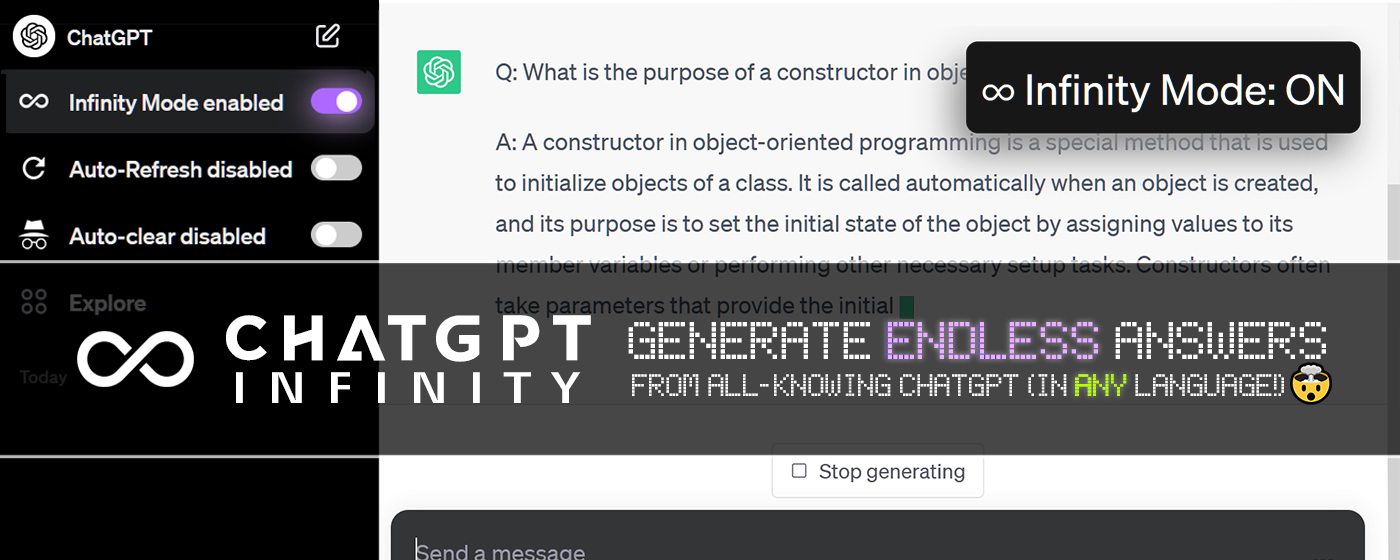
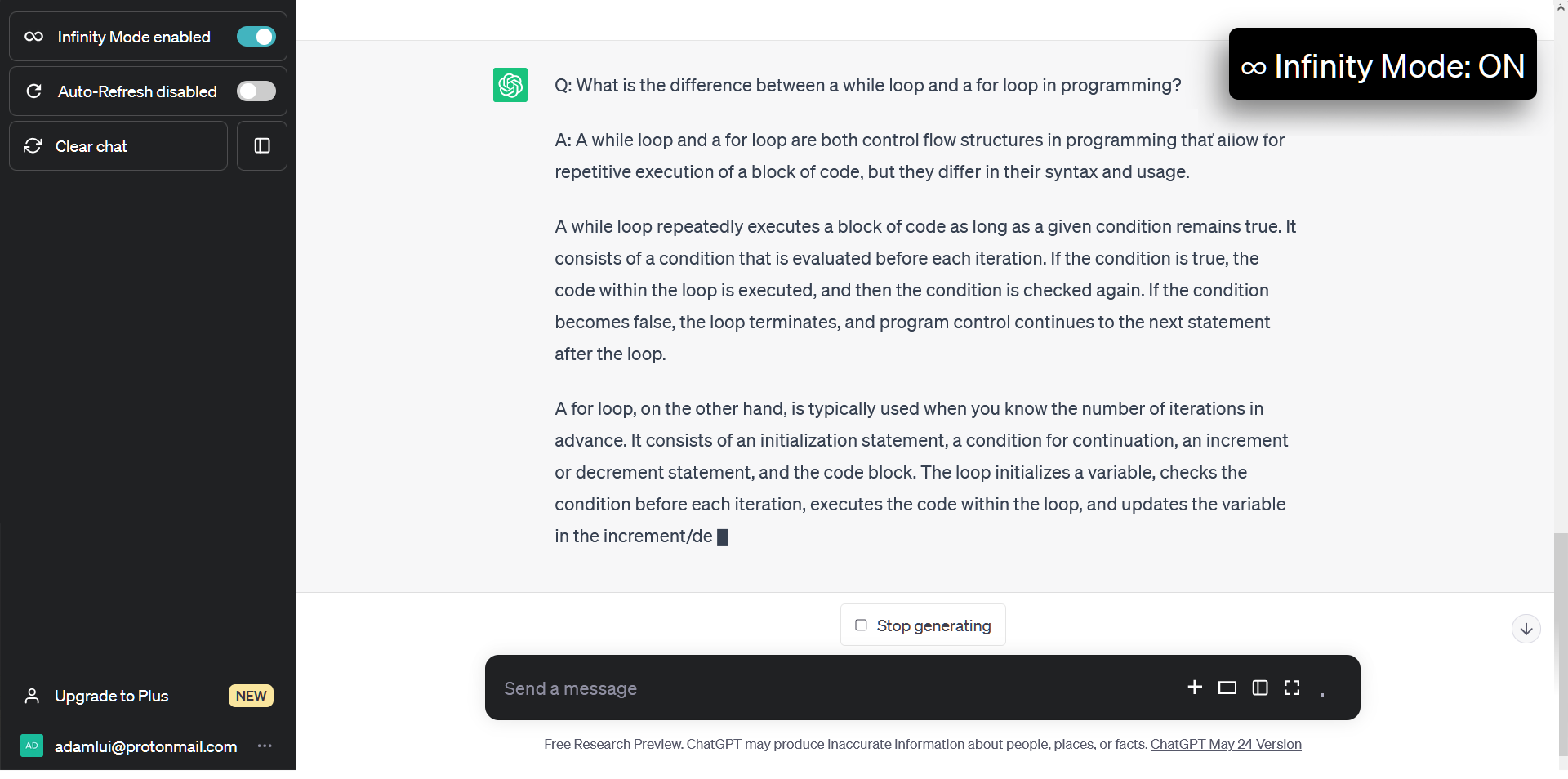
**ChatGPT 无限** 是您的终极聊天伴侣：一个免费（但功能强大）的附加组件，使 ChatGPT 在*任何*主题上生成无限答案！

<div align="center">

<img src="https://assets.chatgptinfinity.com/images/screenshots/desktop/infinity-mode/chat/on-zoomed-out.png">

</div>

<br>

## 💊 好处

🧠 **可自定义主题选择** — 通过选择您希望 ChatGPT 生成答案的特定主题来控制您的学习

🌍 **多语言支持** — 为回复选择任何回复语言

⏱️ **可调整的响应间隔** — 通过调整响应间隔来调整 ChatGPT 的回复速度以符合您所需的速度

📜 **自动滚动** — 通过自动滚动功能享受无缝聊天体验，确保您不会错过任何一个回复
<br><br>

## 🚀 如何安装

### <a href="#" title="Chrome"><img height=16 src="https://assets.aiwebextensions.com/images/icons/browsers/chrome/icon16.png"></a><a href="#" title="Edge"><img height=16 src="https://assets.aiwebextensions.com/images/icons/browsers/edge/icon16.png"></a><a href="#" title="Firefox"><img height=17 src="https://assets.aiwebextensions.com/images/icons/browsers/firefox/icon16.png"></a> 浏览器扩展:

1. 安装 ChatGPT 无限 扩展程序 ([Chrome](https://chrome.chatgptinfinity.com/?utm_source=github&utm_medium=referral&utm_content=platform-link), [Edge](https://edge.chatgptinfinity.com), [Firefox](https://ff.chatgptinfinity.com/?utm_source=github&utm_medium=referral&utm_content=platform-link))

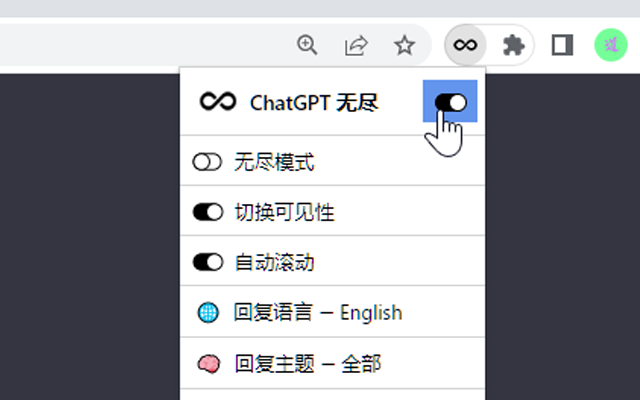
2. 正常访问 [chatgpt.com](https://chatgpt.com)，侧边栏和工具栏菜单中会出现一个切换开关

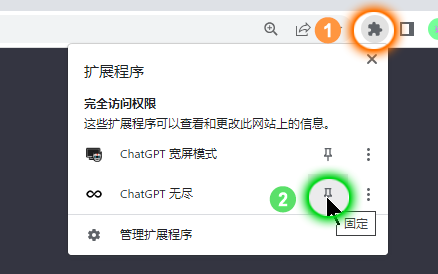
*专业提示：更轻松地访问扩展开关, (1) 点击 <img height=12 width=12 src="https://assets.chatgptinfinity.com/images/icons/toolbar/chrome-puzzle-piece/gray.png"> 在浏览器的工具栏中, (2) 然后 <img height=12 width=12 src="https://assets.chatgptinfinity.com/images/icons/toolbar/push-pin/blue.png"> 扩展名旁边.*

<div align="center">

<img width=268 src="https://assets.chatgptinfinity.com/images/screenshots/desktop/chrome/pin-instructions/zh-cn.png">
<img width=268 src="https://assets.chatgptinfinity.com/images/screenshots/desktop/chrome/toolbar-menu/zh-cn.png">

</div>

### <a href="#" title="Tampermonkey"><img height=17 src="https://assets.aiwebextensions.com/images/icons/userscript-managers/tampermonkey/icon28.png"></a><a href="#" title="Violentmonkey"><img height=17.5 src="https://assets.aiwebextensions.com/images/icons/userscript-managers/violentmonkey/icon25.png"></a><a href="#" title="ScriptCat"><img height=16 src="https://assets.aiwebextensions.com/images/icons/userscript-managers/scriptcat/icon16.png"></a><a href="#" title="OrangeMonkey"><img height=16 src="https://assets.aiwebextensions.com/images/icons/userscript-managers/orangemonkey/icon16.png"></a><a href="#" title="Stay"><img height=18 src="https://assets.aiwebextensions.com/images/icons/userscript-managers/stay/icon32.png"></a><a href="#" title="Userscripts"><img height=17 src="https://assets.aiwebextensions.com/images/icons/userscript-managers/userscripts/icon32.png"></a> Greasemonkey 用户脚本:

1. 安装用户脚本管理器，例如：
    - ScriptCat 为了 [Chrome](https://chromewebstore.google.com/detail/scriptcat/ndcooeababalnlpkfedmmbbbgkljhpjf), [Firefox](https://addons.mozilla.org/firefox/addon/scriptcat/) 或 [Edge](https://microsoftedge.microsoft.com/addons/detail/scriptcat/liilgpjgabokdklappibcjfablkpcekh)
    - Violentmonkey 为了 [Firefox](https://addons.mozilla.org/firefox/addon/violentmonkey/) 或 [Edge](https://microsoftedge.microsoft.com/addons/detail/eeagobfjdenkkddmbclomhiblgggliao)
    - OrangeMonkey 为了 [Chrome](https://chromewebstore.google.com/detail/orangemonkey/ekmeppjgajofkpiofbebgcbohbmfldaf)
    - Tampermonkey 为了 [Chrome](https://chromewebstore.google.com/detail/tampermonkey/dhdgffkkebhmkfjojejmpbldmpobfkfo), [Firefox](https://addons.mozilla.org/firefox/addon/tampermonkey/) 或 [Edge](https://microsoftedge.microsoft.com/addons/detail/tampermonkey/iikmkjmpaadaobahmlepeloendndfphd)
    - [Stay](https://apps.apple.com/app/stay-for-safari/id1591620171) 或 [Userscripts](https://apps.apple.com/app/userscripts/id1463298887) 为了 Safari

2. 安装 [ChatGPT 无穷](https://gm.chatgptinfinity.com) 用户脚本（将在上面安装的管理器中加载）

3. 访问 [chatgpt.com](https://chatgpt.com) & 侧边栏添加无限切换!
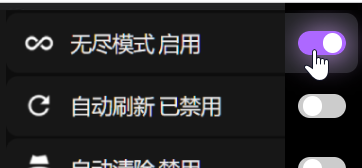
<div align="center">

<img src="https://assets.chatgptinfinity.com/images/screenshots/sidebar-toggle/zh-cn/on-with-cursor.png">

<p>

*注意：可以通过单击用户脚本管理器的工具栏图标来访问其他设置*

</div>

## ⚡ 依赖关系

<h6>
<div align="center">

<a href="https://chatgpt.js.org/#/zh-cn/">
    <picture>
        <source type="image/png" media="(prefers-color-scheme: dark)" srcset="https://assets.chatgptjs.org/images/logos/chatgpt.js/with-reflection/darkmode/logo-6014x1334.png?v=8169c77">
        <img width=546 src="https://assets.chatgptjs.org/images/logos/chatgpt.js/with-reflection/lightmode/logo-6014x1334.png?v=8169c77">
    </picture>
</a>
<br><br>

ChatGPT 无穷 依赖于强大的 [chatgpt.js](https://github.com/KudoAI/chatgpt.js) 库 © 2023–2026 KudoAI 和贡献者在 MIT 许可下的代码。

</div>
</h6>

## 🌐 兼容性

ChatGPT 无穷 与以下浏览器兼容:

### 🖥️ 台式

- **[Google Chrome](https://www.chrome.com)** (通过 [Chrome 扩大](https://chrome.chatgptinfinity.com/?utm_source=github&utm_medium=referral&utm_content=platform-link) or [Greasemonkey 用户脚本](https://gm.chatgptinfinity.com))
- **[Mozilla Firefox](https://www.firefox.com)** (通过 [Firefox 扩展程序](https://ff.chatgptinfinity.com/?utm_source=github&utm_medium=referral&utm_content=platform-link) 或 [Greasemonkey 用户脚本](https://gm.chatgptinfinity.com))
- **[Microsoft Edge](https://www.microsoft.com/edge)** (通过 [Edge 扩大](https://edge.chatgptinfinity.com) or [Greasemonkey 用户脚本](https://gm.chatgptinfinity.com))
- **[Opera](https://www.opera.com)** (通过 [Chrome 扩大](https://chrome.chatgptinfinity.com/?utm_source=github&utm_medium=referral&utm_content=platform-link) or [Greasemonkey 用户脚本](https://gm.chatgptinfinity.com))
- **[Brave](https://brave.com)** (通过 [Chrome 扩大](https://chrome.chatgptinfinity.com/?utm_source=github&utm_medium=referral&utm_content=platform-link) or [Greasemonkey 用户脚本](https://gm.chatgptinfinity.com))
- **[Vivaldi](https://vivaldi.com)** (通过 [Chrome 扩大](https://chrome.chatgptinfinity.com/?utm_source=github&utm_medium=referral&utm_content=platform-link) or [Greasemonkey 用户脚本](https://gm.chatgptinfinity.com))
- **[LibreWolf](https://librewolf.net)** (通过 [Firefox 扩展程序](https://ff.chatgptinfinity.com/?utm_source=github&utm_medium=referral&utm_content=platform-link) 或 [Greasemonkey 用户脚本](https://gm.chatgptinfinity.com))
- **[Ghost](https://ghostbrowser.com)** (通过 [Chrome 扩大](https://chrome.chatgptinfinity.com/?utm_source=github&utm_medium=referral&utm_content=platform-link) or [Greasemonkey 用户脚本](https://gm.chatgptinfinity.com))
- **[QQ](https://browser.qq.com)** (通过 [Chrome 扩大](https://chrome.chatgptinfinity.com/?utm_source=github&utm_medium=referral&utm_content=platform-link) or [Greasemonkey 用户脚本](https://gm.chatgptinfinity.com))
- **[Whale](https://whale.naver.com)** (通过 [Chrome 扩大](https://chrome.chatgptinfinity.com/?utm_source=github&utm_medium=referral&utm_content=platform-link) or [Greasemonkey 用户脚本](https://gm.chatgptinfinity.com))

<br><picture><source type="image/png" media="(prefers-color-scheme: dark)" srcset="https://assets.chatgptinfinity.com/images/logos/platforms/android/head-plus-word/white/logo150x24.png"><img alt="Android" width=111 src="https://assets.chatgptinfinity.com/images/logos/platforms/android/head-plus-word/green-head-black-word/logo150x24.png"></picture><br>

- **[Mozilla Firefox](https://www.mozilla.org/firefox/browsers/mobile/android/)** (通过 [Greasemonkey 用户脚本](https://gm.chatgptinfinity.com))

<br>

<div align="center">

<a href="https://chrome.chatgptinfinity.com/?utm_source=github&utm_medium=referral&utm_content=install-button">
    <img alt="[获取 Chrome 版本]" height=75 src="https://assets.chatgptinfinity.com/images/buttons/add-to-chrome-button.png"></a>
<a href="https://edge.chatgptinfinity.com">
    <img alt="[获取 Edge 版本]" height=75 src="https://assets.chatgptinfinity.com/images/buttons/add-to-edge-button.png"></a>
<a href="https://ff.chatgptinfinity.com/?utm_source=github&utm_medium=referral&utm_content=install-button">
    <img alt="[获取 Firefox 版本]" height=75 src="https://assets.chatgptinfinity.com/images/buttons/add-to-firefox-button.png"></a>
<a href="https://gm.chatgptinfinity.com">
    <img alt="[获取 Greasemonkey 版本]" height=75 src="https://assets.chatgptinfinity.com/images/buttons/add-userscript-button.png"></a>

<br>

[讨论](https://github.com/adamlui/chatgpt-infinity/discussions) / 
[更多 ChatGPT 附加组件](https://github.com/adamlui/ai-web-extensions)

</div>

## 🧠 贡献者

该项目的存在得益于以下贡献者的代码、测试、问题、翻译和想法：

<a href="https://github.com/adamlui">
    <img width=47 title="@adamlui" src="https://avatars.githubusercontent.com/u/10906554?first-contrib=2023.04.28"></a>
<a href="https://github.com/Zin6969">
    <img width=47 title="@Zin6969" src="https://avatars.githubusercontent.com/u/131989355?first-contrib=2023.04.30-doc-translations"></a>
<a href="https://github.com/Joker1718">
    <img width=47 title="@Joker1718" src="https://avatars.githubusercontent.com/u/82336164?first-contrib=2023.11.18-first-button-bug-report"></a>
<a href="https://github.com/xspeed1989">
    <img width=47 title="@xspeed1989" src="https://avatars.githubusercontent.com/u/5162926?first-contrib=2023.11.27-ui-change-report"></a>
<a href="#">
    <img width=47 title="@Chipsum" src="https://avatars.githubusercontent.com/u/37517008?first-contrib=2023.12.05-first-button-bug-report"></a>
<a href="https://github.com/sanchomuzax">
    <img width=47 title="@sanchomuzax" src="https://avatars.githubusercontent.com/u/2911588?first-contrib=2023.2.26-truncate-toggle-label-idea"></a>
<a href="https://greasyfork.org/users/1000404-misspent">
    <picture>
        <source type="image/png" media="(prefers-color-scheme: dark)" srcset="https://assets.chatgptinfinity.com/images/icons/web-stores/greasy-fork/white/icon50.png">
        <img width=47 src="https://assets.chatgptinfinity.com/images/icons/web-stores/greasy-fork/black/icon50.png?first-contrib=2023.7.29-share-box-popup-bug-alert" title="misspent">
    </picture></a>
<a href="https://github.com/eltociear">
    <img width=47 title="@eltociear" src="https://avatars.githubusercontent.com/u/22633385?first-contrib=2024.6.22-add-japanese-readme"></a>
<a href="https://greasyfork.org/users/936309-kskwin123">
    <picture>
        <source type="image/png" media="(prefers-color-scheme: dark)" srcset="https://assets.chatgptinfinity.com/images/icons/web-stores/greasy-fork/white/icon50.png">
        <img width=47 src="https://assets.chatgptinfinity.com/images/icons/web-stores/greasy-fork/black/icon50.png?first-contrib=2024.6.4-auto-start-feature-request" title="KSKwin123">
    </picture></a>
<a href="#">
    <img width=47 title="free palestine" src="https://lh3.googleusercontent.com/a/ACg8ocKGoXwUzABUkuXPI3tc-sMOrziK_6dyr1M7sPYOF54zfZcDFA=s50-w50-h50?first-contrib=2024.6.25-custom-gpt-support-request"></a>
<a href="https://greasyfork.org/users/670188-hacker09">
    <picture>
        <source type="image/png" media="(prefers-color-scheme: dark)" srcset="https://assets.chatgptinfinity.com/images/icons/web-stores/greasy-fork/white/icon50.png">
        <img width=47 src="https://assets.chatgptinfinity.com/images/icons/web-stores/greasy-fork/black/icon50.png?first-contrib=2024.6.27-portuguese-translation-corrections" title="hacker09">
    </picture></a>
<a href="https://github.com/Ivanaix">
    <img width=47 title="@Ivanaix" src="https://avatars.githubusercontent.com/u/175084540?first-contrib=2024.9.2-chat-reset-bug-alert"></a>
<a href="https://github.com/ChinaGodMan">
    <img width=47 title="@ChinaGodMan" src="https://avatars.githubusercontent.com/u/96548841?first-contrib=2024.9.7-improved-chinese-msgs"></a>
<a href="https://github.com/adityadeshmukh10">
    <img width=47 title="@adityadeshmukh10" src="https://avatars.githubusercontent.com/u/110899566?first-contrib=2024.10.15-doc-typo-fix"></a>
<a href="#">
    <img width=47 title="Copilot Autofix" src="https://github.githubassets.com/favicons/favicon.svg?first-contrib=2024.12.9-cmd-injection-autofix"></a>
<a href="https://github.com/9romise">
    <img width=47 title="@9romise" src="https://avatars.githubusercontent.com/u/38204901?first-contrib=2024.12.13-revealed-unneeded-semicolons"></a>
<a href="https://github.com/cyber-sec0">
    <img width=50 title="@cyber-sec0" src="https://avatars.githubusercontent.com/u/91571849?first-contrib=2025.4.1-reported-kiwi-browser-no-longer-maintained"></a>
<a href="https://github.com/14790897">
    <img width=47 title="@14790897" src="https://avatars.githubusercontent.com/u/121866954?first-contrib=2025.5.19-revealed-cwm-stopped-working-leading-to-locales-url-correction"></a>
<a href="https://github.com/zkisaboss">
    <img width=50 title="@zkisaboss" src="https://avatars.githubusercontent.com/u/51681731?first-contrib=2025.7.5-suggested-scheme-aware-icons"></a>
<a href="https://github.com/ahnupeng" target="_blank" rel="noopener">
    <img width=50 title="@ahnupeng" src="https://images.weserv.nl/?url=https://avatars.githubusercontent.com/u/5319112?first-contrib=2025.9.4-suggested-allow-edit-slider-vals&h=47&w=47&mask=circle&maxage=7d"></a>
<a href="https://github.com/bvolpato" target="_blank" rel="noopener">
    <img width=50 title="@bvolpato" src="https://images.weserv.nl/?url=https://avatars.githubusercontent.com/u/3207647?first-contrib=2026.3.27-created-lychee-workflow&h=47&w=47&mask=circle&maxage=7d"></a>
<a href="https://github.com/MichaIng" target="_blank" rel="noopener">
    <img width=50 title="@MichaIng" src="https://images.weserv.nl/?url=https://avatars.githubusercontent.com/u/28480705?first-contrib=2026.3.29-add-index-files-to-lychee-workflow&h=47&w=47&mask=circle&maxage=7d"></a>
<a href="https://github.com/dependabot">
    <img width=47 title="Dependabot" src="https://avatars.githubusercontent.com/in/29110"></a>
<a href="https://github.com/ImgBotApp">
    <img width=47 title="@ImgBotApp" src="https://avatars.githubusercontent.com/u/31427850"></a>
<a href="https://chatgpt.com">
    <picture>
        <source type="image/png" media="(prefers-color-scheme: dark)" srcset="https://assets.chatgptinfinity.com/images/icons/chatgpt/black-on-white/icon50.png">
        <img width=47 title="ChatGPT" src="https://assets.chatgptinfinity.com/images/icons/chatgpt/white-on-gray/icon50.png" title="ChatGPT">
    </picture></a>
<a href="https://chat.deepseek.com/">
    <picture>
        <source type="image/png" media="(prefers-color-scheme: dark)" srcset="https://assets.aiwebextensions.com/images/icons/chatbots/deepseek/white/icon48.png">
        <img width=47 title="DeepSeek AI" src="https://assets.aiwebextensions.com/images/icons/chatbots/deepseek/black/icon48.png">
    </picture></a>

<img height=6px width="100%" src="https://assets.aiwebextensions.com/images/separators/gradient-aqua.png">

<div id="sponsors" align="center">
<br>

### 支持：

<div id="warp">
    <br><br>
    <a href="https://www.warp.dev/chatgptjs" target="_blank">
        <img width="600" src="https://assets.chatgptjs.org/images/banners/warp/banner-1500x500.png?v=476e837">
    </a>
    <h3><a href="https://www.warp.dev/chatgptjs" target="_blank">
        Warp，存在于您的终端中的 AI Devtool</a></h3>
    <i><a href="https://www.warp.dev/chatgptjs" target="_blank">
        适用于 MacOS、Linux 和 Windows</a></i>
</div>
<br><br>

</div>

<img height=6px width="100%" src="https://assets.aiwebextensions.com/images/separators/gradient-aqua.png">

## 🤖 更多 ChatGPT 应用

如需更多精彩的 ChatGPT 应用程序，请访问: https://github.com/adamlui/ai-web-extensions
<br><br>

## 📜 相关应用

### <picture><source type="image/png" media="(prefers-color-scheme: dark)" srcset="https://cdn.jsdelivr.net/gh/adamlui/chatgpt-auto-talk/assets/images/icons/openai/white/icon16.png"><img width=16 src="https://cdn.jsdelivr.net/gh/adamlui/chatgpt-auto-talk/assets/images/icons/openai/black/icon16.png"></picture> [ChatGPT 自动谈话 📣](https://github.com/adamlui/chatgpt-auto-talk) &nbsp;<a href="https://github.com/awesome-scripts/awesome-userscripts#-chatgpt"><img src="https://cdn.jsdelivr.net/gh/adamlui/chatgpt-auto-talk/assets/images/badges/awesome/badge.svg"></a>

> 自动播放 ChatGPT 的回复。
<br>[安装](https://github.com/adamlui/chatgpt-auto-talk/tree/main/docs/zh-cn/#-如何安装) /
[自述文件](https://github.com/adamlui/chatgpt-auto-talk/tree/main/docs/zh-cn/#readme) /
[讨论](https://github.com/adamlui/chatgpt-auto-talk/discussions)

### <picture><source type="image/png" media="(prefers-color-scheme: dark)" srcset="https://assets.chatgptautocontinue.com/images/icons/app/white/icon32.png?v=7e2c739"><img height=16 src="https://assets.chatgptautocontinue.com/images/icons/app/black/icon32.png?v=7e2c739"></picture> [ChatGPT 自动继续](https://chatgptautocontinue.com) &nbsp;<a href="https://github.com/awesome-scripts/awesome-userscripts#-chatgpt"><img src="https://assets.chatgptautocontinue.com/images/badges/awesome/badge.svg"></a>

> 当 ChatGPT 响应被切断时自动继续生成答案。<br>
[安装](https://docs.chatgptautocontinue.com/zh-cn/#-如何安装) / 
[自述文件](https://docs.chatgptautocontinue.com/zh-cn/#readme) / 
[讨论](https://github.com/adamlui/chatgpt-auto-continue/discussions)

### <img width=17 src="https://assets.chatgptwidescreen.com/images/icons/widescreen-robot-emoji/icon32.png"> [ChatGPT Widescreen](https://chatgptwidescreen.com) &nbsp;<img src="https://assets.chatgptwidescreen.com/images/badges/product-hunt/product-of-the-week-2-larger-centered-rounded-light.svg" width="auto" height="24" />

> 通过宽屏/全屏/高屏+垃圾邮件块模式增强 ChatGPT。也可以在 poe.com 上使用！
<br>[安装](https://docs.chatgptwidescreen.com/zh-cn/#-如何安装) / 
[自述文件](https://docs.chatgptwidescreen.com/zh-cn/#readme) / 
[讨论](https://github.com/adamlui/chatgpt-widescreen/discussions)

<img height=6px width="100%" src="https://assets.chatgptinfinity.com/images/separators/gradient-aqua.png">
  
<a href="https://github.com/adamlui/ai-web-extensions">**更多 ChatGPT 附加组件**</a> / 
<a href="#top">回到顶部 ↑</a>