<div align="center">
  <a href="README.md">中文版</a> | <span>English</span>
</div>

<div align="center">
  <img src="https://img.shields.io/github/last-commit/AAswordman/Operit" alt="Last Commit">
  <img src="https://img.shields.io/badge/Platform-Android_8.0%2B-brightgreen.svg" alt="Platform">
  <a href="https://github.com/AAswordman/Operit/releases/latest"><img src="https://img.shields.io/github/v/release/AAswordman/Operit" alt="Latest Release"></a>
  <br>
  <a href="https://github.com/AAswordman/Operit/stargazers"><img src="https://img.shields.io/github/stars/AAswordman/Operit" alt="GitHub Stars"></a>
  <a href="https://aaswordman.github.io/OperitWeb"><img src="https://img.shields.io/badge/📖-User_Guide-blue.svg" alt="User Guide"></a>
  <a href="https://www.patreon.com/c/aaswordsman"><img src="https://img.shields.io/badge/🌍-Patreon-f96854.svg" alt="Patreon"></a>
  <a href="https://afdian.com/a/aaswordsman"><img src="https://img.shields.io/badge/💖-Support_Development-ff6b6b.svg" alt="Support Development"></a>
  <a href="docs/CONTRIBUTING.md"><img src="https://img.shields.io/badge/contributions-welcome-brightgreen.svg" alt="Contributions Welcome"></a>
  <br>
  <a href="mailto:aaswordsman@foxmail.com"><img src="https://img.shields.io/badge/📧-Email-red.svg" alt="Email"></a>
  <a href="https://qm.qq.com/q/Sa4fKEH7sO"><img src="https://img.shields.io/badge/💬-QQ_Group-blue.svg" alt="QQ Group"></a>
  <a href="https://discord.gg/YnV9MWurRF"><img src="https://img.shields.io/badge/🎮-Discord-5865F2.svg" alt="Discord"></a>
  <a href="https://github.com/AAswordman/Operit/issues"><img src="https://img.shields.io/badge/🐛-Issues-orange.svg" alt="Issues"></a>
</div>

<div align="center">
  <img src="app/src/main/assets/logo.svg" width="120" height="120" alt="Operit Logo">
  <h1>Operit AI - Your Intelligent Assistant</h1>
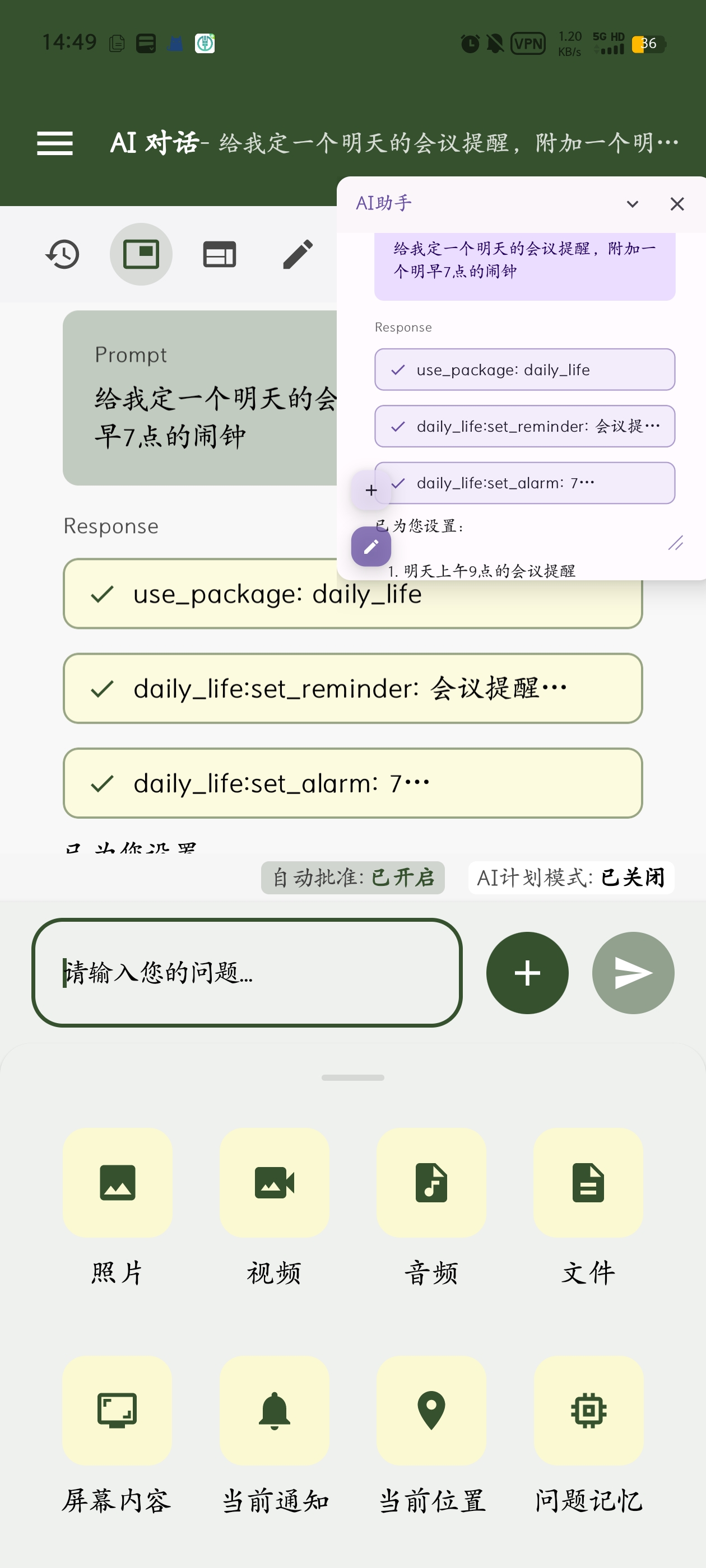
  <p>📱 <b>The first fully functional, standalone AI assistant for mobile devices with powerful tool-calling capabilities</b> 📱</p>
</div>

<div align="center">
  <div style="padding: 10px 0; text-align: center;">
    <img src="docs/assets/9f85b39450c8616909039b66d15a475a.jpg" width="22%" alt="Operit Preview 1" style="display: inline-block; border-radius: 8px; box-shadow: 0 5px 15px rgba(0,0,0,0.15); margin: 0 3px; max-width: 220px;">
    <img src="docs/assets/88a7b7520e4628682a849cc00716c8de.jpg" width="22%" alt="Operit Preview 2" style="display: inline-block; border-radius: 8px; box-shadow: 0 5px 15px rgba(0,0,0,0.15); margin: 0 3px; max-width: 220px;">
    <img src="docs/assets/9036f349c25888d357de5ce34580176d.jpg" width="22%" alt="Operit Preview 3" style="display: inline-block; border-radius: 8px; box-shadow: 0 5px 15px rgba(0,0,0,0.15); margin: 0 3px; max-width: 220px;">
    <img src="docs/assets/d12038f26df3f814b4e3ce967537f039.jpg" width="22%" alt="Operit Preview 4" style="display: inline-block; border-radius: 8px; box-shadow: 0 5px 15px rgba(0,0,0,0.15); margin: 0 3px; max-width: 220px;">
  </div>
</div>

---

## 🌟 Project Introduction

**Operit AI** is the first fully functional AI assistant application on mobile devices that runs **completely standalone** (except for external API calls) on your Android device. It features powerful **tool-calling capabilities**, **Deep Search**, **workflows & automation**, an **intelligent Memory Vault**, and highly customizable **User Personality** and **Character Cards**, with **MNN/llama.cpp local inference**, an **MCP/Skill ecosystem**, and a **multi-language UI**. It's more than just a chat interface—it's an **all-in-one assistant** deeply integrated with Android permissions and various tools, now featuring a built-in **Ubuntu 24 Environment** for unprecedented functionality.

---

## ⚡ Core Highlights

<table>
<tr>
<td width="50%">

### 🖥️ Ubuntu 24 Environment
Complete Ubuntu 24 system with support for vim, MCP, Python, and more—run complex Linux commands and automation tasks on your phone

### 🧠 Intelligent Memory System
AI automatically categorizes memories, supports time-based query/import/export/auto-summary, and intelligently searches conversation history

### 🗣️ Voice Interaction
Natural continuous conversations with local/cloud TTS + local STT, custom voice tones, voice/specific-audio wake-up, and auto read-aloud

</td>
<td width="50%">

### 🤖 Local AI Models
Support for MNN / llama.cpp local models (GGUF)—run AI completely offline to protect your privacy

### 🎭 Personality & Character Cards
Customize AI personality and speaking style, with character card backup/export (Tavern/JSON)/QR sharing and independent histories; supports AI-to-AI chats

### 🔌 Rich Tool Ecosystem
40+ built-in tools + MCP/Skill marketplace plugins + toolkits/workflows, including AutoGLM auto-click agent, drawing/image search, AI-to-AI & self-awareness tools, scheduled tasks, and a prompt marketplace

</td>
</tr>
</table>

---

## 🛠️ Feature Overview

<details>
<summary><b>📦 Built-in Tool System (Click to expand)</b></summary>

| Tool Category | Features |
|--------------|----------|
| 🐧 **Linux Environment** | Complete Ubuntu 24 with apt package management, Python/Node.js runtime, custom repositories |
| 📁 **File System** | Read/write files, search, compress/decompress, format conversion, Git integration |
| 🌐 **Network Tools** | HTTP requests, web access, file upload/download, web development and export |
| ⚙️ **System Operations** | App installation, permission management, UI automation via Accessibility / ADB / Root (includes AutoGLM auto-click agent, supports adb root virtual display / multi-display) |
| 🎬 **Media Processing** | Video conversion, frame extraction, OCR/vision understanding, camera capture, audio/video reading |
| 🧑‍💻 **Developer & Terminal** | Web workspace/one-click packaging, code editing/syntax highlight, terminal SSH/Chroot/vim, Ctrl shortcuts |
| 🎨 **AI Creation** | Drawing toolkits (OpenAI/Qwen/NanoBanana), image search/download |
| 🔍 **Search Engines** | Deep search, DuckDuckGo, Tavily, Google Scholar, Bing, Sogou, Quark, Baidu Maps |
| 🧩 **Toolkits & Workflows** | Toolkit ecosystem/package management, workflow automation, scheduled triggers, voice wake-up triggers |

</details>

<details>
<summary><b>🎨 Interface Customization (Click to expand)</b></summary>

- ✨ **Theme System**: Customize colors, fonts, spacing, padding
- � **Multi-language UI**: Chinese/English coverage with system locale auto-switch
- 🔤 **Fonts & Typography**: Global font size and chat padding controls
- �🎭 **Desktop Pet**: WebP animation support, custom expressions, floating window display
- 📱 **Layout Optimization**: Hide status bar, custom toolbar, tablet adaptation
- 🎨 **Markdown Rendering**: LaTeX formulas (left/right scroll), code highlighting, tables, Mermaid diagrams
- 🧾 **Information Display**: Thinking fold, HTML block preview, code/thinking max height
- 🪟 **Floating Window UX**: Avatar hide in bubble mode, screen selection OCR, full-screen preview
- 🧮 **Analytics**: Token usage stats with model pie chart

</details>

<details>
<summary><b>🔗 Integration Capabilities (Click to expand)</b></summary>

- 🤖 **Tasker Integration**: Trigger custom AI agent events for deep automation
- 🌐 **MCP/Skill Marketplace**: One-click plugin installation, remote MCP, auto-description, uvx/npx support
- 🔌 **Multi-Model Support**: OpenAI, Claude, Gemini, Bailing, OpenRouter, LMStudio
- 🧪 **Model & Prompt Management**: Multi configs/param customization, prompt marketplace
- 🔐 **Permissions**: Per-tool authorization and safety prompts
- 🔑 **Key Pool & Stats**: Batch test/import, token usage stats
- 🗂️ **Workspace Binding**: SAF / SFTP / SSH workspace binding and file access
- 🖱️ **Auto-Click Agent**: AutoGLM + UI Tree dual pipeline for automation
- 📊 **Parallel Tools**: Read-only tools execute in parallel for faster response

</details>

<details>
<summary><b>💬 Chat & Memory Management (Click to expand)</b></summary>

- 🧠 **Memory Vault**: Auto categorization/search, time queries, import/export, attachment memories
- 💬 **Chat Management**: Auto-summary + editor, history folders/branches/migration, chat lock, per-character history
- ⚡ **Parallel Conversations**: Parallel chat processing with toolkit state decisions
- 🤖 **Character Interaction**: Character card chats and history, thinking fold display
- 📦 **Chat Records**: Multi-format import/export, history backup and restore

</details>

<details>
<summary><b>💾 Data & Backup (Click to expand)</b></summary>

- 🗂️ **Global/Auto Backup**: Scheduled DB backup with corruption recovery (excluding MCP/Skill/terminal/packages)
- 🎭 **Character Cards**: Backup, export (Tavern/JSON), QR sharing
- 🧷 **Workspaces**: SAF/SFTP/SSH binding, code editing/syntax highlight, Git ignore
- 🧰 **Skill Management**: Skill toggles, repo parsing, cached downloads

</details>

---

## 📸 Feature Showcase

<table>
<tr>
<td align="center" width="33%">
<img src="docs/assets/webdev/c851e530a258bbbbf41f87dcb907b14.png" width="100%"><br>
<b>Web Development</b><br>
Design web pages on your phone and export as standalone apps
</td>
<td align="center" width="33%">
<img src="docs/assets/floating_and_attach.jpg" height="200px"><br>
<b>Floating Window & Attachments</b><br>
Access anytime, share conveniently
</td>
<td align="center" width="33%">
<img src="docs/assets/84ea63a7437eae374f53c5b64f52c24d.png" height="200px"><br>
<b>Plugin Marketplace</b><br>
Rich MCP ecosystem
</td>
</tr>
</table>

---

## 🚀 Quick Start

| Item | Description |
|------|-------------|
| 📋 **System Requirements** | Android 8.0+ (API 26+), 4GB+ RAM recommended, 200MB+ storage |
| 📥 **Download & Install** | Download the latest APK from the [Release Page](https://github.com/AAswordman/Operit/releases) |
| 📖 **User Guide** | [Complete Documentation](https://aaswordman.github.io/OperitWeb) with detailed tutorials and examples |

> **Security Warning:** To ensure your data security, please download this application exclusively from the official [Release Page](https://github.com/AAswordman/Operit/releases) or the [Official Website](https://aaswordman.github.io/OperitWeb/). Installation packages from unofficial sources may be maliciously modified, potentially leading to privacy leaks or device monitoring.

**Installation Steps:** Download APK → Install & Launch → Follow Setup Guide → Start Using ✨

---

## 🔮 Roadmap / TODO

- **UI automation & screenshot pipeline**  
  - ✅ UI automation supported via Accessibility / ADB / Root permission modes
  - ✅ Virtual display / multi-display supported in adb root scenarios (`display` parameter)
  - ✅ Dual UI Tree approaches: AutoGLM + local uiautomator dump

---

## 📅 Version History

<table>
<tr><th>Version</th><th>Release Date</th><th>Core Updates</th></tr>

<tr>
<td><b>v1.10.1</b><br><sub>Latest</sub></td>
<td>2026-04-17</td>
<td>
• <b>In-App Browser & Web Automation</b>: Greatly expanded the built-in browser with tabs, history, bookmarks, permissions, multi-window support, minimization, and viewport control, plus browser-script import, install, storage, runtime, and page-menu support<br>
• <b>Avatars & UI Customization</b>: Added FBX virtual avatars, upgraded the MMD preview experience, introduced liquid-glass theme effects, and expanded sidebar, chat-bubble, and input-bar appearance customization<br>
• <b>Plugins, Workspace & Context Enhancements</b>: Added configuration-editor support for debugging and automatically writing Operit plugins, a local HTTP chat entry point, workspace renaming and rule-file pickup, plus stronger history jumping, bidirectional paging, and automatic context injection<br>
• <b>Stability & Performance Improvements</b>: Fixed tool-permission checks, HTTP TTS compatibility, SSH/tmux long-output crashes, history jumping, GIF/formula/Markdown rendering, MCP config and stats issues, while continuing to improve conversation flow, deep search, memory, browser behavior, and package management
</td>
</tr>

<tr>
<td><b>v1.10.0</b></td>
<td>2026-03-18</td>
<td>
• <b>Character Group Chat & AI Self-Setup</b>: Added group conversations with multiple character cards and @mentions, plus AI self-configuration to help set up MCP, skills, STT, TTS, and model settings<br>
• <b>Theme & Interaction Upgrades</b>: Added grouped message folding, bubble-theme customization for fonts/colors/backgrounds, wider bubbles, liquid-glass input styling, long-press app-icon shortcuts, and assistant/MP4 virtual avatar support<br>
• <b>Tools & Platform Expansion</b>: Added Ollama, NVIDIA, and OpenAI Response universal-mode providers, a standalone SSH plugin toolkit, Java Bridge, APKTool plugin, web-automation downloads, Markdown audio/video rendering, xAI video generation, workflow cancelation, custom terminal keys, and message queues<br>
• <b>Fixes & Performance Improvements</b>: Fixed speech-recognition, memory-concurrency, floating-window interaction, terminal display, full-screen web automation, and MNN tool-call issues; also improved memory recall, marketplace search, workspace templates, grep performance, and agent retry stability
</td>
</tr>

<tr>
<td><b>v1.9.1</b></td>
<td>2026-02-20</td>
<td>
• <b>Stability & Bugfix Release</b>: Focused fixes for multiple regressions from v1.9.0, improving overall usability and smoothness<br>
• <b>Terminal & Tool Calling</b>: Enhanced terminal tool; fixed terminal freezes caused by interactive UI, strict-tool-call history-triggered request errors, and Windows controller raw command execution issues<br>
• <b>MCP & Memory Vault</b>: Fixed remote MCP not closing; reworked memory write logic, added external vector model support, and introduced connection-editing tools<br>
• <b>Feature Additions & UI Fixes</b>: Added deletion of chats not bound to character cards, workflow batch deletion and execution-log viewing; fixed IME/input box/dark mode/theme transparency/toolbox package-management issues
</td>
</tr>

<tr>
<td><b>v1.9.0</b></td>
<td>2026-02-17</td>
<td>
• <b>Mobile Web Automation</b>: Added web operation capabilities, including CORS bypass for web workspace projects to access external websites<br>
• <b>Windows Terminal Operations</b>: Added Windows command operations for controlling CLI tools like Codex; introduced strict tool-call mode as a compatibility supplement<br>
• <b>Tooling & System Expansion</b>: Added toolbox SQL viewer, Android workspace template, OpenAI response-compatible provider, direct skill input, and chart enhancements in analytics<br>
• <b>Fixes & Improvements</b>: Fixed image-reading/context-summary/special-character truncation/ffmpeg-related issues; improved model-connectivity test output and MCP loading prompts
</td>
</tr>

<tr>
<td><b>v1.8.1</b></td>
<td>2026-02-03</td>
<td>
• <b>Local Llama.cpp</b>: GGUF local inference support and related tools<br>
• <b>Tools & UI</b>: Image search/download, HTML block preview, code/thinking max height, avatar hide in bubble mode, token pie chart, thinking fold display<br>
• <b>Data & Backup</b>: Global backup (excluding MCP/skill/terminal/packages) + character card backup/export/share, skill enable/disable, key pool import/test, workspace SAF binding support<br>
• <b>Fixes</b>: Voice echo capture, token stats in floating window, character editor keyboard overlap, deep search token spike, MCP startup, workflow floating window exit, table truncation, silicon flow voice interruptions
</td>
</tr>

<tr>
<td><b>v1.8.0</b></td>
<td>2026-01-13</td>
<td>
• <b>Workflow System</b>: Supports computation/input/output/execution with voice wake-up triggers<br>
• <b>Voice Wake-up</b>: Enter voice conversation mode directly, with keyword-based quick attachments<br>
• <b>Parallel Conversations</b>: Parallel processing + toolkit state mechanism for dynamic tool decisions<br>
• <b>Additions & Improvements</b>: Time-based memory query, auto backups, OpenAI drawing + new TTS/STT providers, MCP startup optimizations, terminal chroot, and multiple bug fixes
</td>
</tr>

<tr>
<td><b>v1.7.1</b></td>
<td>2025-12-31</td>
<td>
• <b>Root Virtual Display Automation</b>: Virtual screen supported under root, AutoGLM concurrent multi-window tasks<br>
• <b>Skill Ecosystem</b>: Added Skill protocol + Skill marketplace; optional BETA plan for nightly builds<br>
• <b>UX Enhancements</b>: Summary editing, web access in floating window mode, selection OCR, chat lock<br>
• <b>Fixes & Optimizations</b>: Large image crashes, ToolCall errors, code block line breaks, startup speed and virtual-screen stability
</td>
</tr>

<tr>
<td><b>v1.7.0</b></td>
<td>2025-12-19</td>
<td>
• <b>GUI Automation Milestone</b>: Autoglm + virtual display (virtual screen can be toggled in settings)<br>
• <b>Automation Enhancements</b>: One-click Autoglm setup + standalone executor, virtual screen toggle logic, custom screenshot quality<br>
• <b>UX Tweaks</b>: API key masked when unfocused; Autoglm is no longer allowed as the main model<br>
• <b>Tooling</b>: NanoBanana image generation pack, apply file no-overwrite support, MNN STT and more
</td>
</tr>

<tr>
<td><b>v1.6.3</b></td>
<td>2025-12-08</td>
<td>
• <b>Native ToolCall Support</b>: Added support for native model tool calls and DeepSeek's thinking tools<br>
• <b>Workspace & Terminal Enhancements</b>: Select project type on creation, connect to external SSH filesystems, accessibility support for terminal<br>
• <b>Model & Message Display</b>: Multi-select for model configs, display model name/provider on messages<br>
• <b>Optimizations & Fixes</b>: Improved floating window, fixed terminal lag, migrated workspace to internal data
</td>
</tr>

<tr>
<td><b>v1.6.2</b></td>
<td>2025-11-20</td>
<td>
• <b>Conversation Management</b>: Long-press branching, classified history display, batch migration<br>
• <b>Model Configuration</b>: Rename configs, context binding, Google native search<br>
• <b>Bug Fixes</b>: UI switching, bold line breaks, bubble mode issues<br>
• Added crossref academic paper search, upgraded code editor
</td>
</tr>

<tr>
<td><b>v1.6.1</b></td>
<td>2025-11-05</td>
<td>
• <b>Performance Boost</b>: Redesigned UI rendering, significantly improved fluidity<br>
• <b>AI Vision Enhanced</b>: Direct image recognition, indirect recognition capabilities<br>
• <b>Terminal SSH</b>: SSH connection support and reverse-mount phone filesystem<br>
• Auto-summary mechanism, deep search, new authorization system
</td>
</tr>

<tr>
<td><b>v1.6.0</b></td>
<td>2025-10-21</td>
<td>
• <b>MNN Local Model</b> support<br>
• <b>Memory System Overhaul</b>: AI auto-categorization, smart search, import/export<br>
• <b>Terminal Enhancements</b>: vim support, progress bars, custom repositories<br>
• Tasker integration, desktop pets, storyline tags
</td>
</tr>

<tr>
<td><b>v1.5.2</b></td>
<td>2025-10-05</td>
<td>
• MCP enhancements: uvx/npx support, faster startup<br>
• Workspace Git ignore<br>
• Camera capture, HTML rendering, regex filtering
</td>
</tr>

<tr>
<td><b>v1.5.0</b></td>
<td>2025-09</td>
<td>
• <b>Ubuntu 24 Terminal</b> full integration<br>
• MCP Marketplace launch<br>
• Desktop pets, deep search mode
</td>
</tr>

<tr>
<td><b>v1.4.0</b></td>
<td>2025-08</td>
<td>
• Parallel tool execution<br>
• Character card system, character selector<br>
• PNG character card import
</td>
</tr>

<tr>
<td><b>v1.3.0</b></td>
<td>2025-08</td>
<td>
• Web development features<br>
• Theme selector, custom UI<br>
• Anthropic Claude support
</td>
</tr>

<tr>
<td><b>v1.2.x</b></td>
<td>2025-07</td>
<td>
• Voice conversation system<br>
• Knowledge base functionality<br>
• DragonBones animation support
</td>
</tr>

<tr>
<td><b>v1.1.x</b></td>
<td>2025-06</td>
<td>
• MCP protocol support<br>
• OCR recognition, floating window<br>
• Full Gemini support
</td>
</tr>

<tr>
<td><b>v1.0.0</b></td>
<td>2025-05</td>
<td>
• First official release<br>
• Basic AI chat, tool calling<br>
• Shizuku/Root integration
</td>
</tr>
</table>

> 📝 **Full Changelog**: Visit the [Releases Page](https://github.com/AAswordman/Operit/releases) for detailed updates on each version

---

## 👨‍💻 Open Source & Collaboration

Join the Operit open-source ecosystem! We welcome all types of contributions: third-party scripts, MCP plugins, and core feature development.

**Developer Notes:**
- 📚 [Contribution Guide](docs/CONTRIBUTING.md) | [Script Development Guide (Chinese)](docs/SCRIPT_DEV_GUIDE.md)
- 📦 Building requires downloading dependency archives from [Google Drive](https://drive.google.com/drive/folders/1g-Q_i7cf6Ua4KX9ZM6V282EEZvTVVfF7?usp=sharing) (`models.zip`, `subpack.zip`, `jniLibs.zip`, `libs.zip`)
- 💬 Join community discussions: [QQ Group](https://qm.qq.com/q/Sa4fKEH7sO) | [Discord](https://discord.gg/YnV9MWurRF)

### 💖 Contributors

Thanks to all who have contributed to Operit AI!

<a href="https://github.com/AAswordman/Operit/graphs/contributors">
  <img src="https://contrib.rocks/image?repo=AAswordman/Operit" />
</a>

## 💖 Support Development

If Operit AI has been helpful to you, you can voluntarily support its ongoing development and basic project maintenance:

- For international support, use [Patreon](https://www.patreon.com/c/aaswordsman)
- For mainland China support, use [Afdian](https://afdian.com/a/aaswordsman)

- Support is entirely voluntary and does not unlock any features, quotas, updates, support replies, or other perks
- Choosing not to support does not affect normal usage, updates, or access to the open-source code
- You can also use the `Sponsor` button at the top of this GitHub repository to open the support page

---

## 📄 License

This project is licensed under the [GNU LGPLv3](https://www.gnu.org/licenses/lgpl-3.0.html) license.

In simple terms, this means:
- You are free to use, modify, and distribute the code of this project.
- If you modify the code and distribute it, you must also open-source your modified parts under the LGPLv3 license.
- For more details, please see the [LICENSE](LICENSE) file.

---

## 📝 Feedback

Encountered a problem or have a suggestion? Welcome to [submit an Issue](https://github.com/AAswordman/Operit/issues)!

**Submission Guidelines:**
- 📝 Clearly describe the problem/suggestion with reproduction steps
- 📱 Include device model, system version, and other information
- 📸 If possible, provide screenshots or screen recordings

---

<div align="center">
  <h3>⭐ If you like this project, please give us a Star ⭐</h3>
  <p><b>🚀 Help us promote and let more people discover Operit AI 🚀</b></p>
  
  <br>
  
  <sub>Made with ❤️ by the Operit Team</sub>
</div>