node-red-contrib-mcp
The bridge between Node-RED and AI agents





Install · Quick Start · Nodes · AI Agent · Examples
---
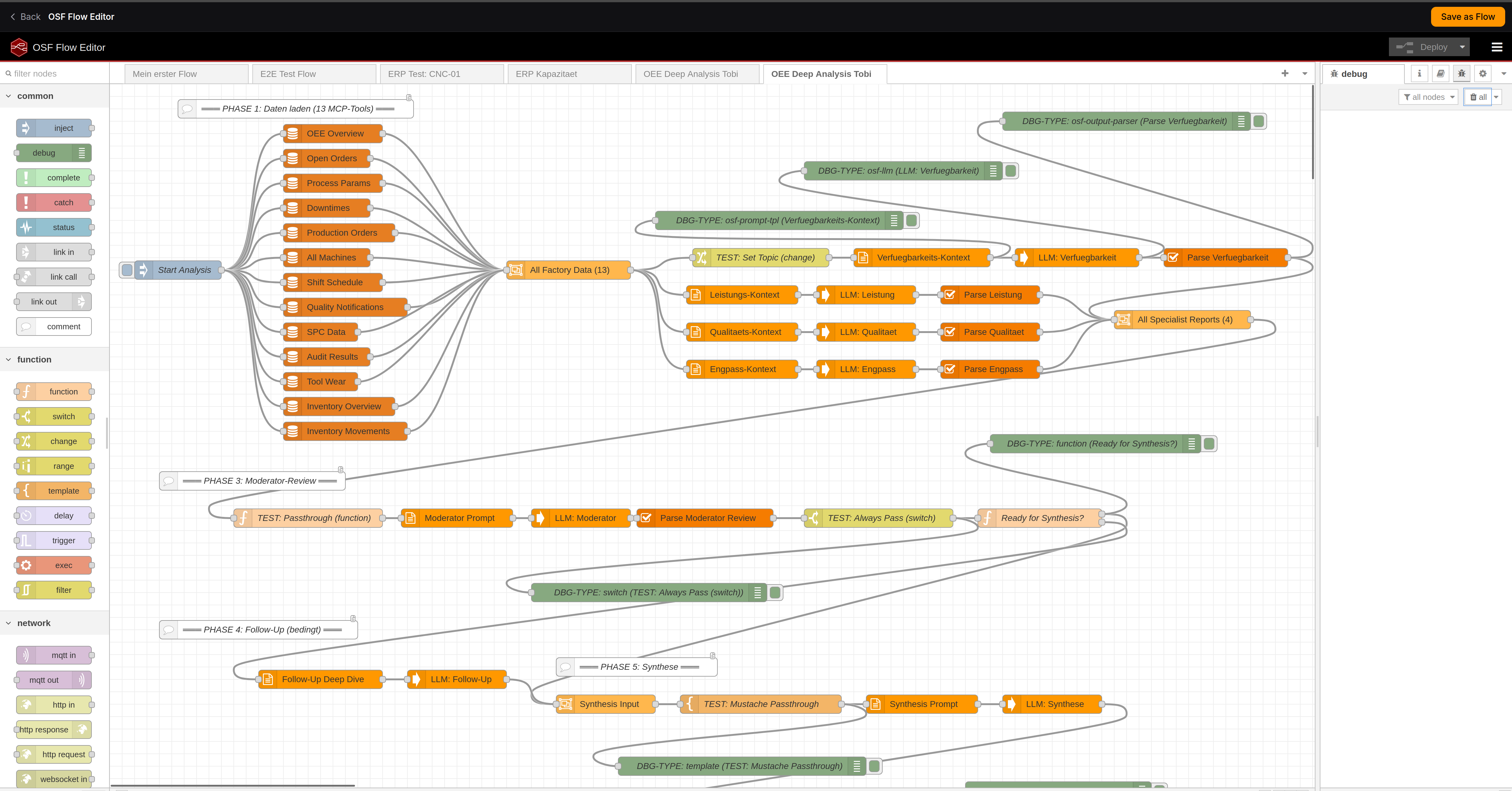
Multi-phase OEE analysis agent built with MCP tool nodes in Node-RED
[MCP](https://modelcontextprotocol.io) (Model Context Protocol) is the open standard by Anthropic for connecting AI to external tools and data. **This package brings MCP to Node-RED** — the world's most popular low-code platform for industrial automation and IoT.
> **4M+ Node-RED installations** meet **10,000+ MCP servers.** Build AI agents visually. No code required.
---
## Features
- **Any MCP server** — Streamable HTTP and SSE transport, with optional auth
- **Any LLM** — OpenAI, Anthropic, Ollama, vLLM, Azure, Gemini, or any OpenAI-compatible API
- **AI Agent node** — full agentic loop (tool discovery → LLM reasoning → tool execution → repeat)
- **Zero lock-in** — Apache-2.0 license, no cloud dependency, runs fully local
- **Production-ready** — error handling, status indicators, configurable timeouts
- **Node-RED native** — config nodes, msg passing, debug panel integration
---
## Architecture
```
┌─────────────────────────────────────────────────────────────────┐
│ Node-RED │
│ │
│ [inject] → [mcp tool] → [llm call] → [mcp tool] → [debug] │
│ │
│ [inject] → [ai agent] → [debug] ← autonomous agent loop │
│ │
└──────────┬──────────────────────────────────────┬───────────────┘
│ │
▼ ▼
┌──────────────┐ ┌──────────────┐
│ MCP Server │ │ LLM API │
│ (any tool) │ │ (any model) │
└──────────────┘ └──────────────┘
```
---
## Install
```bash
cd ~/.node-red
npm install node-red-contrib-mcp
```
Or search for **`node-red-contrib-mcp`** in the Palette Manager:
**Menu → Manage palette → Install → `node-red-contrib-mcp`**
---
## Nodes
| Node | Description |
|------|-------------|
| **mcp server** | *Config* — MCP server connection (URL, transport, API key) |
| **llm config** | *Config* — LLM provider (base URL, model, API key) |
| **mcp tool** | Call any MCP tool. Pass arguments as `msg.payload`, tool name in config or `msg.topic` |
| **mcp tools** | List all available tools from an MCP server. Great for discovery and debugging |
| **mcp resource** | Read resources exposed by an MCP server |
| **llm call** | Call any OpenAI-compatible LLM. Supports system prompt, JSON mode, multi-turn chat |
| **ai agent** | **Autonomous agent** — LLM + MCP tools in a reasoning loop until it has an answer |
---
## Quick Start
### 1. Call an MCP tool
```
[inject {"machine": "CNC-001"}] → [mcp tool "get_oee"] → [debug]
```
### 2. LLM + MCP pipeline
```
[inject] → [mcp tool "get_data"] → [llm call "Summarize this"] → [debug]
```
### 3. AI Agent (the magic node)
```
[inject "Why did OEE drop on machine 9014?"] → [ai agent] → [debug]
```
The agent **autonomously** discovers tools, reasons about which to call, executes them, and synthesizes a final answer. Same pattern as ChatGPT or Claude — but visual, auditable, and in your Node-RED.
---
## AI Agent
The `ai agent` node runs a full agentic reasoning loop:
```
User: "Why did OEE drop on machine 9014 last week?"
┌─── Agent Loop ──────────────────────────────────────────┐
│ │
│ Step 1: LLM sees 91 tools, picks get_oee │
│ → calls MCP server → gets OEE data │
│ │
│ Step 2: LLM analyzes, picks get_downtime_events │
│ → calls MCP server → gets 3 events │
│ │
│ Step 3: LLM synthesizes final answer │
│ │
└─────────────────────────────────────────────────────────┘
Agent: "OEE dropped from 85% to 62% due to 3 unplanned stops:
bearing failure (47min), tool change delay (23min),
and material shortage (18min)."
msg.agentLog = [{tool: "get_oee", ...}, {tool: "get_downtime_events", ...}]
msg.iterations = 3
```
### Agent settings
| Setting | Default | Description |
|---------|---------|-------------|
| MCP Server | — | Which MCP server to use for tools |
| LLM | — | Which LLM provider for reasoning |
| System Prompt | — | Agent personality and instructions |
| Max Loops | 10 | Maximum LLM ↔ tool iterations |
| Temperature | 0.3 | LLM creativity (0 = focused, 1 = creative) |
---
## Examples
### Import this flow
Copy the JSON below, then in Node-RED: **Menu → Import → Paste**
Example: MCP Tool Call
```json
[
{
"id": "mcp-demo-inject",
"type": "inject",
"name": "Trigger",
"props": [{ "p": "payload" }],
"payload": "{\"machine_id\": \"CNC-001\"}",
"payloadType": "json",
"wires": [["mcp-demo-tool"]],
"x": 150,
"y": 100
},
{
"id": "mcp-demo-tool",
"type": "mcp-tool-call",
"name": "Get OEE",
"server": "mcp-demo-server",
"toolName": "get_oee",
"wires": [["mcp-demo-debug"]],
"x": 350,
"y": 100
},
{
"id": "mcp-demo-debug",
"type": "debug",
"name": "Result",
"active": true,
"x": 550,
"y": 100
},
{
"id": "mcp-demo-server",
"type": "mcp-server-config",
"name": "My MCP Server",
"url": "http://localhost:8021/mcp",
"transportType": "http"
}
]
```
Example: AI Agent
```json
[
{
"id": "agent-demo-inject",
"type": "inject",
"name": "Ask question",
"props": [{ "p": "payload" }],
"payload": "What is the current OEE of machine CNC-001 and what are the main loss factors?",
"payloadType": "str",
"wires": [["agent-demo-agent"]],
"x": 170,
"y": 100
},
{
"id": "agent-demo-agent",
"type": "ai-agent",
"name": "Factory Agent",
"server": "agent-demo-mcp",
"llmConfig": "agent-demo-llm",
"systemPrompt": "You are a manufacturing AI assistant. Use the available MCP tools to answer questions about factory operations. Be precise and cite specific numbers.",
"maxIterations": 10,
"temperature": 0.3,
"maxTokens": 4096,
"wires": [["agent-demo-debug"]],
"x": 400,
"y": 100
},
{
"id": "agent-demo-debug",
"type": "debug",
"name": "Agent Response",
"active": true,
"x": 620,
"y": 100
},
{
"id": "agent-demo-mcp",
"type": "mcp-server-config",
"name": "Factory MCP",
"url": "http://localhost:8024/mcp",
"transportType": "http"
},
{
"id": "agent-demo-llm",
"type": "llm-config",
"name": "OpenAI",
"baseUrl": "https://api.openai.com/v1",
"model": "gpt-4o"
}
]
```
Example: MQTT → AI Agent → MQTT (IIoT)
```json
[
{
"id": "mqtt-in",
"type": "mqtt in",
"name": "machine/alerts",
"topic": "machine/+/alert",
"broker": "mqtt-broker",
"wires": [["mqtt-agent"]],
"x": 150,
"y": 100
},
{
"id": "mqtt-agent",
"type": "ai-agent",
"name": "Alert Agent",
"server": "mqtt-mcp-server",
"llmConfig": "mqtt-llm",
"systemPrompt": "You are an industrial AI agent. When you receive a machine alert, investigate using MCP tools and recommend an action. Be concise.",
"maxIterations": 5,
"wires": [["mqtt-out"]],
"x": 380,
"y": 100
},
{
"id": "mqtt-out",
"type": "mqtt out",
"name": "machine/actions",
"topic": "machine/actions",
"broker": "mqtt-broker",
"x": 600,
"y": 100
}
]
```
*MQTT alert comes in → AI agent investigates via MCP tools → action goes out via MQTT.*
---
## Compatible with
### MCP Servers
Works with **any MCP server** that supports Streamable HTTP or SSE transport:
- [OpenShopFloor](https://github.com/BavarianAnalyst/openshopfloor) — 111 manufacturing MCP tools (ERP, OEE, QMS, TMS, UNS, KG)
- [Anthropic MCP Servers](https://github.com/modelcontextprotocol/servers) — filesystem, GitHub, PostgreSQL, Slack, Google Drive, ...
- Any custom MCP server you build
### LLM Providers
Works with **any OpenAI-compatible API**:
| Provider | Base URL |
|----------|----------|
| OpenAI | `https://api.openai.com/v1` |
| Ollama (local) | `http://localhost:11434/v1` |
| Azure OpenAI | `https://YOUR.openai.azure.com/openai/deployments/YOUR_DEPLOYMENT/v1` |
| vLLM | `http://localhost:8000/v1` |
| LiteLLM | `http://localhost:4000/v1` |
| LM Studio | `http://localhost:1234/v1` |
| Anthropic | via LiteLLM proxy |
---
## msg Reference
### mcp-tool-call
| Direction | Property | Type | Description |
|-----------|----------|------|-------------|
| Input | `msg.payload` | object | Tool arguments |
| Input | `msg.topic` | string | Tool name (if not set in config) |
| Output | `msg.payload` | any | Tool result (auto-parsed JSON) |
| Output | `msg.mcpResult` | object | Raw MCP response |
### ai-agent
| Direction | Property | Type | Description |
|-----------|----------|------|-------------|
| Input | `msg.payload` | string | User question or task |
| Output | `msg.payload` | string | Agent's final answer |
| Output | `msg.agentLog` | array | `[{tool, args, result}]` for each call |
| Output | `msg.iterations` | number | Total LLM reasoning steps |
### llm-call
| Direction | Property | Type | Description |
|-----------|----------|------|-------------|
| Input | `msg.payload` | string | User message |
| Input | `msg.messages` | array | Previous conversation (multi-turn) |
| Input | `msg.tools` | array | OpenAI-format tool definitions |
| Output | `msg.payload` | string | LLM response text |
| Output | `msg.toolCalls` | array | Tool calls (if any) |
| Output | `msg.usage` | object | Token usage stats |
---
## Configuration
### MCP Server (config node)
| Field | Description | Example |
|-------|-------------|---------|
| **URL** | MCP server endpoint | `http://localhost:3001/mcp` |
| **Transport** | Protocol variant | `Streamable HTTP` (default) or `SSE` |
| **API Key** | Optional Bearer token | `sk-...` |
### LLM Provider (config node)
| Field | Description | Example |
|-------|-------------|---------|
| **Base URL** | OpenAI-compatible endpoint | `https://api.openai.com/v1` |
| **Model** | Model identifier | `gpt-4o` |
| **API Key** | Your API key | `sk-...` |
---
## Use Cases
| Domain | What you can build |
|--------|-------------------|
| **Manufacturing** | OEE monitoring, capacity planning, predictive maintenance, quality root cause analysis |
| **IIoT** | MQTT → AI Agent → MQTT pipelines, sensor data analysis, anomaly detection |
| **Building Automation** | Smart energy management, BACnet/Modbus + AI reasoning |
| **IT / DevOps** | Database agents, log analysis, automated incident response |
| **Prototyping** | Fastest way to prototype agentic AI — visual debugging in Node-RED |
---
## Requirements
- Node-RED >= 3.0.0
- Node.js >= 18.0.0
- An MCP server to connect to
- An LLM API key (for `llm-call` and `ai-agent` nodes)
## Contributing
Issues and PRs welcome! [github.com/BavarianAnalyst/node-red-contrib-mcp](https://github.com/BavarianAnalyst/node-red-contrib-mcp)
## License
[Apache-2.0](LICENSE) — use it anywhere, commercially or not.
---
Built by OpenShopFloor — the open-source AI platform for factory operations
Live Demo · GitHub · Node-RED Flow Library