# Ayanokoji — Strategic Execution Protocol
A universal strategic execution protocol for AI coding agents. It replaces reactive, error-prone behaviors with pre-calculated, structured planning and verification. Works across **Claude Code, Cursor, Windsurf, GitHub Copilot, Cline, Kiro, OpenCode, Hermes**, and any LLM agent.
---
## Key Features
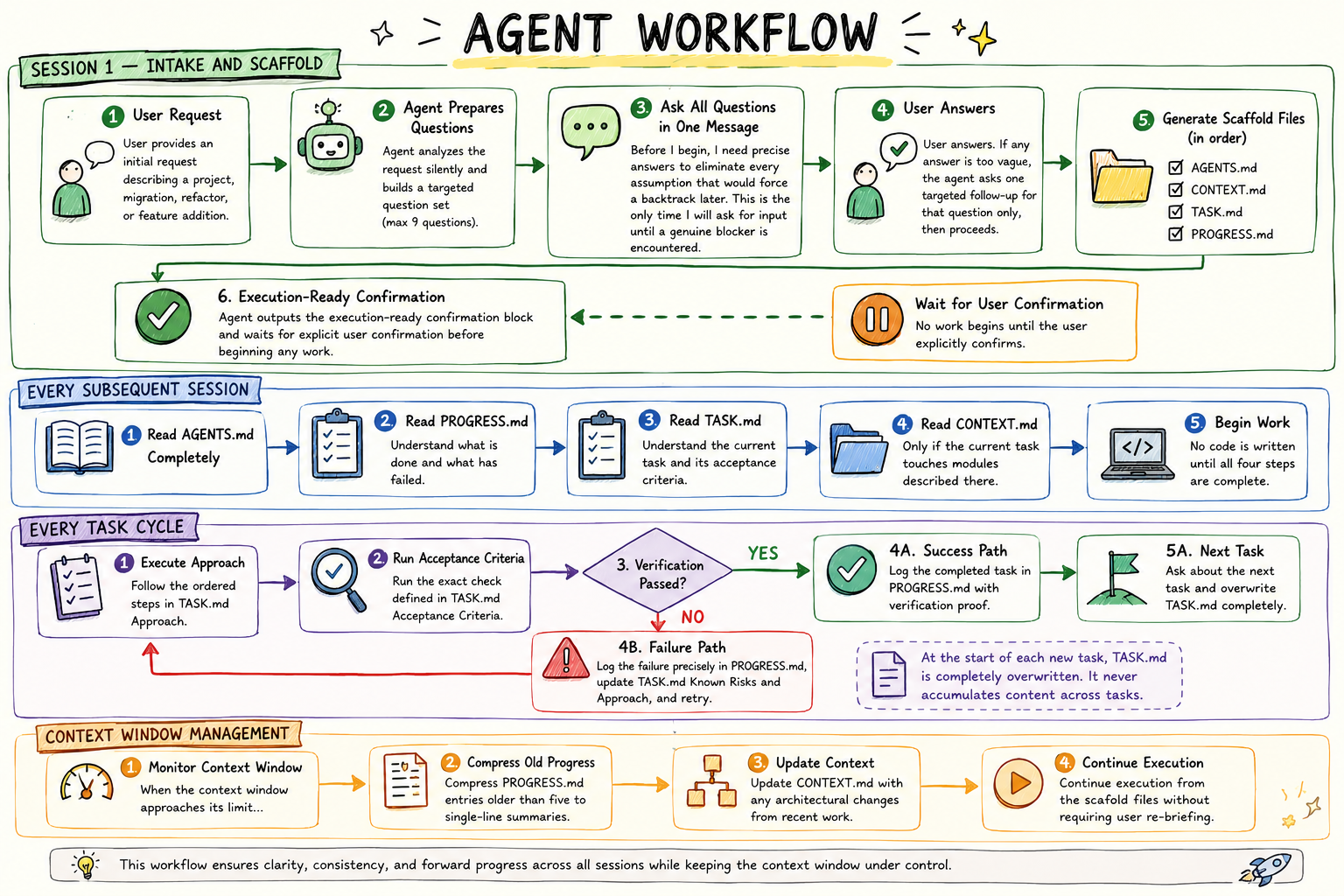
* **Methodical Intake**: The agent silently analyzes tasks and asks at most 9 targeted questions to define the end state, hard constraints, and acceptance criteria before writing any code.
* **Persistent Memory Scaffold**: Generates four root-level markdown files to maintain state across resets:
* `AGENTS.md` — Rulebook (hard-capped at 60 lines) with constraints and operating principles.
* `CONTEXT.md` — High-level architecture map and stack definition.
* `TASK.md` — Bounded mission brief (files in scope, approach, risks, and criteria). Overwritten per task.
* `PROGRESS.md` — Intelligence log of completions (with proof), failures (with exact errors), and blockers.
* **Mandatory Verification Gate**: Enforces execution of TASK.md's exact acceptance criteria. "Tests passed" is not allowed; concrete command outputs or detailed checks must be logged in PROGRESS.md.
* **Fluff & Slop Control**: Restricts LLM outputs to direct code, plan updates, and answers, forbidding greetings (hi, hello) or verbose explanations of what the code does.
---
## Workflow
---
## Commands
All commands are available as slash commands, `@mentions`, or natural language directives.
| Command | Action |
|---|---|
| `/ayanokoji` | Activate the strategic execution protocol for this project. |
| `/ayanokoji-task [desc]` | Overwrite and initialize `TASK.md` with the new task description. |
| `/ayanokoji-gate` | Verify the current task's acceptance criteria and update scaffold logs. |
| `/ayanokoji-status` | Display the current task summary, blockers, failures, and scaffold health. |
| `/ayanokoji-review` | Inspect the active `TASK.md` for completeness and risks before starting. |
| `/ayanokoji-audit` | Audit all four scaffold files for protocol compliance and syntax errors. |
| `/ayanokoji-debt` | List all deferred decisions, `[TO BE DEFINED]` blocks, and blockers. |
| `/ayanokoji-gain` | Summarize project stats: completed tasks, retry rate, and verification quality. |
| `/ayanokoji-help` | Display the protocol quick-reference guide. |
*Deactivate by saying `"stop ayanokoji"` or `"normal mode"`.*
## Setup Guide
### Instant Setup (Recommended)
Run in your project directory. Ayanokoji auto-detects your IDE from directory markers and writes only the relevant rule files:
```bash
npx ayanokoji.md
```
> **Auto-detection rules:** `.claude/` or `CLAUDE.md` → Claude Code · `.cursor/` → Cursor · `.windsurf/` → Windsurf · `.clinerules/` → Cline · `.kiro/` → Kiro · `.github/` → GitHub Copilot. If **none** are found, all rulesets are written.
---
### Target a Specific Agent
Pass a flag to skip auto-detection and configure exactly one agent:
```bash
# npx (one-shot, nothing installed in node_modules)
npx ayanokoji.md --claude # Claude Code → CLAUDE.md
npx ayanokoji.md --cursor # Cursor → .cursor/rules/ayanokoji.mdc
npx ayanokoji.md --windsurf # Windsurf → .windsurf/rules/ayanokoji.md
npx ayanokoji.md --cline # Cline → .clinerules/ayanokoji.md
npx ayanokoji.md --kiro # Kiro → .kiro/steering/ayanokoji.md
npx ayanokoji.md --copilot # GitHub Copilot → .github/copilot-instructions.md
npx ayanokoji.md --all # Every agent at once
```
You can also stack flags to configure multiple agents in one run:
```bash
npx ayanokoji.md --claude --cursor
```
#### Using `npm install` with a flag
When installing via `npm install`, pass the same flag — npm forwards it to the postinstall script automatically:
```bash
npm install ayanokoji.md --claude
npm install ayanokoji.md --cursor
npm install ayanokoji.md --all
```
> After setup completes, the package removes itself from your `package.json` automatically — it is a one-shot tool, not a runtime dependency. The `node_modules/ayanokoji.md` folder will be gone on the next `npm install`.
#### Environment variable fallback
If flags are inconvenient (CI pipelines, scripts), use `AYANOKOJI_FOR`:
```bash
AYANOKOJI_FOR=claude npx ayanokoji.md
AYANOKOJI_FOR="claude,cursor" npx ayanokoji.md
```
---
### Setup Output
Every run prints a summary of what was configured:
```
♟️ Ayanokoji — Strategic Execution Protocol Setup
✅ Configured Master Rulebook (AGENTS.md): AGENTS.md
✅ Configured Claude Code (CLAUDE.md): CLAUDE.md
✅ Installed skill: .openclaw/skills/ayanokoji/SKILL.md
...
♟️ Setup complete.
Configured for: Claude Code
Instruct your agent to read AGENTS.md before writing any code.
```
---
## Manual IDE Setup Guide
### 1. Cursor
Copy the cursor rule to your project:
```bash
mkdir -p .cursor/rules
cp .cursor/rules/ayanokoji.mdc .cursor/rules/ayanokoji.mdc
```
The rule will automatically steer all composer and chat sessions.
### 2. Windsurf
Copy the windsurf rule to your project:
```bash
mkdir -p .windsurf/rules
cp .windsurf/rules/ayanokoji.md .windsurf/rules/ayanokoji.md
```
### 3. Claude Code / Gemini CLI / Antigravity CLI
Install as a plugin:
```bash
claude mcp add ayanokoji https://github.com/Sahnik0/ayanokoji.md
```
Or use the native commands configured in `commands/` and `gemini-extension.json`.
### 4. GitHub Copilot
* **Instruction-tier**: Copy `.github/copilot-instructions.md` to your repository.
* **Plugin-tier**: Add it through the Copilot Plugin Marketplace.
### 5. Cline
Copy the rules file to your project:
```bash
cp .clinerules/ayanokoji.md .clinerules
```
### 6. Kiro
Copy the steering rule:
```bash
mkdir -p .kiro/steering
cp .kiro/steering/ayanokoji.md .kiro/steering/ayanokoji.md
```
### 7. OpenCode
Add the plugin dependency to your `opencode.json`:
```json
{
"plugins": ["ayanokoji.md"]
}
```
### 8. Hermes Agent
Install and enable the plugin:
```bash
hermes plugins install ayanokoji
hermes plugins enable ayanokoji
```
---
## Project Structure
```
ayanokoji.md/
├── AGENTS.md — Canonical ruleset (copied by agents)
├── skills/ — Full protocol markdown files
│ ├── ayanokoji/SKILL.md — Base strategic protocol
│ └── ayanokoji-[sub]/SKILL.md — Sub-skill rules (review, status, etc.)
├── commands/ — Slash command descriptors (.toml)
├── hooks/ — Adapter hooks & scripts for shells/CLIs
├── pi-extension/ — Personal AI (pi) extension files
├── scripts/ — Development lint, build, & sync scripts
├── tests/ — Complete functional unit test suite
├── benchmarks/ — Correctness and LOC graders
├── __init__.py — Hermes plugin runtime entry
└── plugin.yaml — Hermes plugin manifest
```
---
*"Emotions are inefficiencies. I calculate, therefore I execute."*