<!-- Hero Section with Gradient Background Effect -->
<picture>
  <source media="(prefers-color-scheme: dark)" srcset="https://user-images.githubusercontent.com/1687847/82130498-8c3eac80-97d4-11ea-9e88-372ab9c50295.png">
  <img src="https://user-images.githubusercontent.com/1687847/82130498-8c3eac80-97d4-11ea-9e88-372ab9c50295.png" width="140" alt="QuickLook Logo">
</picture>

# QuickLook

<div align="center">

<h3>
  <img src="https://raw.githubusercontent.com/Tarikul-Islam-Anik/Animated-Fluent-Emojis/refs/heads/master/Emojis/Activities/Magic%20Wand.png" width="25" height="25" />
  <i>Instant File Previews, Just Press Space</i>
  <img src="https://raw.githubusercontent.com/Tarikul-Islam-Anik/Animated-Fluent-Emojis/refs/heads/master/Emojis/Activities/Magic%20Wand.png" width="25" height="25" />
</h3>

**The most powerful Quick Look implementation for Windows**

<a href="https://trendshift.io/repositories/3258">
  <img src="https://trendshift.io/api/badge/repositories/3258" alt="Trending" width="250" height="55"/>
</a>
<a href="https://hellogithub.com/repository/QL-Win/QuickLook" target="_blank">
  <img src="https://abroad.hellogithub.com/v1/widgets/recommend.svg?rid=ad5988da3e9a484f9fbf69dde5ff162f&claim_uid=pCb8AnYg1ZTSwUa" alt="Featured｜HelloGitHub" style="width: 250px; height: 54px;" width="250" height="54" />
</a>

<br>

<!-- Animated Badges -->
<p>
  <a href="https://quicklookapp.vercel.app">
    <img src="https://img.shields.io/badge/🌐_Official_Website-Visit_Now-00D9FF?style=for-the-badge&labelColor=000000" alt="Official Website">
  </a>
  <a href="https://github.com/QL-Win/QuickLook/releases">
    <img src="https://img.shields.io/github/v/release/QL-Win/QuickLook?style=for-the-badge&logo=github&color=00C853&labelColor=000000" alt="Release">
  </a>
  <a href="https://github.com/QL-Win/QuickLook/releases">
    <img src="https://img.shields.io/github/downloads/QL-Win/QuickLook/total?style=for-the-badge&logo=github&color=FF6D00&labelColor=000000" alt="Downloads">
  </a>
  <a href="https://github.com/QL-Win/QuickLook/stargazers">
    <img src="https://img.shields.io/github/stars/QL-Win/QuickLook?style=for-the-badge&logo=starship&color=FFD700&labelColor=000000" alt="Stars">
  </a>
  <a href="https://www.gnu.org/licenses/gpl-3.0.en.html">
    <img src="https://img.shields.io/badge/License-GPL_v3-blue?style=for-the-badge&logo=opensourceinitiative&color=3DA639&labelColor=000000" alt="License">
  </a>
<a href="https://github.com/QL-Win/QuickLook/actions/workflows/msbuild.yml">
  <img src="https://img.shields.io/github/actions/workflow/status/QL-Win/QuickLook/msbuild.yml?style=for-the-badge&logo=github&label=Build&labelColor=000000" alt="Build Status">
</a>
<a href="https://dotnet.microsoft.com/en-us/download/dotnet/latest/runtime">
  <img src="https://img.shields.io/badge/Platform-Windows-0078D4?style=for-the-badge&logo=windows&labelColor=000000" alt="Platform">
</a>
</p>


<br><br>

<!-- Hero Image with Modern Styling -->
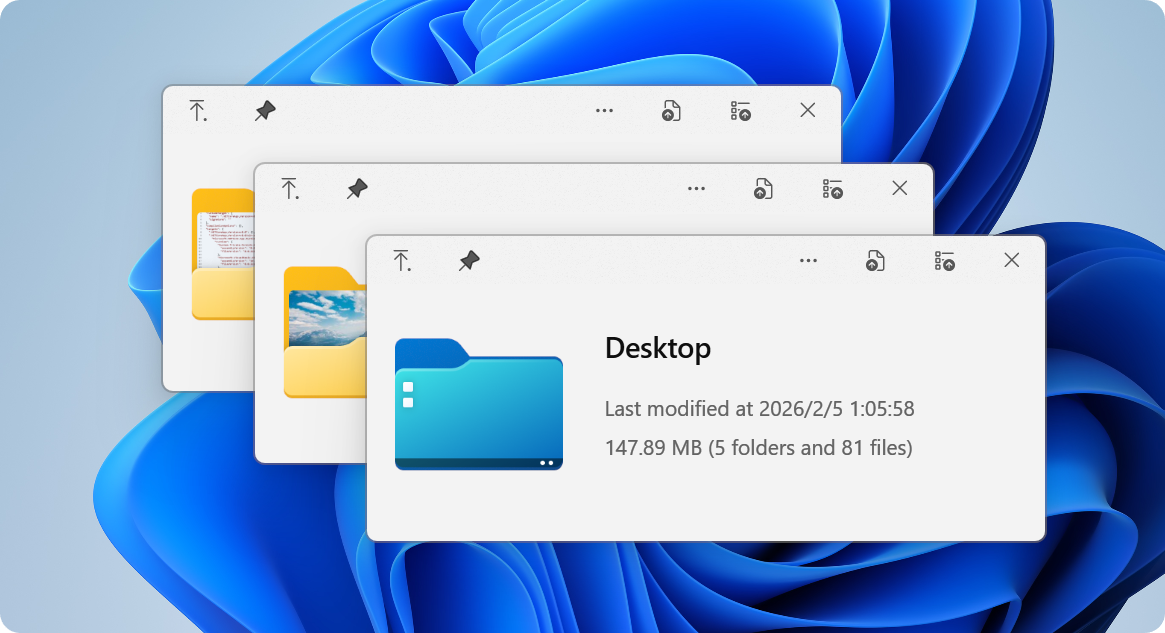
<img src="https://raw.githubusercontent.com/QL-Win/QuickLook/refs/heads/master/Build/Assets/Branding/01.png" width="800" alt="QuickLook Preview" style="border-radius: 20px;">

<br><br>

<!-- Quick Navigation with Icons -->
<table>
  <tr>
    <td align="center" width="20%">
      <a href="#-the-problem">
        <img src="https://github.com/Tarikul-Islam-Anik/Animated-Fluent-Emojis/blob/master/Emojis/Objects/Light%20Bulb.png?raw=true" width="30"><br>
        <b>The Problem</b>
      </a>
    </td>
    <td align="center" width="20%">
      <a href="#-superpowers">
        <img src="https://raw.githubusercontent.com/Tarikul-Islam-Anik/Animated-Fluent-Emojis/master/Emojis/Travel%20and%20places/Rocket.png" width="30"><br>
        <b>Superpowers</b>
      </a>
    </td>
    <td align="center" width="20%">
      <a href="#-get-started">
        <img src="https://raw.githubusercontent.com/Tarikul-Islam-Anik/Animated-Fluent-Emojis/master/Emojis/Objects/Package.png" width="30"><br>
        <b>Get Started</b>
      </a>
    </td>
    <td align="center" width="20%">
      <a href="#-extend">
        <img src="https://github.com/Tarikul-Islam-Anik/Animated-Fluent-Emojis/blob/master/Emojis/Activities/Puzzle%20Piece.png?raw=true" width="30"><br>
        <b>Extend</b>
      </a>
    </td>
    <td align="center" width="20%">
      <a href="#-community">
        <img src="https://raw.githubusercontent.com/Tarikul-Islam-Anik/Animated-Fluent-Emojis/master/Emojis/Smilies/Beating%20Heart.png" width="30"><br>
        <b>Community</b>
      </a>
    </td>
  </tr>
</table>

</div>

<br>

---

## 💡 The Problem

<table>
<tr>
<td width="60%">

### Ever wished Windows had macOS's Quick Look?

You know the drill: you want to peek at a file, so you double-click, wait for an app to launch, view the file, close the app... **exhausting**, right?

macOS users? They just press <kbd>Space</kbd>. Instant preview. **Any file**. 

**Now Windows has it too.** 🎉

QuickLook brings that buttery-smooth, instant-preview experience to Windows. No more waiting. No more opening heavy applications just to peek at a document.

</td>
<td width="40%">

```
WITHOUT QuickLook:
┌─────────────────┐
│ 1. Double click │
│ 2. Wait...      │
│ 3. App loads    │
│ 4. View file    │
│ 5. Close app    │
└─────────────────┘
   ⏱️ ~10 seconds

WITH QuickLook:
┌─────────────────┐
│ 1. Press SPACE  │
│ 2. Done! ✨     │
└─────────────────┘
   ⚡ ~0.2 seconds
```

</td>
</tr>
</table>

<br>

---

## 🚀 Superpowers

<div align="center">

### What Makes QuickLook Extraordinary

</div>

<table align="center"  >
<tr>
<td align="center" width="33%">

### ⚡️ **Lightning Speed**

<img src="https://raw.githubusercontent.com/Tarikul-Islam-Anik/Animated-Fluent-Emojis/master/Emojis/Travel%20and%20places/High%20Voltage.png" width="60">

**Instant previews** with zero lag

Native performance that feels like magic

Hardware-accelerated rendering

</td>
<td align="center" width="33%">

### 🎨 **Gorgeous Design**

<img src="https://raw.githubusercontent.com/Tarikul-Islam-Anik/Animated-Fluent-Emojis/master/Emojis/Activities/Artist%20Palette.png" width="60">

**Fluent Design System** integration

Beautiful on 4K displays

Touch-optimized interface

</td>
<td align="center" width="33%">

### 🌈 **100+ Formats**

<img src="https://raw.githubusercontent.com/Tarikul-Islam-Anik/Animated-Fluent-Emojis/master/Emojis/Travel%20and%20places/Rainbow.png" width="60">

Images, videos, documents, code

**3D models**, archives, fonts

Extensible with plugins

</td>
</tr>
</table>

<br>

<!-- Feature Grid with Modern Cards -->
<table align="center"  >
<tr>
<td width="50%">

#### 📸 **Visual Files**
- 🖼️ Images (JPEG, PNG, GIF, WebP, RAW)
- 🎬 Videos (MP4, AVI, MKV, MOV)
- 🎨 Photoshop (PSD), Illustrator (AI)
- 📐 3D Models (OBJ, STL, FBX)
- 🎭 Animated GIFs & APNGs

#### 📄 **Documents**
- 📝 PDF, Word, Excel, PowerPoint
- 📋 Text files with syntax highlighting
- 📊 Markdown with live rendering
- 📜 E-books (EPUB, MOBI)
- 📑 Comics (CBZ, CBR)

</td>
<td width="50%">

#### 💻 **Developer Files**
- 🐍 Python, JavaScript, C++, Rust
- 🌐 HTML, CSS, JSON, XML
- ⚙️ Config files (YAML, TOML, INI)
- 📦 Archives (ZIP, RAR, 7Z, TAR)
- 🔧 Binary files with hex view

#### 🎵 **Media**
- 🎵 Audio (MP3, FLAC, WAV, AAC)
- 🎼 Sheet music
- 🎨 Fonts (TTF, OTF, WOFF)
- 🖌️ Vector graphics (SVG, EPS)
- 📹 Subtitles (SRT, ASS)

</td>
</tr>
</table>

<br>

<div align="center">

### 🎯 **Works Everywhere**

<table>
<tr>
<td align="center" width="25%">

**File Explorer**

<img src="https://raw.githubusercontent.com/Tarikul-Islam-Anik/Animated-Fluent-Emojis/master/Emojis/Objects/File%20Folder.png" width="50">

Native integration

</td>
<td align="center" width="25%">

**Open/Save Dialogs**

<img src="https://raw.githubusercontent.com/Tarikul-Islam-Anik/Animated-Fluent-Emojis/master/Emojis/Objects/Desktop%20Computer.png" width="50">

System-wide support

</td>
<td align="center" width="25%">

**3rd Party Managers**

<img src="https://raw.githubusercontent.com/Tarikul-Islam-Anik/Animated-Fluent-Emojis/master/Emojis/Objects/Toolbox.png" width="50">

Total Commander, xplorer²

</td>
<td align="center" width="25%">

**Cloud Storage**

<img src="https://raw.githubusercontent.com/Tarikul-Islam-Anik/Animated-Fluent-Emojis/master/Emojis/Travel%20and%20places/Cloud.png" width="50">

OneDrive, Dropbox ready

</td>
</tr>
</table>

</div>

<br>

---

## 📦 Get Started

<div align="center">

### Choose Your Adventure

<br>

<table>
<tr>
<td align="center" width="25%">

<img src="https://raw.githubusercontent.com/Tarikul-Islam-Anik/Animated-Fluent-Emojis/master/Emojis/Objects/Mobile%20Phone.png" width="70">

### **Microsoft Store**

**Recommended for most users**

✅ Automatic updates
✅ Sandboxed security
✅ One-click install

<br>

<a href="https://www.microsoft.com/store/apps/9nv4bs3l1h4s">
  <img src="https://img.shields.io/badge/Get_it_from-Microsoft_Store-0078D4?style=for-the-badge&logo=microsoft&logoColor=white" alt="Microsoft Store">
</a>

<sub>⚠️ Limited Open/Save dialog support</sub>

</td>
<td align="center" width="25%">

<img src="https://raw.githubusercontent.com/Tarikul-Islam-Anik/Animated-Fluent-Emojis/master/Emojis/Objects/Package.png" width="70">

### **Installer**

**Full-featured experience**

✅ Complete functionality
✅ Open/Save dialog support
✅ Portable option available

<br>

<a href="https://github.com/QL-Win/QuickLook/releases">
  <img src="https://img.shields.io/badge/Download-Latest_Release-00C853?style=for-the-badge&logo=github&logoColor=white" alt="Latest Release">
</a>

<sub>💎 Get the full power</sub>

</td>
<td align="center" width="25%">

<img src="https://raw.githubusercontent.com/Tarikul-Islam-Anik/Animated-Fluent-Emojis/master/Emojis/Food/Beer%20Mug.png" width="70">

### **Scoop**

**For command-line lovers**

✅ Easy updates
✅ Reproducible installs
✅ Version management

<br>

```powershell
scoop bucket add extras
scoop install quicklook
```

<sub>🤓 Power user choice</sub>

</td>
<td align="center" width="25%">

<img src="https://raw.githubusercontent.com/Tarikul-Islam-Anik/Animated-Fluent-Emojis/master/Emojis/Travel%20and%20places/Crescent%20Moon.png" width="70">

### **Nightly**

**Live on the edge**

✅ Latest features
✅ Bug fixes first
⚠️ May be unstable

<br>

<a href="https://github.com/QL-Win/QuickLook/releases/">
  <img src="https://img.shields.io/badge/Try-Nightly_Builds-FF6D00?style=for-the-badge&logo=github-actions&logoColor=white" alt="Nightly Builds">
</a>

<sub>🌙 Experimental builds</sub>

</td>
</tr>
</table>

<br>

<details>
<summary><b>🤔 Not sure which version to choose?</b></summary>

<br>

| Feature | Store | Installer | Scoop | Nightly |
|---------|-------|-----------|-------|---------|
| Auto-updates | ✅ | ⚠️ | ✅ | ⚠️ |
| Open/Save dialogs | ❌ | ✅ | ✅ | ✅ |
| Portable mode | ❌ | ✅ | ❌ | ✅ |
| Stability | ✅✅✅ | ✅✅✅ | ✅✅✅ | ✅✅ |

📖 [Read the full comparison](https://github.com/QL-Win/QuickLook/wiki/Differences-Between-Distributions)

</details>

</div>

<br>

### ⚡ Quick Start in 10 Seconds

<table>
<tr>
<td width="50%">

```
Step 1️⃣  Install QuickLook
         ↓
Step 2️⃣  It runs automatically
         ↓
Step 3️⃣  Select any file
         ↓
Step 4️⃣  Press SPACE
         ↓
Step 5️⃣  🎉 Magic happens!
```

</td>
<td width="50%">

**💡 Pro Tips:**
- QuickLook lives in your system tray
- Works with **any file** in File Explorer
- Use arrow keys to preview multiple files
- Press `Esc` or `Space` again to close
- Drag files directly from the preview!

</td>
</tr>
</table>

<br>

---

## ⌨️ Master the Shortcuts

<div align="center">

### Your New Superpowers

<br>

<table>
<tr>
<td align="center" width="33%">

### 🎮 **Basic Controls**

| Key | Action |
|-----|--------|
| <kbd>Space</kbd> | Toggle preview |
| <kbd>Esc</kbd> <kbd>Space</kbd> | Close window |
| <kbd>Enter</kbd> | Open file |
| <kbd>↑</kbd> <kbd>↓</kbd> | Next/Previous |

</td>
<td align="center" width="33%">

### 🔍 **Navigation**

| Key | Action |
|-----|--------|
| <kbd>←</kbd> <kbd>→</kbd> | Navigate files |
| <kbd>Mouse Click</kbd> | Select file |
| <kbd>Page Up</kbd> <kbd>Down</kbd> | Scroll content |
| <kbd>Home</kbd> <kbd>End</kbd> | Jump to start/end |

</td>
<td align="center" width="33%">

### 🎨 **Advanced**

| Key | Action |
|-----|--------|
| <kbd>Wheel</kbd> | Zoom (images) |
| <kbd>Ctrl</kbd>+<kbd>Wheel</kbd> | Zoom (PDFs) |
| <kbd>L-Click Drag</kbd> | Rotate 3D |
| <kbd>M-Click Drag</kbd> | Pan 3D |

</td>
</tr>
</table>

<br>

> **💡 Pro Tip:** You can navigate files using arrow keys even when the preview window isn't focused!

</div>

<br>

---

## 🧩 Extend

<div align="center">

### Supercharge QuickLook with Plugins

*Transform QuickLook into a universal file viewer*

<br>

<!-- Featured Plugins Grid -->
<table align="center">
<tr>
<td align="center" width="50%">

<img src="https://raw.githubusercontent.com/Tarikul-Islam-Anik/Animated-Fluent-Emojis/master/Emojis/Objects/Clipboard.png" width="80">

### **OfficeViewer**

Preview **Word, Excel & PowerPoint** files

**No Microsoft Office required!**

<br>

```
✅ Native Office formats
✅ Standalone viewer
✅ Fast rendering
```

<a href="https://github.com/QL-Win/QuickLook.Plugin.OfficeViewer/releases">
  <img src="https://img.shields.io/badge/Download-Plugin-FF6D00?style=for-the-badge" alt="Download">
</a>

</td>
<td align="center" width="50%">

<img src="https://raw.githubusercontent.com/Tarikul-Islam-Anik/Animated-Fluent-Emojis/master/Emojis/Objects/Page%20Facing%20Up.png" width="80">

### **PdfViewer-Native**

Enhanced PDF viewing with **WebView2**

Modern, fast, feature-rich

<br>

```
✅ Smooth scrolling
✅ Search & annotations
✅ Hardware acceleration
```

<a href="https://github.com/QL-Win/QuickLook.Plugin.PdfViewer-Native/releases">
  <img src="https://img.shields.io/badge/Download-Plugin-00C853?style=for-the-badge" alt="Download">
</a>

</td>
</tr>
<tr>
<td align="center" width="50%">

<img src="https://raw.githubusercontent.com/Tarikul-Islam-Anik/Animated-Fluent-Emojis/master/Emojis/Objects/Printer.png" width="80">

### **PostScriptViewer**

Preview `.ps` and `.eps` files

Perfect for designers

<br>

```
✅ Vector rendering
✅ High quality output
✅ Professional formats
```

<a href="https://github.com/QL-Win/QuickLook.Plugin.PostScriptViewer/releases">
  <img src="https://img.shields.io/badge/Download-Plugin-3DA639?style=for-the-badge" alt="Download">
</a>

</td>
<td align="center" width="50%">

<img src="https://raw.githubusercontent.com/Tarikul-Islam-Anik/Animated-Fluent-Emojis/master/Emojis/Objects/Triangular%20Ruler.png" width="80">

### **CADImport**

View CAD files natively

`.dwg`, `.dxf`, `.plt`, `.cgm`

<br>

```
✅ Engineering drawings
✅ Architecture files
✅ Technical diagrams
```

<a href="https://github.com/emako/QuickLook.Plugin.CADImport/releases">
  <img src="https://img.shields.io/badge/Download-Plugin-0078D4?style=for-the-badge" alt="Download">
</a>

</td>
</tr>
</table>

<br>

### 📦 How to Install or Upgrade Plugins

<table>
<tr>
<td width="33%" align="center">

**1️⃣ Download**

Get the `.qlplugin` file

</td>
<td width="33%" align="center">

**2️⃣ Install**

Ensure QuickLook is currently running, select the file and press `Spacebar`.

</td>
<td width="33%" align="center">

**3️⃣ Restart**

Click on the `Install` button, then restart QuickLook.

</td>
</tr>
</table>

### 📦 How to Remove Plugins

<table>
<tr>
<td width="33%" align="center">

**1️⃣ Quit**

Quit QuickLook.

</td>
<td width="33%" align="center">

**2️⃣ Navigate**

Navigate to the [Data location](https://github.com/QL-Win/QuickLook/wiki/Differences-Between-Distributions#user-data-location).

</td>
<td width="33%" align="center">

**3️⃣ Remove**

You should find several folders. Remove the one you do not want to use.

</td>
</tr>
</table>

<br>

<a href="https://github.com/QL-Win/QuickLook/wiki/Available-Plugins">
  <img src="https://img.shields.io/badge/🔍_Browse_All_Plugins-white?style=for-the-badge" alt="Browse Plugins">
</a>
<a href="https://github.com/QL-Win/QuickLook/wiki/Available-Plugins#how-to-install-or-upgrade-a-plugin">
  <img src="https://img.shields.io/badge/📖_Installation_Guide-white?style=for-the-badge" alt="Installation Guide">
</a>

</div>

<br>

---

## 💖 Community

<div align="center">

### Join Thousands of Happy Users

<br>

<table>
<tr>
<td align="center" width="33%">

<img src="https://raw.githubusercontent.com/Tarikul-Islam-Anik/Animated-Fluent-Emojis/master/Emojis/Smilies/Speech%20Balloon.png" width="80">

### **QQ Group**

Join our Chinese community

**371388501**

<br>

<a href="https://qm.qq.com/q/KIczirznua">
  <img src="https://img.shields.io/badge/Join-QQ_Group-12B7F5?style=for-the-badge&logo=tencentqq&logoColor=white" alt="QQ Group">
</a>

</td>
<td align="center" width="33%">

<img src="https://github.com/Tarikul-Islam-Anik/Animated-Fluent-Emojis/blob/master/Emojis/Travel%20and%20places/Globe%20with%20Meridians.png?raw=true" width="80">

### **Translate**

Help QuickLook speak your language

Make it accessible

<br>

<a href="https://github.com/QL-Win/QuickLook/wiki/Translations">
  <img src="https://img.shields.io/badge/Contribute-Translations-FFD700?style=for-the-badge&logo=googletranslate&logoColor=white" alt="Translations">
</a>

</td>
<td align="center" width="33%">

<img src="https://raw.githubusercontent.com/Tarikul-Islam-Anik/Animated-Fluent-Emojis/master/Emojis/Smilies/Star-Struck.png" width="80">

### **Star Us**

Show your support

It means a lot!

<br>

<a href="https://github.com/QL-Win/QuickLook/stargazers">
  <img src="https://img.shields.io/github/stars/QL-Win/QuickLook?style=for-the-badge&logo=github&color=FFD700&logoColor=white" alt="Star us">
</a>

</td>
</tr>
</table>

<br>

### 👨‍💻 For Developers

Interested in contributing? Check out our development resources:

<a href="https://github.com/QL-Win/QuickLook/wiki">
  <img src="https://img.shields.io/badge/📚_Developer_Wiki-black?style=for-the-badge&logo=gitbook&logoColor=white" alt="Wiki">
</a>
<a href="CodeMaid.config">
  <img src="https://img.shields.io/badge/🛠️_Code_Style_Guide-black?style=for-the-badge&logo=visualstudiocode&logoColor=white" alt="Code Style">
</a>
<a href="https://github.com/QL-Win/QuickLook/issues">
  <img src="https://img.shields.io/badge/🐛_Report_Issues-black?style=for-the-badge&logo=github&logoColor=white" alt="Issues">
</a>

</div>

<br>

---

## 🙏 Credits

<div align="center">

### Built with Love by Amazing People

<br>

<table>
<tr>
<td align="center" width="25%">

<img src="https://github.com/Tarikul-Islam-Anik/Animated-Fluent-Emojis/blob/master/Emojis/Activities/Artist%20Palette.png?raw=true" width="60">

**Design Team**

[@OiCkilL](https://twitter.com/OiCkilL)
[@QubitsDev](https://twitter.com/qubitsdev)
[@Donno](https://github.com/Donnnno)
[@Shomnipotence](https://github.com/Shomnipotence)

*Fluent UI & Icons*

</td>
<td align="center" width="25%">

<img src="https://raw.githubusercontent.com/Tarikul-Islam-Anik/Animated-Fluent-Emojis/master/Emojis/Smilies/Nerd%20Face.png" width="60">

**Contributors**

[Our Amazing Team](https://github.com/QL-Win/QuickLook/graphs/contributors)

*Code, translations & ideas*

</td>
<td align="center" width="25%">

<img src="https://github.com/Tarikul-Islam-Anik/Animated-Fluent-Emojis/blob/master/Emojis/Objects/Books.png?raw=true" width="60">

**Open Source**

[Libraries We Use](https://github.com/QL-Win/QuickLook/wiki/On-the-Shoulders-of-Giants)

*Standing on giants*

</td>
<td align="center" width="25%">

<img src="https://raw.githubusercontent.com/Tarikul-Islam-Anik/Animated-Fluent-Emojis/master/Emojis/Smilies/Smiling%20Face%20with%20Hearts.png" width="60">

**You!**

Every User Matters

*Thank you for using QuickLook*

</td>
</tr>
</table>

</div>

<br>

---

## 📜 License

<div align="center">

<br>

<img src="https://www.gnu.org/graphics/gplv3-127x51.png" alt="GPL v3">

<br><br>

**QuickLook is free and open source under [GPL-3.0](https://opensource.org/licenses/GPL-3.0)**

*Free software, free forever. No ads, no tracking, no premium tiers.*

<br>

**Need commercial licensing?** Contact us for sublicensing options.

</div>

<br>

---

<div align="center">

<br>

## ⭐ Like QuickLook? Star the repo!

**Your support keeps this project alive and improving**

<br>

<a href="https://quicklookapp.vercel.app">
  <img src="https://img.shields.io/badge/🏠_Visit_Homepage-white?style=for-the-badge" alt="Homepage">
</a>
<a href="https://github.com/QL-Win/QuickLook/wiki">
  <img src="https://img.shields.io/badge/📖_Documentation-white?style=for-the-badge" alt="Docs">
</a>
<a href="https://github.com/QL-Win/QuickLook/issues">
  <img src="https://img.shields.io/badge/💬_Get_Help-white?style=for-the-badge" alt="Help">
</a>
<a href="https://github.com/QL-Win/QuickLook/releases">
  <img src="https://img.shields.io/badge/📦_Download-white?style=for-the-badge" alt="Download">
</a>

<a href="https://github.com/adnan-bhaldar/QuickLook-Website">
  <img src="https://img.shields.io/badge/🌐_Help maintain the homepage-00D9FF?style=for-the-badge&labelColor=000000">
</a>

<br><br>

<sub>Note: The official website content may be inaccurate or out of date. To help maintain the site, please submit a PR to <a href="https://github.com/adnan-bhaldar/QuickLook-Website">QuickLook Website Repository</a></sub>

<br>

<sub>Made with ❤️ by the QuickLook community</sub>

<br>

<!-- Animated Emojis Footer -->
<img src="https://raw.githubusercontent.com/Tarikul-Islam-Anik/Animated-Fluent-Emojis/master/Emojis/Travel%20and%20places/Rocket.png" width="25">
<img src="https://raw.githubusercontent.com/Tarikul-Islam-Anik/Animated-Fluent-Emojis/master/Emojis/Smilies/Beating%20Heart.png" width="25">
<img src="https://raw.githubusercontent.com/Tarikul-Islam-Anik/Animated-Fluent-Emojis/master/Emojis/Smilies/Star-Struck.png" width="25">
<img src="https://raw.githubusercontent.com/Tarikul-Islam-Anik/Animated-Fluent-Emojis/refs/heads/master/Emojis/Travel%20and%20places/Star.png" width="25">

</div>