[](https://www.jsdelivr.com/package/gh/PolarComputer/Dexs-Modal)
# Dexs-Modal
100% Free from Bootstrap and Jquery
Dexs, or Decks is a simple modal js library. Built completly with HTML DOM objects, and having no depenencies, Dexs is a super tiny modal libary. This libary was brought to you by Polar Computers Inc. and the Pace Software Team. This project wouldn't have be possible without the amazing insperation from MicroModal, Vex Modal, and Bootstrap Modal. With the help of contrubitors and the Pace Team at Polar, we keep this libary uptodate.
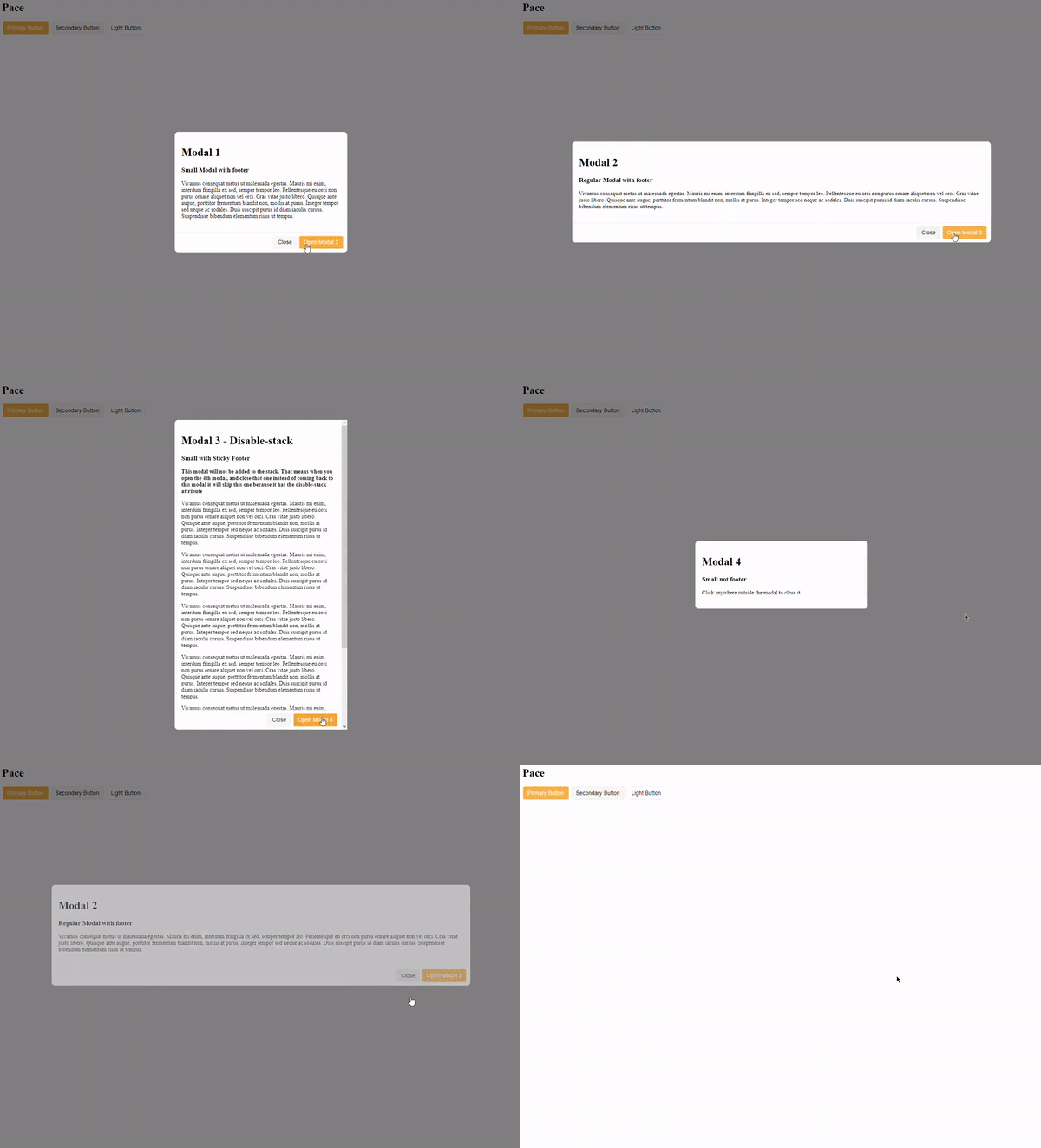
[ Simple CodePen Demo ]( https://codepen.io/sellersew/pen/PoYzLqp )
## What is Dexs?
Dexs, is a simple modal library. It is super tiny, and isn't reliant on Bootstrap or jQuery. Making it perfect for a super simple project. We made Dexs while working on the Pace Productive Suite. While, we all love the Bootstrap and jQuery libraries, they are large and bulky and we didn't need many components from them. So we build our own Javascript libary to solve our promblems. But Dexs, was designed with a lot more in mind, other than being slim. One of the biggest things we needed was the ability to open multiple modals and them to stack ontop each other. What we needed was for you able to open one modal, then open a second. When closing the second, go back to the first. We call this layering of modals, a stack.
## Installation
Installing Dexs is super simple too. Just add the libary and your are ready to go. We highly recommend once you have downloaded the files, you minify them, this will decrease the size of the files.
``` html
```
#### CDN
You can either use a CDN or host the files directly. But if you want here is a link to our CDN, hosted on JSdelivr.
[ JSdelivr Repo ]( https://www.jsdelivr.com/package/gh/PolarComputer/Dexs-Modal )
## Examples
Here are some examples. Most of these are pretty simple and while Dexs doesn't do much more than is described, what you can do is pretty much limitless. This is just a simple framework we have built to make multi-level modals simplier.
### Opening modal
It's super easy to open a Dexs, modal. Just use the JS command `dexs.open( id );`. You can read more about other JS commands, like closing modals, below.
HTML
``` html
Titile
```
Javascript
``` javascript
dexs.open( "sample-modal" );
```
### Simple Modal
This is a basic modal, with not footer buttons and just text. It will auto scale to meet the size of the contents. Anything you put inside the `.modal-body` class will get the standard Dexs
``` html
Hello World
This is a basic Dexs Modal
```
### Small Modal
By adding the class `.dexs--small` to the main element it will create a small modal with a max with of `500px`.
``` html
Hello World
This is a basic Dexs Modal
```
### Modal with Footer
This is a regular sized modal, with a footer. The footer allows you to place elements at the bottom modal with a separator. These elements will standardly `align-right` but you can change at with a custom class.
``` html
Titile
```
### Modal with Sticky Footer
Some times you have content that will take up more than the standard amount of screen. This will cause the modal to automatically enable scroll on the modal, so it doesn't overflow the screen. By adding the class `.sticky-footer` to the `.modal-footer` element. It will keep the footer always visible at the bottom of the modal as you scroll though elements inside your modal-body.
``` html
Titile
```
### Modal with Overflow
Some times you have alot of content inside a modal and you need it to scroll. If that is the case add the class "scrollable", to the main modal class.
``` html
Titile
```
### Disable Adding to stack
Normally if you open a new modal while an another modal is open it is added to a deck. This will record the order that modals are opened, so when you close one it will go to the last one open. To disable a modal being added to the history stack add the attribute `disable-stack` to the element.
``` html
Title
```
### Destroy On Close
This will destroy the HTML modal, when it is closed. This is useful if you are generating custom popups in JavaScript and the content is rendered every time. Simply add the attribute, "destroy-on-close". When this is closed, you won't be able to open it again, it is destroyed.
``` html
Title
```
## Dexs Commands
Here are some more commands you can use.
| | Command | Description |
| --- | --- | --- |
| Open Modal | `dexs.open(id);` | Opens modal by id and adds existing open modals to stack. |
| Close Modal | `dexs.close();` | Will close current open modal. Will return boolean, if modal is open and it is successfully close, return `true`. If no modal is open, to be closes, returns `false`. |
| Close All Modals | `dexs.closeAll();` | Will close all current open Modals, and clear the stack. Meaning no modal will open that was in the stack. |
| Is Open | `decs.isOpen(id);` | Returns boolean if the specific modal, based on id which is passed to the function, is currently open. if the the current modal is open returns `true`, if the modal that is specified is not open returns `false`. |
| Get Stack | `dexs.stack();` | Returns an array of objects, with the ID's and level number of all modals in the stack. Ex. `[{ id: 'sampleModal-1', level: 2 }, { id: 'sampleModal-2', level: 1 }]`|
| Clear Stack | `dexs.clearStack();` | Doesn't close the current modal, but will make remove all other modal from stack. Making it so when you close the current modal, you exscape all the proceeding modals in the stack. |
| Remove from Stack | `dexs.removeFromStack(id);` | Removes element direcly from stack. This will NOT close any open elements. But remove elements that had been opened, and would of opened up when the proceding modals were closed. |