



Use Claude Code's **UltraCode** mode (xhigh effort + the Workflow/deep-reasoning
harness) with **any model you already pay for** — pick it live from the `/model`
menu.
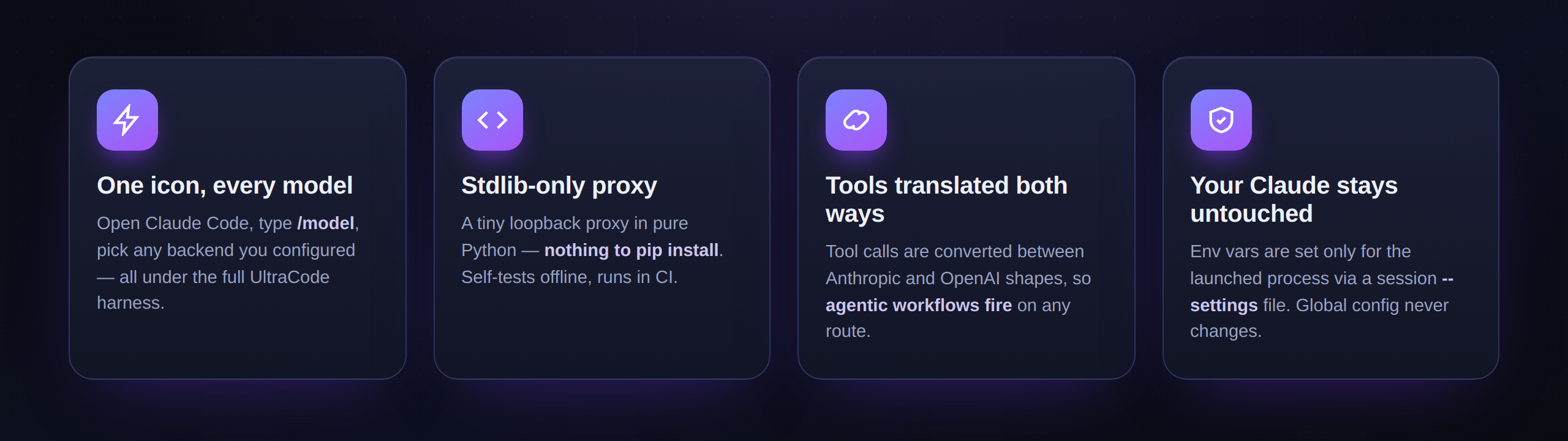
One icon. Open Claude Code, type `/model`, and choose any backend you've set up —
all running with the full UltraCode harness. Your normal Claude Code install is
left untouched.
The example config ships ready-to-use entries for **GPT‑5.5 (Codex login)**,
**MiniMax‑M3**, **MiMo v2.5 Pro**, **DeepSeek V4 Pro/Flash**, **Step Flash**,
**Ollama Cloud**, **OpenCode Go**, **OpenRouter**, **Requesty**, and **local models** — keep
the ones you have a plan for, delete the rest. (Cursor's Composer needs the
`cursor-agent` CLI and isn't HTTP-based — see
[docs/ADD_A_MODEL.md](docs/ADD_A_MODEL.md).)
## How it works
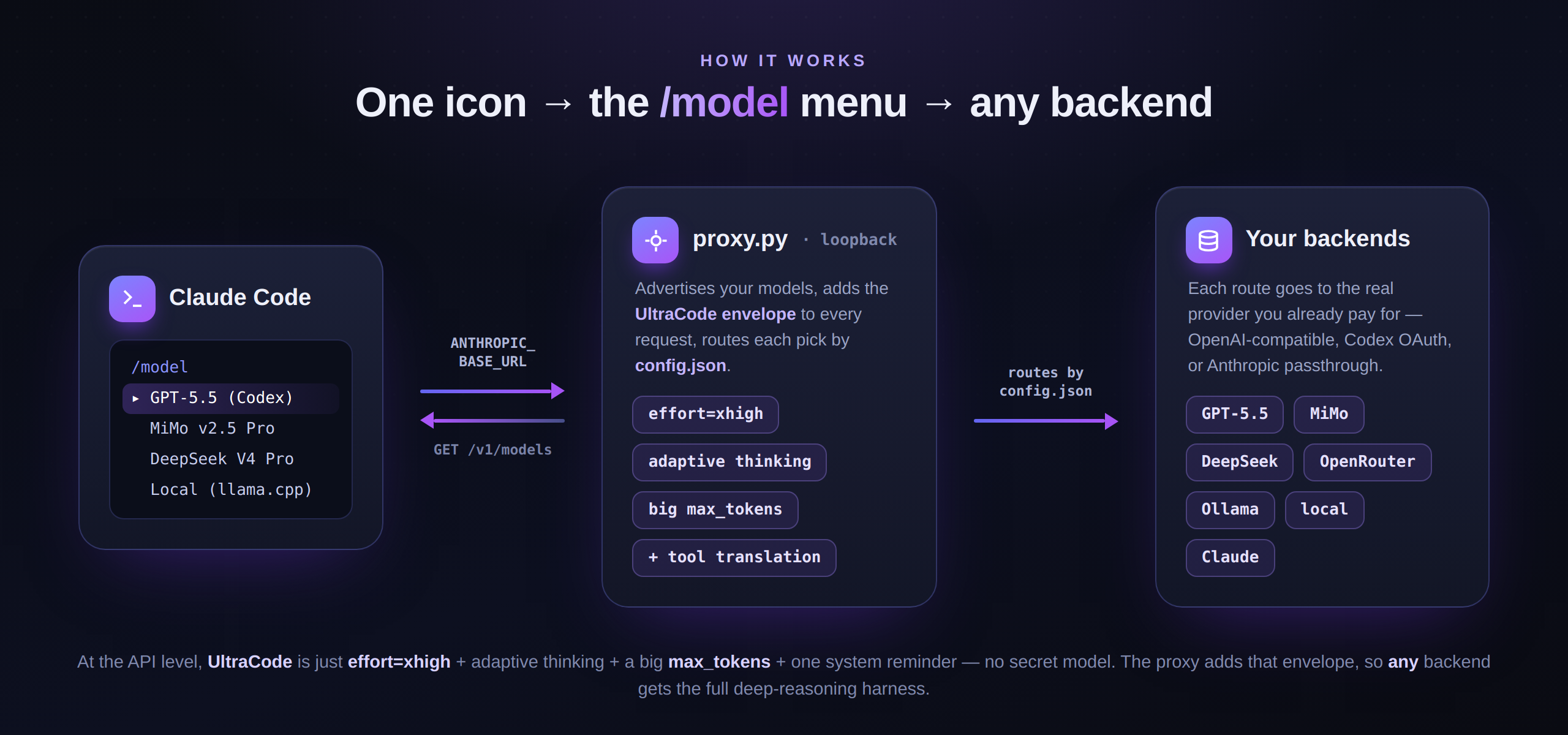
> **How is this possible?** At the API level, "UltraCode" is just
> `effort=xhigh` + adaptive thinking + a big `max_tokens` + one system reminder —
> there is no secret model. The proxy adds that envelope to every request, so any
> backend gets the UltraCode treatment. Full breakdown (with the reverse‑engineering
> evidence) in [docs/HOW_IT_WORKS.md](docs/HOW_IT_WORKS.md).
## Orchestrator + Worker: two models, one workflow 🪄
Claude Code's `/model` menu is single-slot — and its **dynamic-workflow** engine
quietly issues most of its background/sub-agent traffic as the *stock* model
(`claude-opus-4-8`) no matter what you pick. So the dozens of parallel workers
that do the bulk of a workflow don't follow your selection (and can bill a model
you didn't choose).
This proxy turns that single slot into **two**. The launcher opens a two-column
selector before Claude Code starts: choose an **orchestrator** (the main
interactive loop) on the left and a **worker** (every Workflow/Task sub-agent) on
the right. The same choices are also available later in `/model`: for every model
you configure, the proxy auto-adds a `Worker → ` entry.
- Pick **one** model (or choose `Same as orchestrator` in the selector) → it runs
**everything**, orchestrator *and* every parallel worker. One pick, your model
end-to-end.
- Pick an orchestrator **plus** a worker model → the smart model plans while a
cheaper/faster model fans out the parallel work.
How it routes: the proxy classifies each request by a structural signal (the main
loop carries interactive-only tools like `AskUserQuestion`; sub-agents never do),
then sends the orchestrator tier to your orchestrator model and every worker to
your worker model. The workflow's stock-model background calls are remapped to
your picks too — so **"use MiniMax" really means MiniMax everywhere**, not Opus
behind the scenes. Toggle off with `UC_ORCH_WORKER=0`. Workers run fully in
parallel (threaded proxy, no artificial concurrency cap).
## Auto Router: the right model for every task, automatically 🧭
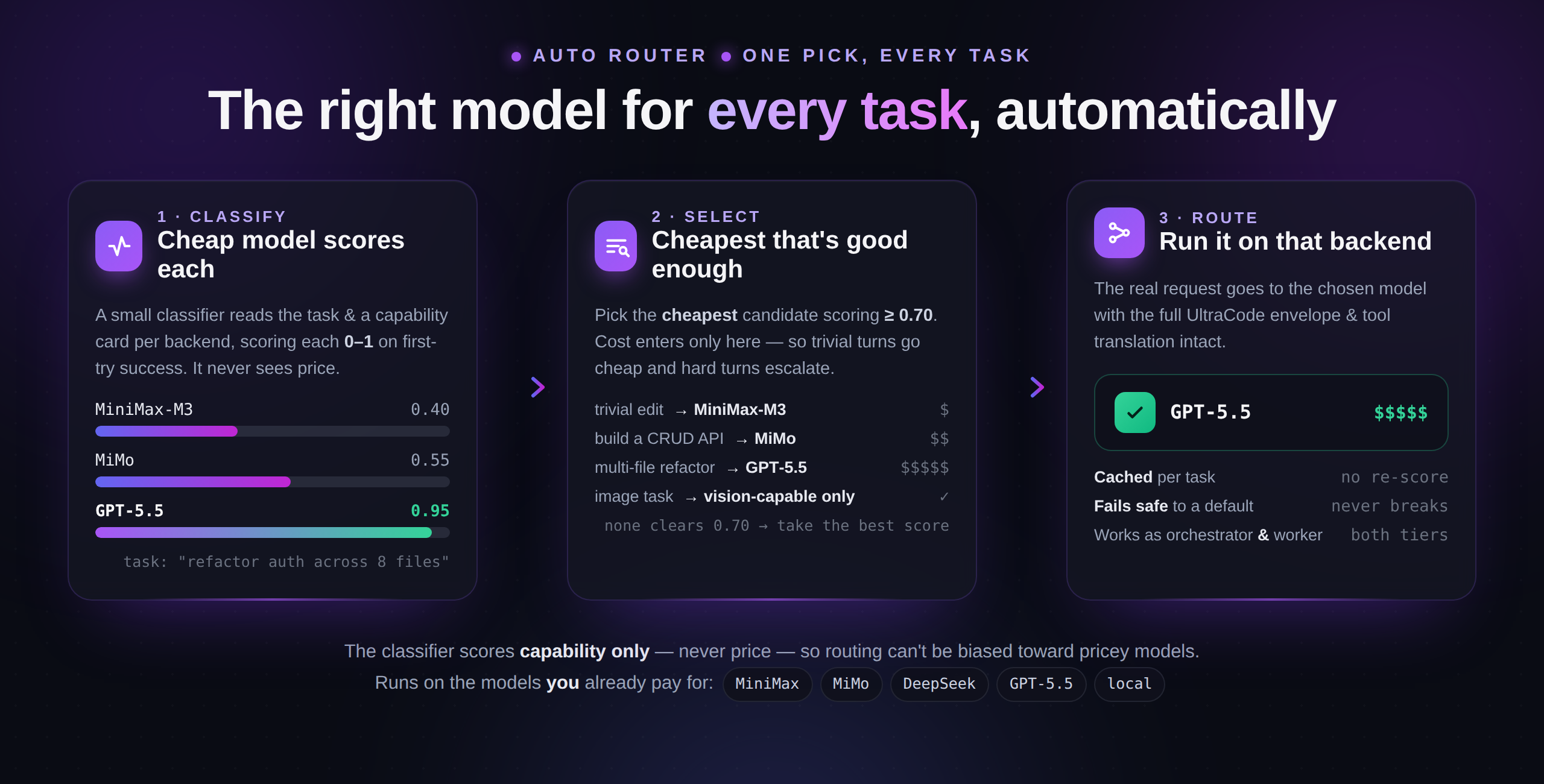
Don't want to pick at all? Choose **`Auto (smart routing)`** and the proxy
decides *per task* which of your backends to use — **trivial turns go to a cheap
model, hard turns escalate to your strongest one.** Same idea as Factory Droid's
model router ("frontier quality, lower cost"), rebuilt on the models *you*
already pay for.
A tiny, cheap **classifier** model you nominate scores each candidate `0–1` on
how likely it is to nail the current task (reading a short capability card you
write for each). The proxy then routes to the **cheapest candidate that clears a
quality bar** (default `0.7`). The classifier never sees price, so it can't be
biased toward expensive models; decisions are cached per task; and it degrades
safely (any failure falls back to a sensible default and never breaks a request).
It's **off until you configure it** — the shipped `config.example.json` has a
ready-to-use block. Full guide: [docs/AUTO_ROUTER.md](docs/AUTO_ROUTER.md).
```jsonc
"router": {
"enabled": true,
"classifier": "claude-mimo", // your cheapest fast model does the scoring
"threshold": 0.7, // cheapest candidate scoring >= this wins
"candidates": [
{ "id": "claude-minimax-m3", "cost": 0.3, "card": "cheap; single-file edits, codegen, simple refactors" },
{ "id": "claude-gpt-5.5-codex", "cost": 5.0, "card": "frontier; big refactors, hard debugging, images" }
]
}
```
Works as your orchestrator, your worker, or both. Watch it decide with
`UC_ROUTER_LOG=1`.
**See it route, offline (no keys):**
```
python3 examples/auto_router_demo.py
```
```text
# Task Classifier scores Routed to Cost
1 add a docstring to the foo() helper cheap=0.90 mid=0.92 strong=0.95 claude-cheap $0.3
2 write a CRUD REST endpoint with tests cheap=0.50 mid=0.85 strong=0.95 claude-mid $1.0
3 refactor the auth module across 8 files ... cheap=0.40 mid=0.55 strong=0.95 claude-strong $5.0
4 what does this screenshot show? [image] cheap=0.90 mid=0.92 strong=0.95 claude-strong $5.0 ← only vision-capable
5 (repeat task #1) served from cache claude-cheap $0.3 ← classifier not re-called
```
## Built for long, dynamic workflows ✨
UltraCode shines on *long, autonomous* runs — deep reasoning, multi-step
Workflows, multi-agent fan-out. The catch with any "route to a third-party
backend" shim is that those backends occasionally hiccup, and on a 40-minute
agent run a single unhandled hiccup can wedge the whole session. **We hardened
the proxy against the three failure modes we actually hit in production**, so it
keeps going instead of stalling:
- **🔁 Empty turns auto-retry.** A backend that returns a turn with no text and no
tool call (a transient blip, or a budget-exhausted reasoning turn at high
effort) is transparently re-issued. It buffers only until the first real token,
so a normal turn adds **zero latency** and output is never duplicated — and it
never retries after real output or a fatal error.
- **⏱️ A stalled stream can't freeze the run.** If a GPT‑5.5/codex stream opens and
then goes silent mid-turn, a bounded idle timeout turns the stall into a quick
retry instead of a ~10-minute hang — so one stuck sub-agent no longer freezes an
entire multi-agent / dynamic-workflow run.
- **🛠️ Rejecting a tool call just works.** Declining (or skipping) a tool mid-run no
longer 400s strict backends like DeepSeek — the proxy repairs the tool-call
sequence and synthesizes a stub reply for anything you didn't answer, including
partial parallel calls. ([#3](https://github.com/OnlyTerp/UltraCode-Shim/issues/3))
- **💬 No "dead air" while a model thinks.** Reasoning models (MiniMax‑M3, etc.)
can think for seconds before the first answer token. The proxy keeps the
connection live during that phase, so a workflow step looks busy instead of
frozen — without leaking the chain-of-thought into the answer.
All of these are tunable via env vars and locked down by the offline self-test in
CI. Details and knobs: [docs/HOW_IT_WORKS.md → Reliability](docs/HOW_IT_WORKS.md#6-reliability--surviving-long-and-dynamic-workflows).
## Demo
There's a ready-to-run scenario in [`examples/demo/`](examples/demo/) — a buggy
little Game of Life. Launch UltraCode there, pick any model, enable auto mode,
and paste [the prompt](examples/demo/PROMPT.md): it fixes the bug, adds an
animated color renderer + starting patterns, and runs its own self-test, ending
on a glider crawling across the screen.
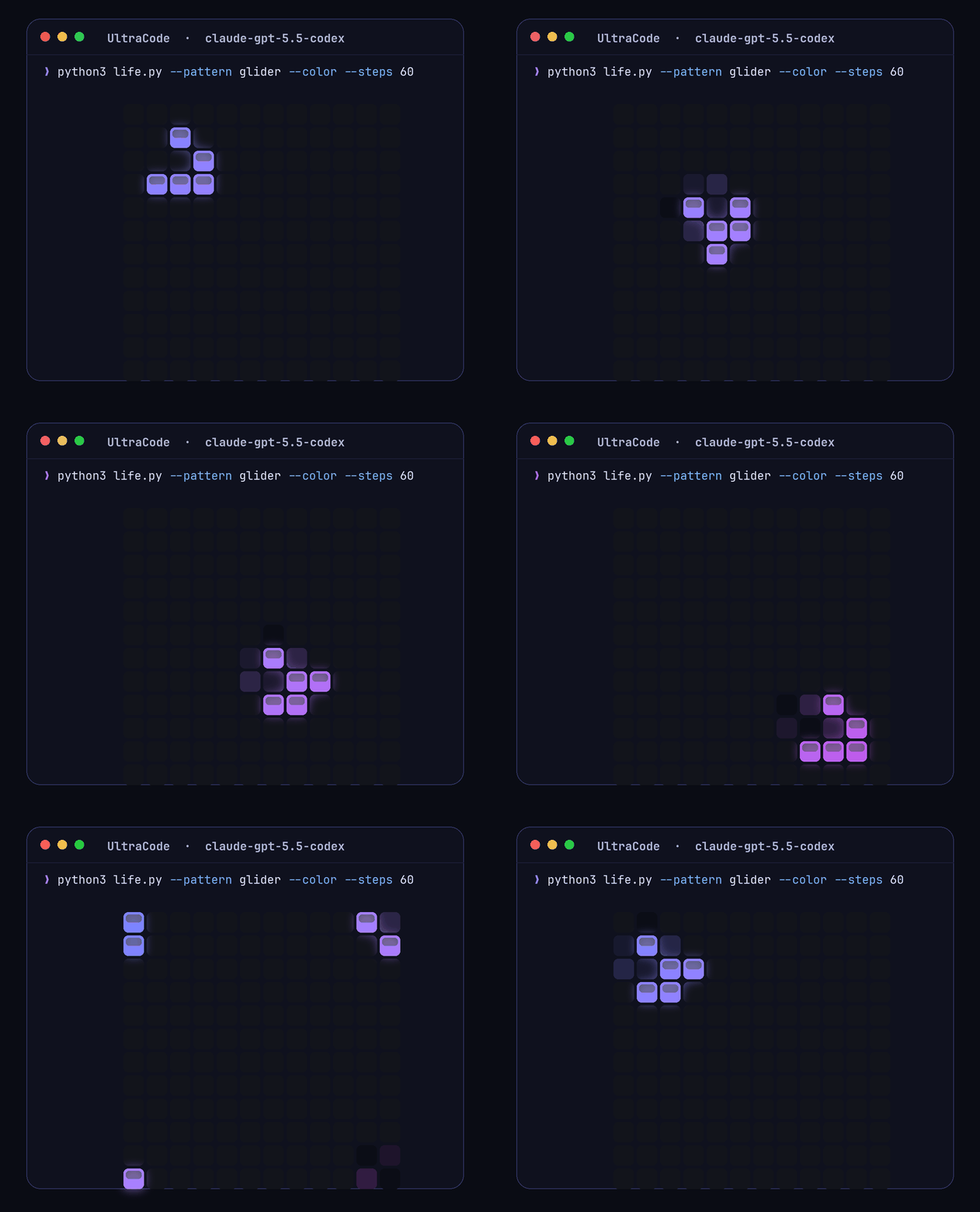
The demo's payoff: an animated, colored glider crawling across the terminal. Record your own run over this — see assets/demo/README.md.
Verified live against real backends: **GPT‑5.5** (Codex login) and **Cursor
Composer**, plus an offline self-test that runs in CI on Linux/Windows ×
Python 3.8/3.12.
## What you need
- **Claude Code CLI** with UltraCode access (`npm i -g @anthropic-ai/claude-code`).
- **Python 3.8+** (standard library only — there is nothing to `pip install`).
- **At least one backend credential**, e.g. an API key (MiMo / OpenRouter / OpenAI /
a local server) and/or a `codex login` for GPT‑5.5. You only set up the ones you have.
Tested on **Windows 11** (no WSL needed). macOS/Linux/WSL work too via `bin/ultracode`.
## Quick start
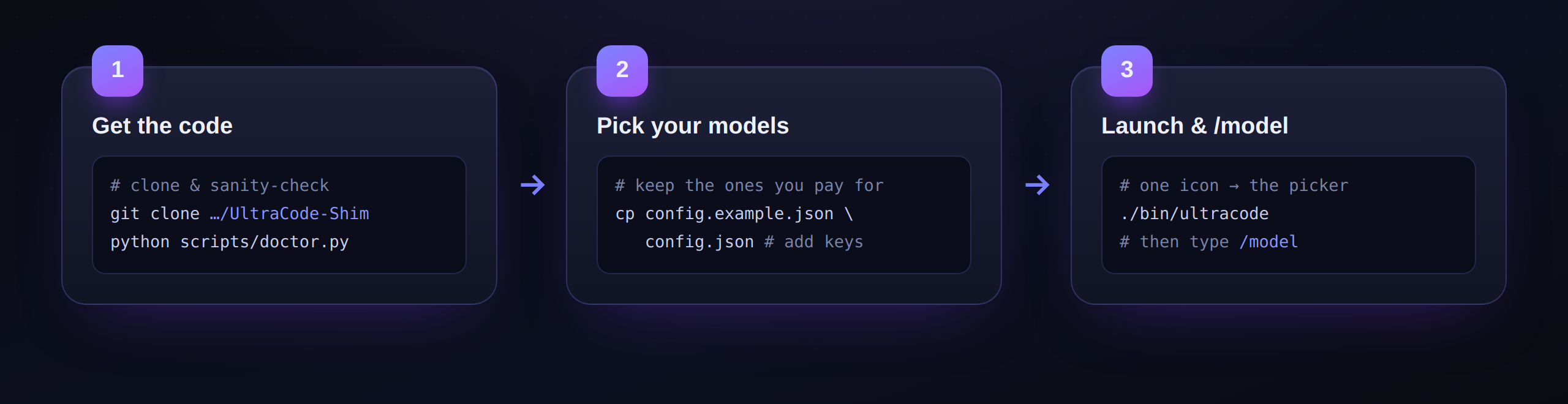
**One command** gets the code, runs the offline self-test, creates your
`config.json`, and installs a `ultracode` launcher on your PATH. Then you edit
one file and run `ultracode`.
### macOS / Linux / WSL
```bash
curl -fsSL https://raw.githubusercontent.com/OnlyTerp/UltraCode-Shim/main/install.sh | bash
```
### Windows (PowerShell)
```powershell
irm https://raw.githubusercontent.com/OnlyTerp/UltraCode-Shim/main/install.ps1 | iex
```
Already cloned the repo? Just run `./install.sh` (or `.\install.ps1`) from inside
it — same result, no network clone.
Then:
1. **Pick your models** — edit `config.json` (created for you): keep the backends
you have a key/plan for, delete the rest, drop your keys in. See
[Configure your models](#configure-your-models).
2. **Run it** — `ultracode`. The launcher starts the proxy, opens the two-column
orchestrator/worker selector, then launches Claude Code. Type `/model` anytime
to change either tier. (`UC_SELECTOR=0` skips the selector and uses `/model`
only.)
> **Prefer Desktop icons on Windows?** Run `.\install.ps1 -DesktopIcons` (or, in a
> clone, `.\windows\Install-DesktopIcons.ps1`) to get **"UltraCode (All Models)"**
> and **"Claude Code (Normal)"** shortcuts. Uninstall the launcher anytime with
> `./install.sh --uninstall` (or `.\install.ps1 -Uninstall`).
Manual install (no install script)
```bash
git clone https://github.com/OnlyTerp/UltraCode-Shim.git
cd UltraCode-Shim
python3 scripts/doctor.py # sanity-check + offline self-test
cp config.example.json config.json # then edit it (gitignored)
./bin/ultracode # mac/linux/WSL
# windows: .\windows\Start-UltraCode.ps1 (or .\windows\Install-DesktopIcons.ps1)
```
The launchers copy `config.example.json` → `config.json` for you on first run if
you skip that step.
## Configure your models
Everything is in one file: **`config.json`** (copied from `config.example.json`).
It has two sections you edit:
- **`models`** — what shows up in the `/model` menu. Every `id` **must start with
`claude` or `anthropic`** (Claude Code filters the rest out).
- **`routes`** — where each of those ids actually goes. The route key must match
the model `id`.
> **Real Claude (Opus / Sonnet / Haiku) is always in the picker.** You don't list
> it in `config.json` — the proxy adds the stock Claude models to `/model`
> automatically and *keeps them there even when there's no Anthropic key to fetch
> the list*, so Opus never silently disappears. Picking one routes straight to
> real Claude with the UltraCode envelope. The list is **self-updating**: the
> proxy learns the real Claude ids from any successful upstream `/v1/models` fetch
> and caches them, so when Anthropic ships the next Opus it shows up here
> automatically — no update to this tool needed. Don't want any of this? Set
> `proxy.include_stock_models: false` (or `UC_INCLUDE_STOCK_MODELS=0`); disable
> just the learning with `proxy.learn_stock_models: false` (or `UC_STOCK_LEARN=0`).
Example — MiMo and an OpenRouter model:
```jsonc
{
"models": [
{ "id": "claude-mimo", "display_name": "MiMo v2.5 Pro" },
{ "id": "claude-openrouter", "display_name": "Llama 3.3 70B (OpenRouter)" }
],
"routes": {
"claude-mimo": {
"type": "openai_compat",
"upstream": "https://token-plan-sgp.xiaomimimo.com/v1",
"model": "mimo-v2.5-pro",
"auth": "Bearer ${MIMO_API_KEY}"
},
"claude-openrouter": {
"type": "openai_compat",
"upstream": "https://openrouter.ai/api/v1",
"model": "meta-llama/llama-3.3-70b-instruct",
"auth": "Bearer ${OPENROUTER_API_KEY}"
}
}
}
```
Put your key right in `config.json` (it's gitignored) or use `${ENV_VAR}` and
export it — or drop keys into a gitignored `ultracode.env` the launchers load.
[Requesty](https://requesty.ai) works the same way — another `openai_compat`
gateway with `upstream` `https://router.requesty.ai/v1`, `provider/model` naming
(e.g. `openai/gpt-4o-mini`), and `auth` `Bearer ${REQUESTY_API_KEY}`.
Route types:
| `type` | Use for | Needs |
|-----------------|----------------------------------------------------|-------|
| *(omit)* | Real Claude or any Anthropic-compatible endpoint | nothing, or `auth`/`upstream` |
| `openai_compat` | MiMo, DeepSeek, OpenRouter, Requesty, OpenAI, Ollama, local llama.cpp — anything that speaks OpenAI Chat Completions (tools included) | an API key |
| `codex_oauth` | GPT‑5.5 via a ChatGPT/Codex login (no API key) | `codex login` once |
| `cursor_agent` | Cursor Composer (experimental) | `cursor-agent login` |
| `auto` | The [Auto Router](docs/AUTO_ROUTER.md) — score candidates per task and route to the cheapest that's good enough | a `router` block + a classifier model |
> **Reasoning models (MiniMax‑M3, etc.):** an `openai_compat` route can carry a
> `"body": { ... }` dict of extra params merged into every request. **MiniMax‑M3**
> needs `"body": { "reasoning_split": true }` so its `` chain‑of‑thought is
> returned separately instead of leaking into the visible answer — the shipped
> example already sets this. See [docs/ADD_A_MODEL.md](docs/ADD_A_MODEL.md#minimax-m3).
Full walkthrough: [docs/ADD_A_MODEL.md](docs/ADD_A_MODEL.md).
## Is my normal Claude Code safe?
Yes. The UltraCode launcher only sets environment variables **for the launched
process** and uses a session-scoped `--settings` file. It never edits your global
Claude config or credentials. On Windows the `-DesktopIcons` install also gives
you a **"Claude Code (Normal)"** icon, so you can always start the plain version.
Remove the launcher with `./install.sh --uninstall` (or `.\install.ps1
-Uninstall`); remove Windows icons + session state with `windows\Uninstall.ps1`.
## Telling your AI assistant to set this up
This repo is built so you can hand it to an assistant. Point it at
[AGENTS.md](AGENTS.md) — that's a step-by-step runbook (install → configure →
test → troubleshoot) written for an AI to follow.
## Docs
| Doc | What |
|-----|------|
| [AGENTS.md](AGENTS.md) | Runbook for an AI assistant to install/configure/test |
| [docs/SETUP.md](docs/SETUP.md) | Human setup guide (Windows + macOS/Linux) |
| [docs/HOW_IT_WORKS.md](docs/HOW_IT_WORKS.md) | The mechanism + reverse-engineering evidence |
| [docs/AUTO_ROUTER.md](docs/AUTO_ROUTER.md) | The Auto Router — pick the right model per task automatically |
| [docs/DIRECTIVES.md](docs/DIRECTIVES.md) | Routing directives — pin a request to a model from the prompt (per-role multi-agent workflows) |
| [docs/ADD_A_MODEL.md](docs/ADD_A_MODEL.md) | Add any backend to the `/model` menu |
| [docs/TROUBLESHOOTING.md](docs/TROUBLESHOOTING.md) | Symptom → cause → fix |
## License
MIT — see [LICENSE](LICENSE). This is an unofficial, community project; it is not
affiliated with Anthropic, OpenAI, or any model provider. You are responsible for
complying with the terms of whatever accounts you route through it.