




Give your AI coding agent access to best-practices of ML and AI.

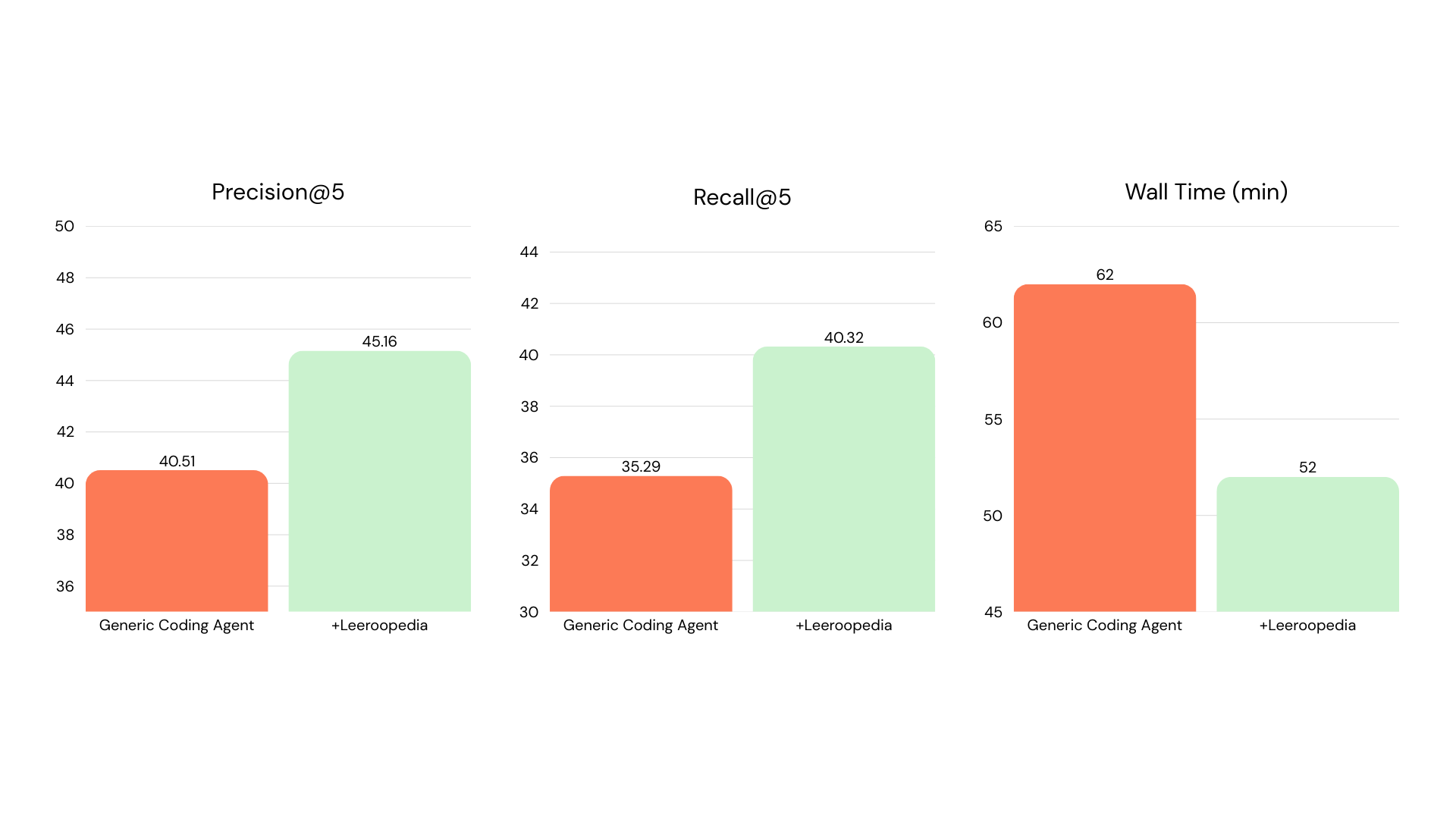
 - **Self-Evolving RAG**: Build a RAG service that automatically improves itself over multiple rounds. **45.16 vs 40.51** Precision@5, **40.32 vs 35.29** Recall@5, in **52 vs 62 min** wall time. [→ results](examples/self_evolve_rag/)
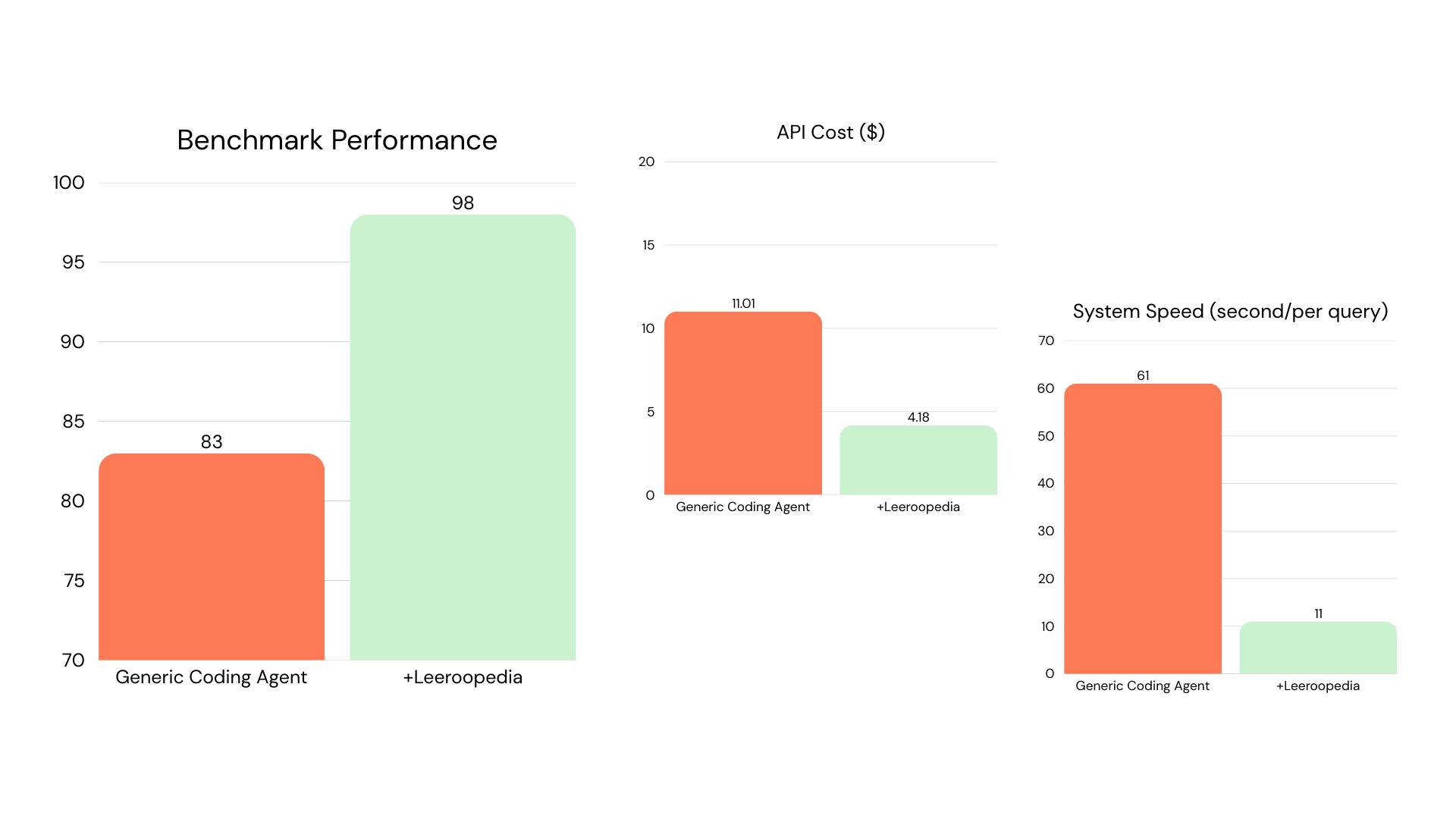
 - **Customer Support Agent**: Multi-agent triage system classifying 200 tickets into 27 intents. **98 vs 83** benchmark performance, **11s vs 61s** per query. [→ results](examples/customer_support_agent/)
 ## Quick Start
### 1. Get Your API Key
1. Go to [app.leeroopedia.com](https://app.leeroopedia.com)
2. Create an account or log in
3. Navigate to **Dashboard > API Keys**
4. Copy your API key (format: `kpsk_...`)
### 2. Use the hosted server (no installation needed)
Just paste this URL into any MCP client that supports remote servers:
```
https://mcp.leeroopedia.com/mcp?token=kpsk_your_key_here
```
See the **[connect guides](https://docs.leeroopedia.com)** for all IDEs, running locally, and troubleshooting.
### 3. Configure Claude Code
**Remote (no install):**
```bash
claude mcp add --transport http leeroopedia "https://mcp.leeroopedia.com/mcp?token=kpsk_your_key_here"
```
**Local (via uvx):**
Add to your `~/.claude.json` or project `.mcp.json`:
```json
{
"mcpServers": {
"leeroopedia": {
"command": "uvx",
"args": ["leeroopedia-mcp"],
"env": {
"LEEROOPEDIA_API_KEY": "kpsk_your_key_here"
}
}
}
}
```
> **Getting `spawn uvx ENOENT`?** Your IDE can't find `uvx` in its PATH. Run `which uvx` (or `where uvx` on Windows) in your terminal to get the full path, then use it in your config:
> ```json
> "command": "/home/username/.local/bin/uvx"
> ```
> Common locations: `~/.local/bin/uvx` (Linux), `~/.local/bin/uvx` (macOS curl install), `/opt/homebrew/bin/uvx` (macOS Homebrew).
### 4. Configure Cursor
**Remote (no install):**
Add to your Cursor settings (`.cursor/mcp.json`):
```json
{
"mcpServers": {
"leeroopedia": {
"url": "https://mcp.leeroopedia.com/mcp?token=kpsk_your_key_here"
}
}
}
```
**Local (via uvx):**
```json
{
"mcpServers": {
"leeroopedia": {
"command": "uvx",
"args": ["leeroopedia-mcp"],
"env": {
"LEEROOPEDIA_API_KEY": "kpsk_your_key_here"
}
}
}
}
```
> **Getting `spawn uvx ENOENT`?** See the tip in [Configure Claude Code](#3-configure-claude-code) above.
### 5. Configure OpenAI Codex
Run the CLI command:
```bash
codex mcp add leeroopedia --env LEEROOPEDIA_API_KEY=kpsk_your_key_here -- uvx leeroopedia-mcp
```
Or add to your `~/.codex/config.toml`:
```toml
[mcp_servers.leeroopedia]
command = "uvx"
args = ["leeroopedia-mcp"]
[mcp_servers.leeroopedia.env]
LEEROOPEDIA_API_KEY = "kpsk_your_key_here"
```
> **Getting `spawn uvx ENOENT`?** See the tip in [Configure Claude Code](#3-configure-claude-code) above.
### 6. Optional: Add the Agent Skill File
For coding agents that support project-level instruction files (Claude Code, Cursor, Codex), you can add an optional skill file that teaches the agent **when and how** to pick the right Leeroopedia tool for each situation. This improves tool selection, encourages parallel searches, and provides canonical workflows for common tasks like "How do I implement X?" or "My run crashed".
Download [`SKILL.md`](https://raw.githubusercontent.com/Leeroo-AI/leeroopedia-mcp/main/SKILL.md) and place it in the appropriate location for your agent:
| Agent | Where to place the file | Format |
|-------|------------------------|--------|
| **Claude Code** | Project root or `CLAUDE.md` (paste the content) | Markdown |
| **Cursor** | `.cursor/rules/leeroopedia.md` (or add as an Agent Skill) | Markdown |
| **Codex** | Project root `AGENTS.md` (paste the content) | Markdown |
> This step is optional. The MCP tools work without the skill file. The skill file just helps the agent make better tool choices automatically.
## Documentation
> **[docs.leeroopedia.com](https://docs.leeroopedia.com)** — full setup guides, environment variables, troubleshooting, connect guides for every IDE, and detailed tool usage.
## Contributing
We welcome contributions! Please see our [Contributing Guide](CONTRIBUTING.md) for details on how to get started.
This project follows our [Code of Conduct](CODE_OF_CONDUCT.md).
## License
This project is licensed under the [MIT License](LICENSE).
## Quick Start
### 1. Get Your API Key
1. Go to [app.leeroopedia.com](https://app.leeroopedia.com)
2. Create an account or log in
3. Navigate to **Dashboard > API Keys**
4. Copy your API key (format: `kpsk_...`)
### 2. Use the hosted server (no installation needed)
Just paste this URL into any MCP client that supports remote servers:
```
https://mcp.leeroopedia.com/mcp?token=kpsk_your_key_here
```
See the **[connect guides](https://docs.leeroopedia.com)** for all IDEs, running locally, and troubleshooting.
### 3. Configure Claude Code
**Remote (no install):**
```bash
claude mcp add --transport http leeroopedia "https://mcp.leeroopedia.com/mcp?token=kpsk_your_key_here"
```
**Local (via uvx):**
Add to your `~/.claude.json` or project `.mcp.json`:
```json
{
"mcpServers": {
"leeroopedia": {
"command": "uvx",
"args": ["leeroopedia-mcp"],
"env": {
"LEEROOPEDIA_API_KEY": "kpsk_your_key_here"
}
}
}
}
```
> **Getting `spawn uvx ENOENT`?** Your IDE can't find `uvx` in its PATH. Run `which uvx` (or `where uvx` on Windows) in your terminal to get the full path, then use it in your config:
> ```json
> "command": "/home/username/.local/bin/uvx"
> ```
> Common locations: `~/.local/bin/uvx` (Linux), `~/.local/bin/uvx` (macOS curl install), `/opt/homebrew/bin/uvx` (macOS Homebrew).
### 4. Configure Cursor
**Remote (no install):**
Add to your Cursor settings (`.cursor/mcp.json`):
```json
{
"mcpServers": {
"leeroopedia": {
"url": "https://mcp.leeroopedia.com/mcp?token=kpsk_your_key_here"
}
}
}
```
**Local (via uvx):**
```json
{
"mcpServers": {
"leeroopedia": {
"command": "uvx",
"args": ["leeroopedia-mcp"],
"env": {
"LEEROOPEDIA_API_KEY": "kpsk_your_key_here"
}
}
}
}
```
> **Getting `spawn uvx ENOENT`?** See the tip in [Configure Claude Code](#3-configure-claude-code) above.
### 5. Configure OpenAI Codex
Run the CLI command:
```bash
codex mcp add leeroopedia --env LEEROOPEDIA_API_KEY=kpsk_your_key_here -- uvx leeroopedia-mcp
```
Or add to your `~/.codex/config.toml`:
```toml
[mcp_servers.leeroopedia]
command = "uvx"
args = ["leeroopedia-mcp"]
[mcp_servers.leeroopedia.env]
LEEROOPEDIA_API_KEY = "kpsk_your_key_here"
```
> **Getting `spawn uvx ENOENT`?** See the tip in [Configure Claude Code](#3-configure-claude-code) above.
### 6. Optional: Add the Agent Skill File
For coding agents that support project-level instruction files (Claude Code, Cursor, Codex), you can add an optional skill file that teaches the agent **when and how** to pick the right Leeroopedia tool for each situation. This improves tool selection, encourages parallel searches, and provides canonical workflows for common tasks like "How do I implement X?" or "My run crashed".
Download [`SKILL.md`](https://raw.githubusercontent.com/Leeroo-AI/leeroopedia-mcp/main/SKILL.md) and place it in the appropriate location for your agent:
| Agent | Where to place the file | Format |
|-------|------------------------|--------|
| **Claude Code** | Project root or `CLAUDE.md` (paste the content) | Markdown |
| **Cursor** | `.cursor/rules/leeroopedia.md` (or add as an Agent Skill) | Markdown |
| **Codex** | Project root `AGENTS.md` (paste the content) | Markdown |
> This step is optional. The MCP tools work without the skill file. The skill file just helps the agent make better tool choices automatically.
## Documentation
> **[docs.leeroopedia.com](https://docs.leeroopedia.com)** — full setup guides, environment variables, troubleshooting, connect guides for every IDE, and detailed tool usage.
## Contributing
We welcome contributions! Please see our [Contributing Guide](CONTRIBUTING.md) for details on how to get started.
This project follows our [Code of Conduct](CODE_OF_CONDUCT.md).
## License
This project is licensed under the [MIT License](LICENSE).