<div id="about-content">
  <img src="https://ewanhowell.com/assets/images/plugins/cem-template-loader/logo.webp" />
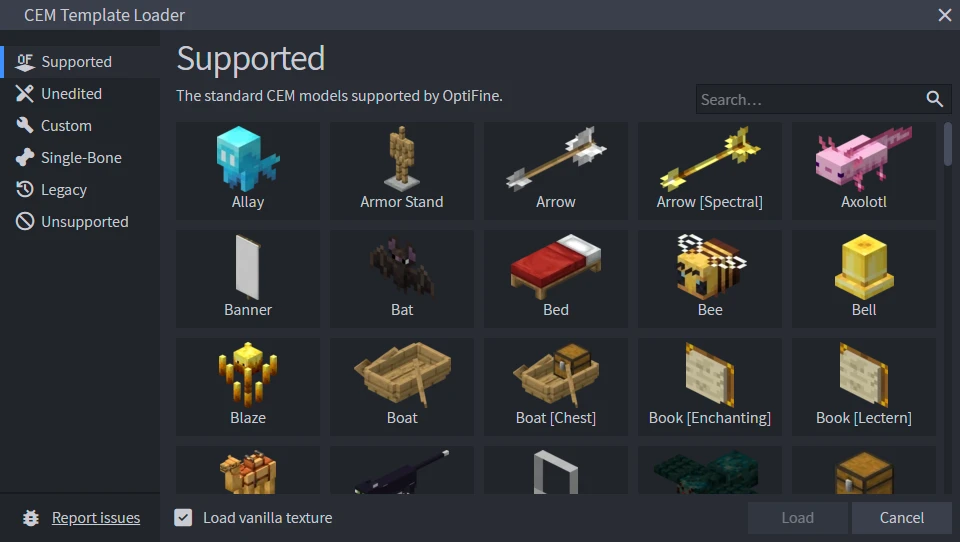
  <p>CEM Template Loader can be used to load the vanilla entity models for Minecraft: Java Edition, so you can use them in OptiFine CEM, or as texturing templates.</p>
  <p>To use this plugin, head to the <strong>Tools</strong> menu and select <strong>CEM Template Loader</strong>. From here, select the model that you would like to edit and load it.</p>
  <p>After editing your model, export it as an <strong>OptiFine JEM</strong> to the folder <code>assets/minecraft/optifine/cem</code>. If a texture is used in the model, make sure it saves with a valid file path.</p>
  <img style="height: 300px; margin: 10px 0 12px; image-rendering: auto;" src="https://ewanhowell.com/assets/images/plugins/cem-template-loader/images/dialog.webp" />
  <h2>Important</h2>
  <p>When editing an entity model, you cannot rotate root groups (top level folders), or move the pivot points of root groups, as this can break your model. If you need to rotate a root group, use a subgroup. If you need to change a root group's pivot point, use CEM animations.</p>
  <h2>Animation Editor</h2>
  <p>CEM Template Loader also includes an animation editor, so that you can create custom entity animations.</p>
</div>
<style>
  .about {
    height: 100%;
    display: flex;
    flex-direction: column;
    justify-content: space-between;
  }
  #about-content {
    overflow-y: auto;
    min-height: 128px;
  }
  #about-content > img {
    width: 100%;
    height: 128px;
    object-fit: contain;
    margin: 16px 0 24px;
    filter: drop-shadow(0 3px 10px #0006);
  }
  #about-markdown-links {
    display: flex;
    justify-content: space-around;
    margin: 20px 20px 0;
  }
  #about-markdown-links > a {
    display: flex;
    flex-direction: column;
    align-items: center;
    gap: 5px;
    padding: 5px;
    text-decoration: none;
    flex-grow: 1;
    flex-basis: 0;
    color: var(--color-subtle_text);
    text-align: center;
  }
  #about-markdown-links > a:hover {
    background-color: var(--color-accent);
    color: var(--color-light);
  }
  #about-markdown-links > a > i {
    font-size: 32px;
    width: 100%;
    max-width: initial;
    height: 32px;
    text-align: center;
  }
  #about-markdown-links > a:hover > i {
    color: var(--color-light) !important;
  }
  #about-markdown-links > a > p {
    flex: 1;
    display: flex;
    align-items: center;
    margin: 0;
  }
</style>
<div id="about-markdown-links">
  <a href="https://ewanhowell.com/">
    <i class="material-icons icon" style="color: #33E38E;">language</i>
    <p>By Ewan Howell</p>
  </a>
  <a href="https://discord.ewanhowell.com/">
    <i class="fa_big icon fab fa-discord" style="color: #727FFF;"></i>
    <p>Discord Server</p>
  </a>
  <a href="https://youtu.be/arj2eim42KI">
    <i class="fa_big icon fab fa-youtube" style="color: #FF4444;"></i>
    <p>CEM Modelling Tutorial</p>
  </a>
</div>