# WolframAlpha LLM MCP Server
 A Model Context Protocol (MCP) server that provides access to WolframAlpha's LLM API. https://products.wolframalpha.com/llm-api/documentation
## Features
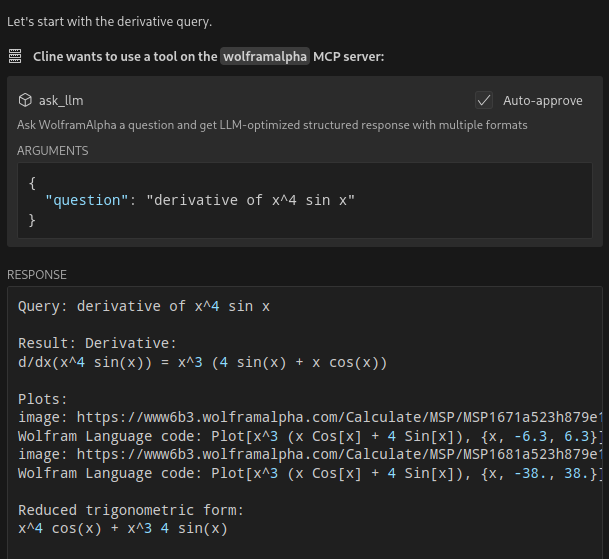
- Query WolframAlpha's LLM API with natural language questions
- Answer complicated mathematical questions
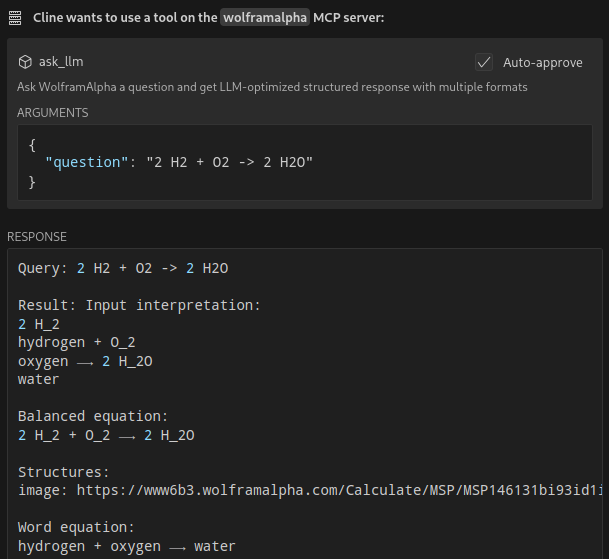
- Query facts about science, physics, history, geography, and more
- Get structured responses optimized for LLM consumption
- Support for simplified answers and detailed responses with sections
## Available Tools
- `ask_llm`: Ask WolframAlpha a question and get a structured llm-friendly response
- `get_simple_answer`: Get a simplified answer
- `validate_key`: Validate the WolframAlpha API key
## Installation
```bash
git clone https://github.com/Garoth/wolframalpha-llm-mcp.git
npm install
```
## Configuration
1. Get your WolframAlpha API key from [developer.wolframalpha.com](https://developer.wolframalpha.com/)
2. Add it to your Cline MCP settings file inside VSCode's settings (ex. ~/.config/Code/User/globalStorage/saoudrizwan.claude-dev/settings/cline_mcp_settings.json):
```json
{
"mcpServers": {
"wolframalpha": {
"command": "node",
"args": ["/path/to/wolframalpha-mcp-server/build/index.js"],
"env": {
"WOLFRAM_LLM_APP_ID": "your-api-key-here"
},
"disabled": false,
"autoApprove": [
"ask_llm",
"get_simple_answer",
"validate_key"
]
}
}
}
```
## Development
### Setting Up Tests
The tests use real API calls to ensure accurate responses. To run the tests:
1. Copy the example environment file:
```bash
cp .env.example .env
```
2. Edit `.env` and add your WolframAlpha API key:
```
WOLFRAM_LLM_APP_ID=your-api-key-here
```
Note: The `.env` file is gitignored to prevent committing sensitive information.
3. Run the tests:
```bash
npm test
```
### Building
```bash
npm run build
```
## License
MIT
A Model Context Protocol (MCP) server that provides access to WolframAlpha's LLM API. https://products.wolframalpha.com/llm-api/documentation
## Features
- Query WolframAlpha's LLM API with natural language questions
- Answer complicated mathematical questions
- Query facts about science, physics, history, geography, and more
- Get structured responses optimized for LLM consumption
- Support for simplified answers and detailed responses with sections
## Available Tools
- `ask_llm`: Ask WolframAlpha a question and get a structured llm-friendly response
- `get_simple_answer`: Get a simplified answer
- `validate_key`: Validate the WolframAlpha API key
## Installation
```bash
git clone https://github.com/Garoth/wolframalpha-llm-mcp.git
npm install
```
## Configuration
1. Get your WolframAlpha API key from [developer.wolframalpha.com](https://developer.wolframalpha.com/)
2. Add it to your Cline MCP settings file inside VSCode's settings (ex. ~/.config/Code/User/globalStorage/saoudrizwan.claude-dev/settings/cline_mcp_settings.json):
```json
{
"mcpServers": {
"wolframalpha": {
"command": "node",
"args": ["/path/to/wolframalpha-mcp-server/build/index.js"],
"env": {
"WOLFRAM_LLM_APP_ID": "your-api-key-here"
},
"disabled": false,
"autoApprove": [
"ask_llm",
"get_simple_answer",
"validate_key"
]
}
}
}
```
## Development
### Setting Up Tests
The tests use real API calls to ensure accurate responses. To run the tests:
1. Copy the example environment file:
```bash
cp .env.example .env
```
2. Edit `.env` and add your WolframAlpha API key:
```
WOLFRAM_LLM_APP_ID=your-api-key-here
```
Note: The `.env` file is gitignored to prevent committing sensitive information.
3. Run the tests:
```bash
npm test
```
### Building
```bash
npm run build
```
## License
MIT