<p align="center">
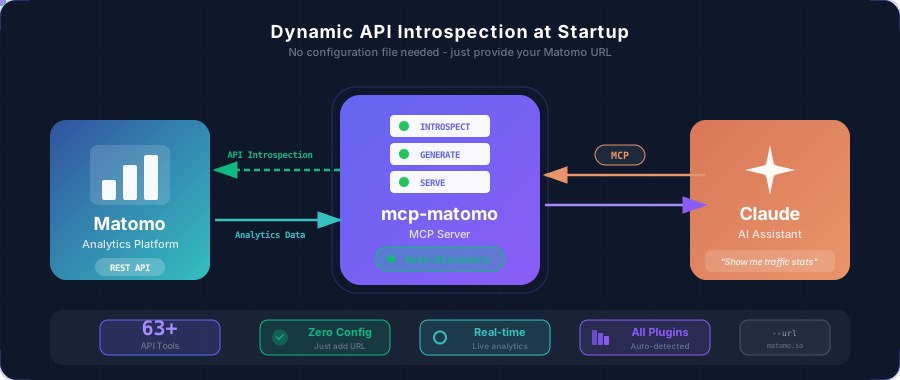
  <img src="assets/architecture.svg" alt="MCP Matomo Architecture" width="100%"/>
</p>

<h1 align="center">MCP Matomo</h1>

<p align="center">
  <a href="https://github.com/FGRibreau/mcp-matomo/actions/workflows/ci.yml"><img src="https://github.com/FGRibreau/mcp-matomo/actions/workflows/ci.yml/badge.svg" alt="CI"/></a>
  <a href="LICENSE"><img src="https://img.shields.io/badge/License-MIT-blue.svg" alt="License: MIT"/></a>
  <a href="https://www.rust-lang.org/"><img src="https://img.shields.io/badge/rust-stable-orange.svg" alt="Rust"/></a>
</p>

<p align="center">
  <strong>A Model Context Protocol (MCP) server that exposes your Matomo Analytics API to Claude and other MCP-compatible AI assistants.</strong>
</p>

---

## Sponsors

<table>
  <tr>
    <td align="center" width="175">
      <a href="https://france-nuage.fr/?mtm_source=github&mtm_medium=sponsor&mtm_campaign=france-nuage&mtm_content=mcp-matomo">
        <img src="assets/sponsors/france-nuage.svg" height="60" alt="France-Nuage"/><br/>
        <b>France-Nuage</b>
      </a><br/>
      <sub>Host Matomo on sovereign French cloud. EU-only, re-internalisable.</sub>
    </td>
    <td align="center" width="175">
      <a href="https://www.hook0.com/?mtm_source=github&mtm_medium=sponsor&mtm_campaign=hook0&mtm_content=mcp-matomo">
        <img src="assets/sponsors/hook0.png" height="60" alt="Hook0"/><br/>
        <b>Hook0</b>
      </a><br/>
      <sub>Forward Matomo events as signed webhooks to your stack. Self-hostable.</sub>
    </td>
    <td align="center" width="175">
      <a href="https://getnatalia.com/?mtm_source=github&mtm_medium=sponsor&mtm_campaign=natalia&mtm_content=mcp-matomo">
        <img src="assets/sponsors/natalia.svg" height="60" alt="Natalia"/><br/>
        <b>Natalia</b>
      </a><br/>
      <sub>AI voice agent calls back the visitors your funnel just lost. 24/7.</sub>
    </td>
    <td align="center" width="175">
      <a href="https://netir.fr/?mtm_source=github&mtm_medium=sponsor&mtm_campaign=netir&mtm_content=mcp-matomo">
        <img src="assets/sponsors/netir.svg" height="60" alt="Netir"/><br/>
        <b>Netir</b>
      </a><br/>
      <sub>Hire vetted French freelance analytics engineers via marketplace.</sub>
    </td>
  </tr>
  <tr>
    <td align="center" width="233">
      <a href="https://nobullshitconseil.com/?mtm_source=github&mtm_medium=sponsor&mtm_campaign=nbc&mtm_content=mcp-matomo">
        <img src="assets/sponsors/nobullshitconseil.svg" height="60" alt="NoBullshitConseil"/><br/>
        <b>NoBullshitConseil</b>
      </a><br/>
      <sub>Tech advisory without the bullshit. Data &amp; analytics strategy.</sub>
    </td>
    <td align="center" width="233">
      <a href="https://qualneo.fr/?mtm_source=github&mtm_medium=sponsor&mtm_campaign=qualneo&mtm_content=mcp-matomo">
        <img src="assets/sponsors/qualneo.svg" height="60" alt="Qualneo"/><br/>
        <b>Qualneo</b>
      </a><br/>
      <sub>Qualiopi LMS for French trainers. 32 indicators tracked end-to-end.</sub>
    </td>
    <td align="center" width="233">
      <a href="https://recapro.ai/?mtm_source=github&mtm_medium=sponsor&mtm_campaign=recapro&mtm_content=mcp-matomo">
        <img src="assets/sponsors/recapro.png" height="60" alt="Recapro"/><br/>
        <b>Recapro</b>
      </a><br/>
      <sub>Private AI for client analytics reviews. Transcribe &amp; report sovereign.</sub>
    </td>
  </tr>
</table>

> **Interested in sponsoring?** [Get in touch](mailto:rust@fgribreau.com)

## Overview

This project provides an MCP server that exposes all available Matomo API methods as tools.

## Quick Start

### Prerequisites

- Rust stable ([install](https://rustup.rs/))
- A Matomo instance with API access
- A Matomo API token (`token_auth`)

### 1. Build the project

```bash
git clone https://github.com/FGRibreau/mcp-matomo.git
cd mcp-matomo
cargo build --release
```

### 2. Run the MCP server

The server can introspect your Matomo instance directly at startup:

```bash
./target/release/mcp-matomo \
  --url https://your-matomo-instance.com \
  --token YOUR_API_TOKEN
```

The server will:
1. Connect to your Matomo instance
2. Fetch all available API methods
3. Generate the tool definitions dynamically
4. Start listening on stdin/stdout for MCP messages

<details>
<summary>How to get your Matomo API token</summary>

1. Log in to your Matomo instance
2. Go to **Settings** (gear icon) → **Personal** → **Security**
3. Scroll down to **Auth tokens**
4. Click **Create new token**
5. Give it a name and copy the generated token

</details>

### Alternative: Use a pre-generated OpenAPI specification

If you prefer faster startup times (skipping the introspection step), you can use a pre-generated OpenAPI spec:

```bash
# Use a pre-generated spec
./target/release/mcp-matomo \
  --openapi matomo-api.json \
  --token YOUR_API_TOKEN
```

> **Note:** You can generate an OpenAPI spec by running the server with `--url` and saving the output, or by using an external OpenAPI generator.

## Configuration

### Claude Code

Add the following to your Claude Code MCP settings. You can do this via the CLI:

```bash
# Dynamic introspection (recommended)
claude mcp add matomo \
  --command /path/to/mcp-matomo \
  --args "--url" "https://your-matomo-instance.com" \
  --env "MCP_MATOMO_TOKEN=YOUR_API_TOKEN"
```

Or with a pre-generated OpenAPI spec for faster startup:

```bash
claude mcp add matomo \
  --command /path/to/mcp-matomo \
  --args "--openapi" "/path/to/matomo-api.json" \
  --env "MCP_MATOMO_TOKEN=YOUR_API_TOKEN"
```

Or manually add it to your MCP settings file:

```json
{
  "mcpServers": {
    "matomo": {
      "command": "/path/to/mcp-matomo",
      "args": ["--url", "https://your-matomo-instance.com"],
      "env": {
        "MCP_MATOMO_TOKEN": "YOUR_API_TOKEN"
      }
    }
  }
}
```

### Claude Desktop

Add to `~/Library/Application Support/Claude/claude_desktop_config.json` (macOS) or `%APPDATA%\Claude\claude_desktop_config.json` (Windows):

```json
{
  "mcpServers": {
    "matomo": {
      "command": "/absolute/path/to/mcp-matomo",
      "args": ["--url", "https://your-matomo-instance.com"],
      "env": {
        "MCP_MATOMO_TOKEN": "YOUR_API_TOKEN"
      }
    }
  }
}
```

## Usage Examples

Once configured, you can ask Claude questions like:

- *"How many visitors did I have yesterday?"*
- *"Show me the top 10 countries by visits this month"*
- *"What are my most popular pages this week?"*
- *"Compare last week's traffic to the week before"*
- *"Which devices are my visitors using?"*

Claude will automatically use the appropriate Matomo API tools to fetch and analyze your analytics data.

## Available Tools

The MCP server dynamically generates tools based on your Matomo instance's API. Below is the complete list of supported Matomo API methods exposed as MCP tools:

### Visits & Traffic Overview

| Tool | Description |
|------|-------------|
| `VisitsSummary_get` | General overview of visitor behavior (visits, pageviews, bounce rate, time on site) |
| `VisitFrequency_get` | Compare returning visitors vs new visitors metrics |
| `API_get` | All available metrics in one comprehensive call |
| `MultiSites_getAll` | Overview metrics for all your websites |
| `MultiSites_getOne` | Overview metrics for a specific website |

### Pages & Content Analytics

| Tool | Description |
|------|-------------|
| `Actions_get` | Basic overview of visitor actions on your website |
| `Actions_getPageUrls` | Most visited page URLs (hierarchical folder structure) |
| `Actions_getPageTitles` | Page titles that have been visited |
| `Actions_getEntryPageUrls` | Entry pages (first page viewed during visits) |
| `Actions_getEntryPageTitles` | Titles of entry pages |
| `Actions_getExitPageUrls` | Exit pages (last page viewed during visits) |
| `Actions_getExitPageTitles` | Titles of exit pages |
| `Actions_getDownloads` | Downloaded files tracking |
| `Actions_getOutlinks` | Outbound links clicked by visitors |
| `Contents_getContentNames` | Content names viewed and interacted with |
| `Contents_getContentPieces` | Content pieces viewed and interacted with |
| `PagePerformance_get` | Page load times and performance metrics |

### Site Search

| Tool | Description |
|------|-------------|
| `Actions_getSiteSearchKeywords` | Keywords searched on your internal search engine |
| `Actions_getSiteSearchNoResultKeywords` | Search keywords that returned no results |
| `Actions_getSiteSearchCategories` | Search categories selected by visitors |
| `Actions_getPageUrlsFollowingSiteSearch` | Pages clicked after internal search |
| `Actions_getPageTitlesFollowingSiteSearch` | Page titles clicked after internal search |

### Traffic Sources & Referrers

| Tool | Description |
|------|-------------|
| `Referrers_get` | Acquisition channels overview |
| `Referrers_getAll` | All referrers (websites, keywords, campaigns) unified |
| `Referrers_getReferrerType` | Distribution by channel type (direct, search, social, etc.) |
| `Referrers_getKeywords` | Search keywords used to find your website |
| `Referrers_getSearchEngines` | Search engines that referred visitors |
| `Referrers_getWebsites` | Referring websites |
| `Referrers_getSocials` | Social networks that led visitors to your site |
| `Referrers_getCampaigns` | Marketing campaigns performance |
| `Referrers_getAIAssistants` | AI assistants that led visitors to your website |

### Visitor Location & Demographics

| Tool | Description |
|------|-------------|
| `UserCountry_getCountry` | Visitors by country |
| `UserCountry_getContinent` | Visitors by continent |
| `UserCountry_getRegion` | Visitors by region/state |
| `UserCountry_getCity` | Visitors by city |
| `UserLanguage_getLanguage` | Browser language settings |
| `UserLanguage_getLanguageCode` | Exact language codes |

### Devices & Technology

| Tool | Description |
|------|-------------|
| `DevicesDetection_getType` | Device types (desktop, mobile, tablet) |
| `DevicesDetection_getBrand` | Device brands/manufacturers |
| `DevicesDetection_getModel` | Device models |
| `DevicesDetection_getBrowsers` | Browser types |
| `DevicesDetection_getBrowserVersions` | Browser versions |
| `DevicesDetection_getBrowserEngines` | Browser rendering engines |
| `DevicesDetection_getOsFamilies` | Operating system families |
| `DevicesDetection_getOsVersions` | Operating system versions |
| `DevicePlugins_getPlugin` | Browser plugins enabled |
| `Resolution_getResolution` | Screen resolutions |
| `Resolution_getConfiguration` | OS + browser + resolution combinations |

### Visitor Engagement

| Tool | Description |
|------|-------------|
| `VisitorInterest_getNumberOfVisitsPerPage` | Visits by number of pageviews |
| `VisitorInterest_getNumberOfVisitsPerVisitDuration` | Visits by duration |
| `VisitorInterest_getNumberOfVisitsByVisitCount` | Visitors by visit count (Nth visit) |
| `VisitorInterest_getNumberOfVisitsByDaysSinceLast` | Returning visitors by days since last visit |

### Time-based Analytics

| Tool | Description |
|------|-------------|
| `VisitTime_getVisitInformationPerServerTime` | Visits by server time |
| `VisitTime_getVisitInformationPerLocalTime` | Visits by visitor's local time |
| `VisitTime_getByDayOfWeek` | Visits by day of week |

### Goals & Conversions

| Tool | Description |
|------|-------------|
| `Goals_get` | Goal conversion overview |
| `Goals_getDaysToConversion` | Days before visitors convert |
| `Goals_getVisitsUntilConversion` | Number of visits before conversion |

### Events Tracking

| Tool | Description |
|------|-------------|
| `Events_getCategory` | Event categories |
| `Events_getAction` | Event actions |
| `Events_getName` | Event names |

### Users & AI

| Tool | Description |
|------|-------------|
| `UserId_getUsers` | Metrics per individual User ID |
| `AIAgents_get` | AI agents tracking |

> **Note:** The exact tools available depend on your Matomo instance configuration and installed plugins. Use `--url` to dynamically discover all available methods for your specific instance.

### Writing data (opt-in)

The server is **read-only by default**: every tool above only queries data. A curated set of
mutating tools for **Goals** and **Funnels** is exposed only when you pass `--enable-writes`
(or set `MCP_MATOMO_ENABLE_WRITES=true`). Without the flag none of these appear, so the LLM
cannot mutate an instance you meant to observe. The token you configure must have write
permission on the target site, and the Funnels tools require the Funnels plugin.

| Tool | Description |
|------|-------------|
| `Goals_addGoal` | Create a conversion goal (returns the new goal id) |
| `Goals_updateGoal` | Update an existing conversion goal |
| `Goals_deleteGoal` | Delete a conversion goal |
| `Funnels_updateFunnel` | Create or update a funnel (upsert) — requires the Funnels plugin |
| `Funnels_deleteFunnel` | Delete a funnel — requires the Funnels plugin |

The destructive management surface (deleting sites, users, …) is intentionally left out.

## CLI Reference

The MCP server can either introspect Matomo dynamically or use a pre-generated OpenAPI spec:

```
mcp-matomo [OPTIONS]

Options:
  -u, --url <URL>            Matomo instance URL (e.g., https://matomo.example.com)
                             When provided, introspects the Matomo API at startup
                             [env: MCP_MATOMO_URL]

  -o, --openapi <OPENAPI>    Path to a pre-generated OpenAPI JSON file
                             Use for faster startup with a cached spec
                             [env: MCP_MATOMO_OPENAPI_FILE]

  -t, --token <TOKEN>        Matomo API token (token_auth)
                             [env: MCP_MATOMO_TOKEN]

  -s, --site-id <SITE_ID>    Site ID for API introspection [default: 1]
                             [env: MCP_MATOMO_SITE_ID]

  -H, --header <HEADER>      Extra HTTP header on every request ("Key:Value")
                             Repeatable; also MCP_MATOMO_EXTRA_HEADERS

      --enable-writes        Expose the curated Goals/Funnels write tools
                             Read-only by default; off unless set [default: false]
                             [env: MCP_MATOMO_ENABLE_WRITES]

  -h, --help                 Print help
  -V, --version              Print version
```

**Note:** Either `--url` or `--openapi` must be provided.

| Env var | Default | Effect |
|---------|---------|--------|
| `MCP_MATOMO_ENABLE_WRITES` | `false` | When `true`, exposes the Goals/Funnels write tools. Leave unset to stay read-only. |

---

## HTTP Configuration

### User-Agent

All HTTP requests include a custom User-Agent header:

```
User-Agent: mcp-matomo/<version>
```

This can be useful for identifying MCP requests in your Matomo server logs or configuring firewall/proxy rules.

### Extra Headers

You can inject custom HTTP headers into all requests using the `MCP_MATOMO_EXTRA_HEADERS` environment variable.

| Variable | Format | Description |
|----------|--------|-------------|
| `MCP_MATOMO_EXTRA_HEADERS` | `Header1:Value1,Header2:Value2` | Custom headers added to every HTTP request |

**Example use cases:**
- Bypass authentication proxies (Zero Trust, OAuth2 Proxy)
- Add custom tracking headers
- Pass tenant identifiers in multi-tenant setups

```bash
# Single header
export MCP_MATOMO_EXTRA_HEADERS="X-Auth-Bypass:secret-token"

# Multiple headers
export MCP_MATOMO_EXTRA_HEADERS="Authorization:Bearer xyz,X-Tenant-Id:acme-corp"

# In Claude Code configuration
claude mcp add matomo \
  --command /path/to/mcp-matomo \
  --args "--url" "https://your-matomo-instance.com" \
  --env "MCP_MATOMO_TOKEN=YOUR_API_TOKEN" \
  --env "MCP_MATOMO_EXTRA_HEADERS=X-Custom:value"
```

**JSON configuration:**

```json
{
  "mcpServers": {
    "matomo": {
      "command": "/path/to/mcp-matomo",
      "args": ["--url", "https://your-matomo-instance.com"],
      "env": {
        "MCP_MATOMO_TOKEN": "YOUR_API_TOKEN",
        "MCP_MATOMO_EXTRA_HEADERS": "X-Auth-Bypass:secret,X-Tenant:acme"
      }
    }
  }
}
```

## Development

```bash
# Build debug version
cargo build

# Run tests
cargo test

# Run with logging
RUST_LOG=debug ./target/debug/mcp-matomo --openapi matomo-api.json --token YOUR_TOKEN
```

## Troubleshooting

### "No tools available"

If using dynamic introspection (`--url`):
1. Verify your Matomo instance is accessible
2. Check that your API token has the correct permissions
3. Try specifying a different `--site-id` if you have multiple sites

If using a pre-generated spec (`--openapi`):
1. Make sure your OpenAPI JSON file is valid and contains paths
2. Try using `--url` instead to regenerate the spec dynamically

### "401 Unauthorized" errors

1. Verify your API token is correct
2. Check that the token has sufficient permissions (at least "view" access)
3. Ensure the token is being passed correctly (via `--token` flag or `MCP_MATOMO_TOKEN` env var)

### "Connection refused" or timeouts

1. Verify your Matomo instance is accessible from your machine
2. Check for firewalls or VPN requirements
3. If using `--url`, ensure the URL is correct and includes the protocol (https://)
4. If using `--openapi`, ensure the URL in the spec matches your current Matomo URL

## Contributing

Contributions are welcome! Please feel free to submit a Pull Request.

## License

MIT License - see [LICENSE](LICENSE) for details.

## Acknowledgments

- Built with [rmcp](https://github.com/anthropics/model-context-protocol) - Rust MCP SDK
- Inspired by the [Model Context Protocol](https://modelcontextprotocol.io/) specification
