duts
Discord universal token script




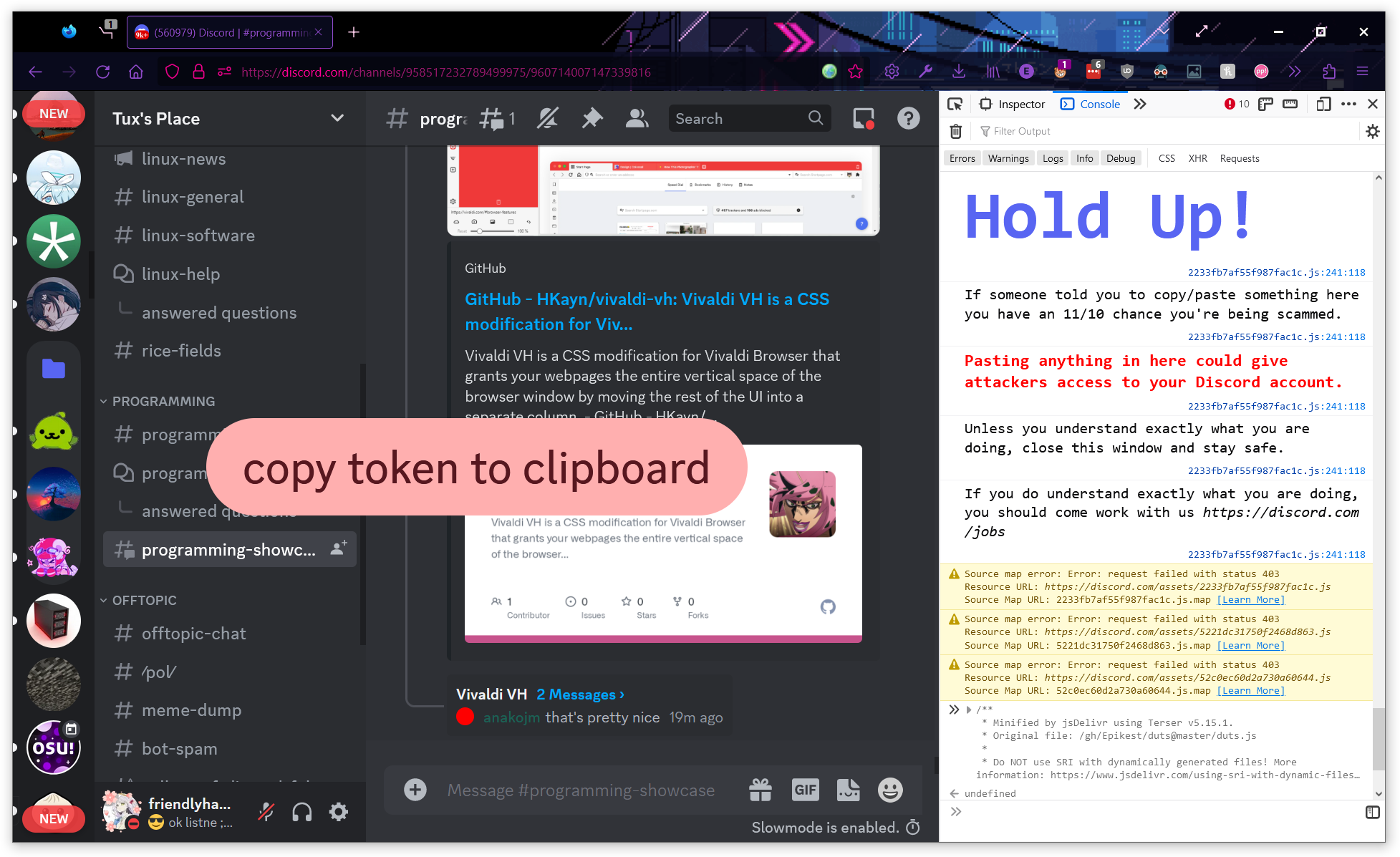
## why?
sometimes, you just need an easy and foolproof way to get your Discord authentication token. this script is designed to be as straightforward to use as possible, and it works on most[^compatibility] platforms that Discord can run on.
traditionally, retrieving your token has been a rather unintuitive process that may require you to dig around in your local storage (which doesn't work on the desktop app by the way!), fish around in the network request headers, or execute a shady script you found on YouTube. this script puts an end to that nonsense and can make it as easy as copy, paste, click.
it's also a tad bit more stylish than the typical skid solution.
## usage
### Discord desktop app & desktop browsers
the following steps should work on all desktop web browsers as well as the Discord desktop app:
1. open the developer web console (`Ctrl` + `Shift` + `I` or `⌥` + `⌘` + `I` on MacOS)
- if using the stable channel of the Discord desktop app, set `"DANGEROUS_ENABLE_DEVTOOLS_ONLY_ENABLE_IF_YOU_KNOW_WHAT_YOURE_DOING": true` in the Discord app settings file (`%appdata%/discord/settings.json` on Windows) and reload the app (`Ctrl` + `R`) else the developer tools panel won't open
- some client mods bypass this restriction
2. make sure you're on the `Console` tab
3. copy the minified script from [jsDelivr](https://cdn.jsdelivr.net/gh/Epikest/duts/duts.min.js)
4. paste the script in the console and press `Enter`
- you may need to first allow pasting if using Firefox, you can do this by typing `allow pasting` and pressing `Enter`
5. press the button that pops up and you should have your token copied to your clipboard
### Chromium-based browsers on mobile and desktop
the following steps should work on most Chromium-based browsers such as Chrome, Chromium, Opera, Brave, Vivaldi, etc.:
1. open the [Discord web app](https://discord.com/login)
- if on a mobile device, use [Discord Canary](https://canary.discord.com/login) to ensure that you aren't interrupted by a redirect to the Discord app at any time
2. copy this script
```js
fetch("https://cdn.discordapp.com/attachments/897505826330255431/1092301785932238859/duts.js")
.then((r) => r.text())
.then((d) => eval(d))
```
this script fetches from a Discord CDN URL to avoid running into [CSP](https://developer.mozilla.org/docs/Web/HTTP/CSP)
3. while Discord is the focused tab, type `javascript:` into the address bar while removing any other text
4. paste the script and press `Enter`
- some mobile operating systems and browsers (namely Chrome on iOS) may remove the JavaScript URI scheme after you paste the script, so the steps 3 and 4 may need to be reversed
5. press the button that pops up and you should have your token copied to your clipboard
### Via bookmarklet
if for some reason you can't use the above methods, you can create and run a bookmarklet to run the script.
it's a bit more involved, but still pretty easy and works on almost all browsers:
1. open the [Discord web app](https://discord.com/login)
- if on a mobile device, use [Discord Canary](https://canary.discord.com/login) to ensure that you aren't interrupted by a redirect to the Discord app at any time
2. create a new bookmark in your browser
3. set the contents of the bookmark to `javascript:fetch("https://cdn.discordapp.com/attachments/897505826330255431/1092301785932238859/duts.js").then((t=>t.text())).then((d=>eval(d)))`
4. save the bookmark
5. run the bookmarklet by opening it like you would any other bookmark
6. press the button that pops up and you should have your token copied to your clipboard
[^compatibility]: the script has been certified to function as intended on the following platforms:
### Android
- Canary build 189717 (5d9c3fd) using version 13 (build TP1A.220624.014) on Google Pixel 6 via Google Chrome 64-bit 112.0.5615.47
- Canary build 189717 (5d9c3fd) using version 13 (build TP1A.220905.004) on Samsung Galaxy S22+ via Brave Canary 64-bit 1.52.42 (Chromium 112.0.5615.87)
- Stable build 189617 (5a59d26) using version 14 Beta 1 (build UPB1.230309.014) on Google Pixel 7 Pro via Google Chrome 64-bit 103.0.5060.71
### iOS/iPadOS
- Canary build 187775 (0be0543) using version 16.3.1 on Apple iPhone 14 Pro Max via Google Chrome 112.0.5615.46
- Stable build 189617 (5a59d26) using version 16.1.1 on iPad (8th generation) via Safari
### Windows 10 64-bit
- Canary build 189717 (5d9c3fd) using version 21H2 (build 19044.1466) via official desktop app
- Stable build 189617 (5a59d26) using version 21H2 (build 19044.1466) via Firefox Developer Edition (aurora) 64-bit 113.0b3
- Stable build 189617 (5a59d26) using version 21H2 (build 19044.1466) via Microsoft Edge 64-bit 112.0.1722.39 (Chromium 112.0.5615.49)
### Windows 11
- Canary build 189717 (5d9c3fd) using version 22H2 (build 22621.1265) via Brave Nightly 64-bit 1.52.47 (Chromium 112.0.5615.121)
- Canary build 189717 (5d9c3fd) using version 22H2 (build 22621.1265) via official desktop app
- Stable build 187599 (c2dd678) using version 22H2 (build 22621.1265) via official desktop app