# ModuWeb (Web Accessibility Tools)
[](LICENSE)
[](https://github.com/Daegu-Cyber-University/ModuWeb/releases)
[](https://github.com/Daegu-Cyber-University/ModuWeb/actions/workflows/ci.yml)
[](https://www.jsdelivr.com/package/gh/Daegu-Cyber-University/ModuWeb)
> A drop-in web accessibility widget for any website — add screen reading (TTS), voice commands (STT), magnification, color adjustment and more with a single script tag.
>
> 한국어 문서: **[README.md](README.md)**
**🔗 Live Demo: **
[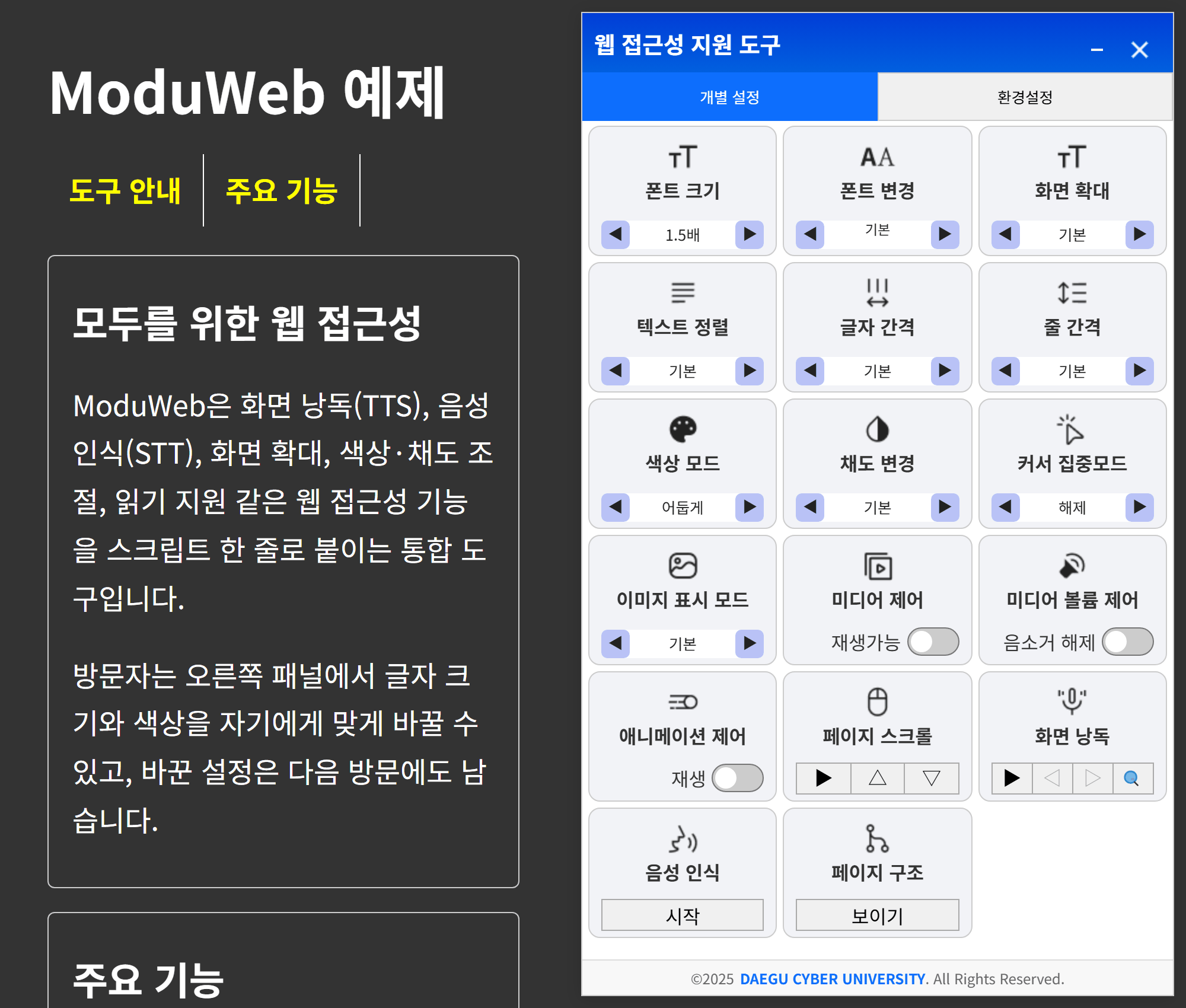](https://daegu-cyber-university.github.io/ModuWeb/)
## Why ModuWeb?
- **One-line install** — a single `
```
`@2` serves the latest 2.x release, so new releases reach your site without downloading anything. Use `@2.3` to receive patch releases only, or a tag such as `@v2.3.11` to pin a version. Don't use `@main`: it serves unreleased commits. A new release can take up to 7 days to reach every visitor (jsDelivr's version-range cache plus browser caches); purging the CDN cache with the [jsDelivr purge tool](https://www.jsdelivr.com/tools/purge) makes new visitors get it right away. jsDelivr also serves the other locales with an `Access-Control-Allow-Origin` header, so no server setup is needed.
Configure declaratively with `data-wat-*` attributes:
```html
```
| Attribute | Description |
|---|---|
| `data-wat-auto` | Enable auto-initialization (required switch) |
| `data-wat-config` | Path to config.json (relative to the script) or inline JSON (starts with `{`). With the CDN, a relative path resolves against jsDelivr, so use inline JSON or an absolute URL on your site |
| `data-wat-language` | Default language (`ko`, `en-US`, `en-GB`, `ja`, `zh`, `de`) |
| `data-wat-container` | Container CSS selector |
| `data-wat-inject-css` | Set `"false"` to manage the stylesheet with your own `` |
### Option 2 — Single file (offline / air-gapped)
Copy **one file**, `dist/webAccTools.standalone.min.js`, to your server. CSS, icons and Korean locale data are bundled inside — no assets folder, no config file, no network access required.
```html
```
> For languages other than Korean, also deploy the `assets/locales/` folder (Korean is built in).
### Option 3 — Self-hosted folder
1. Download the zip from the [releases page](https://github.com/Daegu-Cyber-University/ModuWeb/releases)
2. Copy the `dist/` folder to your web server **as-is** (the JS resolves CSS/icons/locales under `assets/` by relative path)
3. Add one line to your HTML
```html
```
### Option 4 — Manual initialization
```html
```
### Loading from another domain
If the files live on a different (sub)domain from the page, the script itself still runs, but the browser requires an `Access-Control-Allow-Origin` header on the files the widget fetches from that server. Without it, the standalone file still works in Korean but cannot load other locales; with `webAccTools.js` + `assets/` the Korean locale and the open-button icon are blocked too, leaving the panel blank. The widget files are public static assets, so allowing every origin is fine. jsDelivr (Option 1) already sends the header.
```apache
# Apache — .htaccess in the widget folder (needs mod_headers)
Header set Access-Control-Allow-Origin "*"
```
For IIS add the same header under `system.webServer/httpProtocol/customHeaders` in `web.config`; for Nginx use `add_header Access-Control-Allow-Origin "*";` in the widget folder's `location`.
## Features
| Category | Features |
|---|---|
| Visual | Font size / typeface, text alignment & spacing, full-page magnification, hiding images or showing their alt text |
| Color | Light / dark / inverted color modes, custom text & background colors with 7:1 contrast suggestions, saturation control, red/green color-blindness correction |
| Focus | Reading guide (mask / underline) and large cursor, media & animation control, auto page scroll |
| Audio | TTS screen reading (auto / focus / keyboard modes), STT voice commands |
| Extras | Dictionary lookup (shown only when a dictionary server endpoint is configured), page structure viewer |
| Keyboard | Full keyboard navigation, focus indicators, shortcuts |
| Profiles | 7 one-click presets per disability type, settings persistence, export/import |
## Browser support
| Desktop | Mobile |
|---|---|
| Chrome 90+, Edge 90+, Firefox 88+, Safari 14.1+ | iOS Safari 14.5+, Android Chrome 90+, Samsung Internet 14+ |
The files in `dist/` are not transpiled: they use static class fields and optional chaining as written, and the color modes rely on the CSS `:is()` selector, so older browsers either don't run the script or don't apply the color modes. Voice commands (STT) don't work in Firefox, which has no `SpeechRecognition`. TTS and STT use the browser's Web Speech API, so the available voices and recognition languages depend on the browser and OS.
## Documentation
Full documentation (configuration options, API reference, developer guide) currently lives in the Korean [README.md](README.md) and [ARCHITECTURE.md](ARCHITECTURE.md). The library UI itself supports 6 languages. Contributions translating the docs are very welcome — see [CONTRIBUTING.md](CONTRIBUTING.md).
The widget dispatches custom events on `document` that your page can listen to: `wat:initialized`, `wat:settings:saved` / `wat:settings:loaded`, `wat:stt:stateChanged`, `wat:media:stopStateChanged` / `wat:media:muteStateChanged`, and `wat:dictionary:searchStarted` / `wat:dictionary:searchSuccess` / `wat:dictionary:searchNotFound` / `wat:dictionary:searchError`. Each one bubbles and carries `timestamp` and `plugin` (the WAT instance) in `event.detail`; the table under "API 문서 > 이벤트" in [README.md](README.md#이벤트) lists the other fields.
## License
[Apache-2.0](LICENSE) © [Daegu Cyber University](https://www.dcu.ac.kr)