# pi-intelli-search
[](https://www.npmjs.com/package/@curio-data/pi-intelli-search)
[](https://www.npmjs.com/package/@curio-data/pi-intelli-search)
[](https://github.com/earendil-works/pi)
[](./LICENSE)

Intelligent web research for [`Pi`](https://github.com/earendil-works/pi): search, extract, collate, and cache grounded web context in one tool call.
A `Pi` extension for deep web research. It searches via [Perplexity Sonar](https://docs.perplexity.ai), fetches pages through a dual-fetch comparison ([_Defuddle_](https://github.com/kepano/defuddle) versus Markdown endpoint), extracts query-relevant content per page with a dedicated LLM guided by a _focused prompt_, then collates findings: deduplicating, flagging inconsistencies, and synthesising a concise summary. Everything is cached in `.search/` for offline reuse. Cache suggest surfaces related previous searches on each query.

**Features:**
- 🔍 **Search:** [_Perplexity Sonar_](https://docs.perplexity.ai) via [_OpenRouter_](https://openrouter.ai). One API key, no $50 minimum.
- 🌐 **Fetch:** Dual-fetch each page (HTML → Defuddle versus Markdown endpoint), compare quality, pick the cleaner version.
- 📄 **Extract:** Per-page LLM extraction guided by a _focused prompt_. Compresses ≈50K to ≈3-5K chars of query-relevant content.
- 🔗 **Collate:** Cross-source deduplication, inconsistency detection, and synthesis into a focused ≈5K summary.
- 💾 **Cache:** Persistent `.search/` cache with automatic cache suggest. Related previous searches surfaced on each query.
- 🎯 **Configurable:** Swap any pipeline stage (search, extract, collate) to any model `Pi` supports.
- 💰 **Low cost:** Approximately $0.05 per research session with default settings.
## What It Adds Over Other Extensions
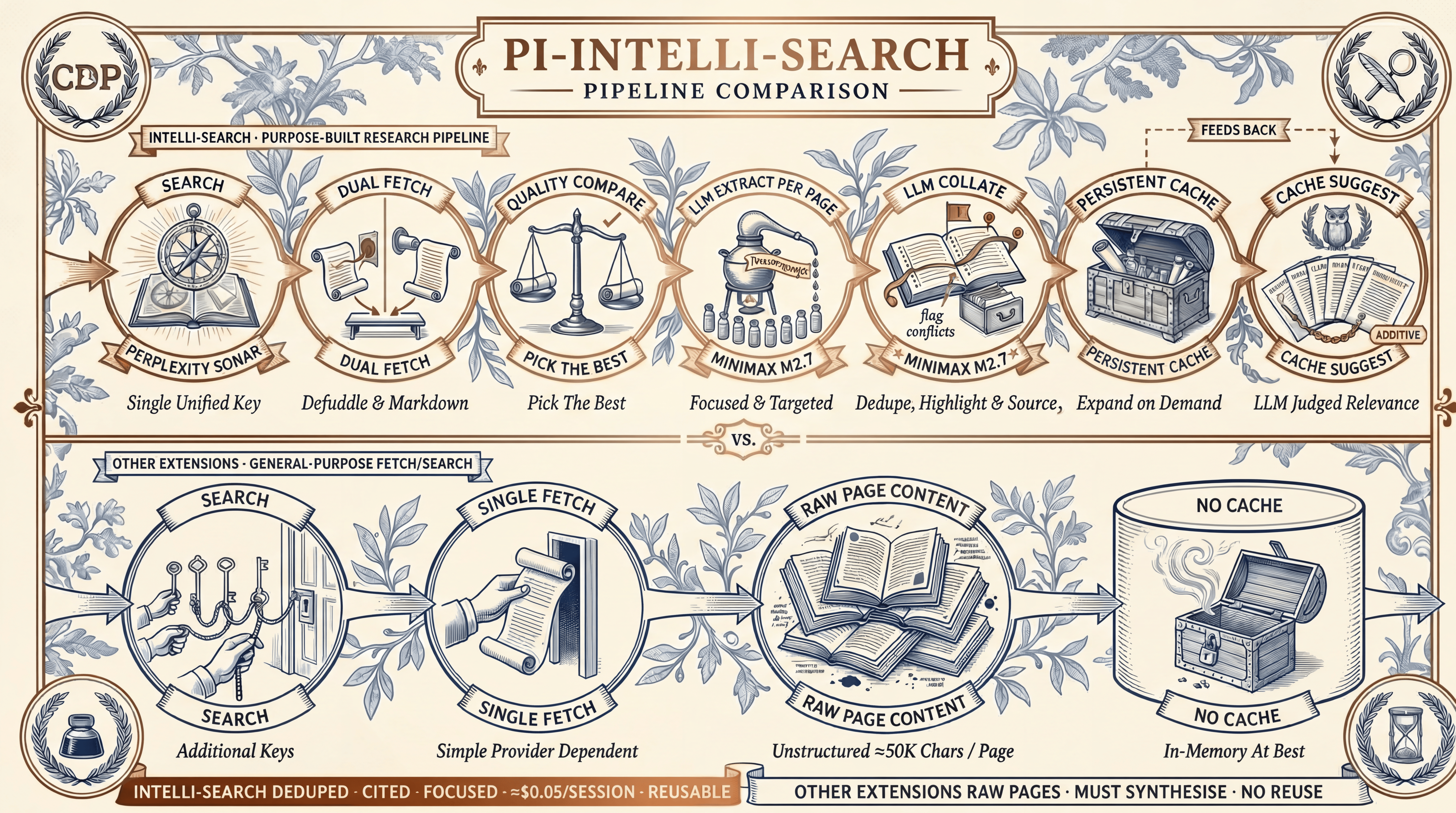
Four capabilities together separate `intelli-search` from every other extension in the `Pi` ecosystem:
1. **Dual-fetch quality comparison.** Every page is fetched twice in parallel (Defuddle versus Markdown endpoint), scored, and the better version wins. Server-rendered Markdown is not guaranteed to be cleaner than HTML; the comparison catches this automatically.
2. **Per-page LLM extraction guided by `focusPrompt`.** Each page is compressed to ≈3-5K chars of query-relevant content before entering the agent's context. Extraction quality scales with the chosen model.
3. **LLM collation with deduplication.** A collation model synthesises across sources, flags conflicting claims, and preserves source attribution. The agent does not spend reasoning tokens on mechanical synthesis.
4. **Persistent cache with cache suggest.** Full pages and extractions are kept in `.search/` and indexed. An LLM judge surfaces related previous searches on each query, so follow-up research is faster and cheaper.
The agent receives a concise ≈5K summary by default. The full page content stays in the cache, accessible via native `Pi` tools like `read` or `grep` for deeper inspection. No other `Pi` search extension offers both.
For the detailed feature-by-feature comparison against six other `Pi` search extensions, see [docs/COMPARISON.md](docs/COMPARISON.md).
## Install
### Prerequisites
You need at minimum an [OpenRouter](https://openrouter.ai) account for [_Perplexity Sonar_](https://docs.perplexity.ai) search. The same account also covers extraction and collation with the default models. For the extract and collate stages, any model or provider `Pi` supports can be used. See [Model Configuration](#model-configuration) for how to swap them.
1. **Sign in with OAuth (recommended):** run `/login openrouter` in `Pi`. On `Pi` 0.82.0 and later this performs OpenRouter OAuth PKCE sign-in and stores a user-controlled key automatically. No manual key paste is required.
2. **Or add a key manually:** create one at [openrouter.ai/keys](https://openrouter.ai/keys), then edit `~/.pi/agent/auth.json`:
```json
{
"openrouter": {
"type": "api_key",
"key": "sk-or-v1-..."
}
}
```
### Install the Extension
From `npm` (recommended):
```bash
pi install npm:@curio-data/pi-intelli-search
```
From _GitHub_:
```bash
pi install git:github.com/Curio-Data/pi-intelli-search
```
Local development:
```bash
pi install /path/to/pi-intelli-search
```
On first load, `Pi` will show: `Added models: perplexity/sonar, perplexity/sonar-pro`. If your OpenRouter key is missing, you will see a warning notification.
### Verify Installation
Start `Pi` and type `/model`. You should see `perplexity/sonar` and `perplexity/sonar-pro` in the model list. If they are missing after a manual edit, reopen `/model`: since `Pi` 0.82.0 the picker reloads `models.json` on open. Restart `Pi` only if they are still absent.
### Customise (Optional)
No configuration is needed to get started. The defaults use OpenRouter for all stages. If you want to change models, add a `pi-intelli-search` block to `~/.pi/agent/settings.json` or, for a trusted project, `/.pi/settings.json`:
**Defaults (what you get without any config):**
```jsonc
{
"pi-intelli-search": {
"searchModel": {
"provider": "openrouter",
"model": "perplexity/sonar"
},
"extractModel": {
"provider": "openrouter",
"model": "minimax/minimax-m2.7"
},
"collateModel": {
"provider": "openrouter",
"model": "minimax/minimax-m2.7"
},
"defaultUrls": 8,
"maxUrls": 16,
"cacheDir": ".search",
"extractMaxChars": 150000,
"extractionConcurrency": 4,
"extractionMaxTokens": 3000,
"collationMaxTokens": 4000,
"fetchTimeoutMs": 20000,
"fetchConcurrency": 4,
"browserFingerprint": "chrome_145"
}
}
```
**Customised example (different provider, tuned pipeline):**
```jsonc
{
"pi-intelli-search": {
"searchModel": {
"provider": "openrouter",
"model": "perplexity/sonar"
},
"extractModel": {
"provider": "openai",
"model": "gpt-4o-mini"
},
"collateModel": {
"provider": "openai",
"model": "gpt-4o-mini"
},
"defaultUrls": 6,
"maxUrls": 6,
"cacheDir": ".my-research-cache",
"extractMaxChars": 80000,
"extractionMaxTokens": 8000,
"collationMaxTokens": 16000,
"fetchTimeoutMs": 30000,
"fetchConcurrency": 2,
"browserFingerprint": "chrome_145"
}
}
```
See [Model Configuration](#model-configuration) for all options and [Settings](#settings) for the full reference.
## Tools
| Tool | Description |
| ------------------ | --------------------------------------------------------------------------------------------------- |
| `intelli_search` | Search the web and return a concise answer with source URLs. |
| `intelli_extract` | Extract query-relevant content from a web page, preserving code and technical detail verbatim. |
| `intelli_collate` | Deduplicate and synthesise multiple extractions into a summary. Writes cache. |
| `intelli_research` | Search, fetch, extract, collate, cache. The primary research tool. One call. |
## Quick Start
### Quick Search
```text
intelli_search(query="TypeScript 5.8 release date")
```
### Deep Research
**Always provide a `focusPrompt`.** The extraction LLM works best with specific guidance.
```text
intelli_research(
query="Svelte 5 runes tutorial examples",
focusPrompt="Extract the core rune concepts ($state, $derived, $effect), their syntax, and how they replace the old reactive declarations. Include migration patterns from Svelte 4."
)
```
### Targeted Research With Domain Restriction
```text
intelli_research(
query="Cloudflare Workers KV write timeout limits",
focusPrompt="Extract KV write limits, timeout thresholds, storage limits, and any workarounds for bulk writes. Focus on hard numbers and error messages.",
maxUrls=3,
domains=["developers.cloudflare.com"]
)
```
### Comparing Options
```text
intelli_research(
query="Tailwind CSS vs Vanilla Extract comparison 2026",
focusPrompt="Extract pros/cons, bundle size benchmarks, DX tradeoffs, and migration costs. Note which claims come from official sources vs blog opinions."
)
```
## Model Configuration
All three pipeline stages use independently configurable models. Defaults are chosen for cost-efficiency, but **any model `Pi` can access works**. This includes built-in providers, [OpenRouter](https://openrouter.ai) models, or models from other extensions.
| Stage | Default | Config key |
| ------- | ----------------------------- | ----------------------- |
| Search | `openrouter/perplexity/sonar` | `searchModel` |
| Extract | `openrouter/minimax/minimax-m2.7` | `extractModel` |
| Collate | `openrouter/minimax/minimax-m2.7` | `collateModel` |
### Why OpenRouter for _Sonar_?
[_Perplexity Sonar_](https://docs.perplexity.ai) is an excellent search-grounded model, but it is not in `Pi`'s built-in model list. Rather than requiring a separate Perplexity API account (which requires a **$50 minimum credit top-up**), the extension routes _Sonar_ through [OpenRouter](https://openrouter.ai). _OpenRouter_ is a unified pay-as-you-go API with a lower minimum spend. One API key gives you _Sonar_ alongside thousands of other models. On first load, the extension patches `~/.pi/agent/models.json` to add _Sonar_ under the `openrouter` provider so `Pi` can discover it. This approach has several benefits:
- **Avoids the Perplexity API $50 minimum.** Routing through `OpenRouter` consolidates spend on a single account already used across the open-source coding-agent ecosystem, including `Pi`. No separate _Perplexity_ subscription is required.
- **One account, many models.** The same OpenRouter key covers _Sonar_ and any other models you might want for extract or collate.
- **Is non-destructive.** The patch merges new models by ID. It never replaces existing OpenRouter models.
- **Is idempotent.** It is safe across extension reloads and updates.
### Swapping the Extract and Collate Model
_MiniMax_ M2.7 (via OpenRouter) is the default because it is cheap and effective for extraction and collation. However, you can use any model `Pi` supports. Override in `~/.pi/agent/settings.json` or `.pi/settings.json`:
**Option A: Use a `Pi` Built-In Provider** (auth via `/login`):
```jsonc
{
"pi-intelli-search": {
"extractModel": {
"provider": "openai",
"model": "gpt-4o-mini"
},
"collateModel": {
"provider": "openai",
"model": "gpt-4o-mini"
}
}
}
```
**Option B: Use Another OpenRouter Model** (same key, no extra setup):
```jsonc
{
"pi-intelli-search": {
"extractModel": {
"provider": "openrouter",
"model": "google/gemini-2.0-flash-001"
},
"collateModel": {
"provider": "openrouter",
"model": "google/gemini-2.0-flash-001"
}
}
}
```
**Option C: Use a Model Provided by Another Extension** (for example, Z.Ai or local models):
```jsonc
{
"pi-intelli-search": {
"extractModel": {
"provider": "zai",
"model": "glm-5.1"
},
"collateModel": {
"provider": "zai",
"model": "glm-5.1"
}
}
}
```
The only requirement is that the model is registered in `Pi`'s model registry and has auth configured. Run `/login` to set up built-in providers, or follow the extension's own setup for extension-provided models.
### Model Selection Guidance
For extraction and collation, the ideal model has:
- **Low cost per token:** 8 extractions, 1 collation, and 1 cache suggest per default session.
- **Good instruction following:** Must adhere to extraction prompts precisely.
- **Sufficient context:** Cleaned pages can be ≈50K chars (truncated to `extractMaxChars`).
Models known to work well for extraction and collation: _MiniMax_ M2.7 (default, via OpenRouter), _Qwen_ 3.5-Flash (≈1M context, ≈$0.26/M output), _DeepSeek_ V4 Flash (≈1M context, ≈$0.28/M output), _Gemini_ 2.0 Flash Lite (≈1M context, ≈$0.30/M output), _GPT-4.1_ Nano (≈1M context, ≈$0.40/M output).
### Required API Keys
With default settings, you need one key in `~/.pi/agent/auth.json`:
```json
{
"openrouter": {
"type": "api_key",
"key": "sk-or-v1-..."
}
}
```
A single [OpenRouter](https://openrouter.ai) key is the minimum required. It covers Sonar for search plus MiniMax M2.7 for extraction and collation with the default models. The extract and collate stages can use any model `Pi` supports. Override `extractModel` or `collateModel` in settings to switch providers.
Run `/login openrouter` in `Pi` to authorise via OAuth (`Pi` 0.82.0 and later), or edit the file directly with a key from [openrouter.ai/keys](https://openrouter.ai/keys).
## Pipeline
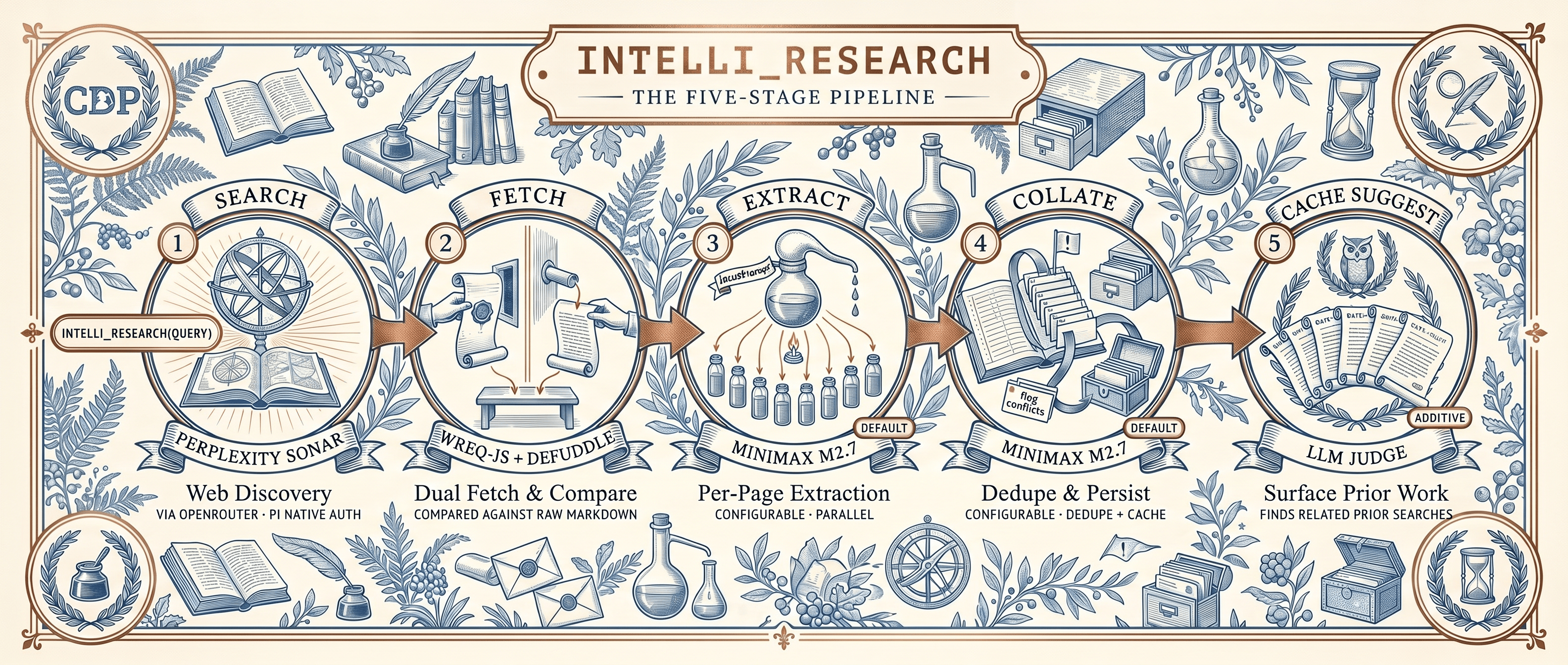
All model assignments are configurable. See [Model Configuration](#model-configuration).
Each page is dual-fetched (HTML via Defuddle versus Markdown endpoint) and scored for quality. Per-page extraction (guided by `focusPrompt`) compresses ≈50K chars to ≈3-5K of query-relevant content before collation, keeping the total context manageable (≈24-40K for 8 pages).
At the end of each run the pipeline writes a local-only `meta.json` telemetry sidecar into the cache directory (see [Cache Structure](#cache-structure)). Set `disableTelemetry: true` to suppress it.
See [docs/ARCHITECTURE.md](docs/ARCHITECTURE.md) for detailed design decisions.
## Cost
Per research session with the default 8 pages: **≈$0.05**
| Step | Calls | Cost |
| ------------------------------ | ---------------- | -------- |
| Search (_Sonar_) | 1 | ≈$0.02 |
| Fetch (Defuddle + Markdown) | 8 (≤4 concurrent) pairs | $0.00 |
| Extract (M2.7 via OpenRouter) | 8 (≤4 concurrent) | ≈$0.03 |
| Collate (M2.7 via OpenRouter) | 1 | ≈$0.005 |
| Cache suggest (M2.7 via OpenRouter) | 1 | ≈$0.0002 |
Costs scale with your chosen extract or collate model. _MiniMax_ M2.7 (via OpenRouter) is the default specifically for its low relative cost.
## Settings
Override defaults in `~/.pi/agent/settings.json` or, for a trusted project, `/.pi/settings.json` under the `pi-intelli-search` namespace. `Pi` ignores project-local settings until you approve the project; the global file always applies:
```jsonc
{
"pi-intelli-search": {
// Model assignments (see Model Configuration above)
"searchModel": {
"provider": "openrouter",
"model": "perplexity/sonar"
},
"extractModel": {
"provider": "openrouter",
"model": "minimax/minimax-m2.7"
},
"collateModel": {
"provider": "openrouter",
"model": "minimax/minimax-m2.7"
},
// Pipeline tuning
"defaultUrls": 8,
"maxUrls": 16,
"cacheDir": ".search",
"extractMaxChars": 150000,
"extractionMaxTokens": 3000,
"collationMaxTokens": 4000,
// Fetch behavior
"fetchTimeoutMs": 20000,
"fetchConcurrency": 4,
"browserFingerprint": "chrome_145"
}
}
```
### Settings Reference
| Setting | Stage | Default | What It Does |
|---|---|---|---|
| `searchModel` | 1. Search | `openrouter/perplexity/sonar` | Model for the initial web search. Swap to a stronger model for deeper search results, or to a cheaper one to reduce the ≈$0.02 search cost. See [Model Configuration](#model-configuration). |
| `extractModel` | 3. Extract | `openrouter/minimax/minimax-m2.7` | Model for per-page content extraction. Runs 8 times per session so low cost per token matters. Ensure the model's context window exceeds `extractMaxChars` plus the system prompt. For a model with a smaller window (e.g. 256K), lower `extractMaxChars` to match. See [Model Configuration](#model-configuration). |
| `collateModel` | 4. Collate | `openrouter/minimax/minimax-m2.7` | Model for cross-source synthesis and deduplication. Sees all extractions at once so it needs enough context and instruction-following to flag contradictions. A model with ≥128K context handles 8 full extractions comfortably. See [Model Configuration](#model-configuration). |
| `defaultUrls` | 1 → 2 | `8` | Fallback when the agent does not pass `maxUrls` per call. Lower values reduce cost and latency but give less thorough results. The agent's [skill guide](skills/intelli-search/SKILL.md) recommends 3 (targeted), 8 (broad), or 12 (exhaustive). |
| `maxUrls` | 1 → 2 | `16` | Hard cap on URLs fetched. Lower caps mean faster responses and lower cost; higher caps allow more thorough research. Each extra URL adds roughly $0.004 in extract cost with the default model. Requests above the cap are silently clamped. |
| `cacheDir` | 4, 5 | `.search` | Directory where research sessions are cached. Change this to keep project-specific research separate. Example: `".my-research-cache"`. |
| `extractMaxChars` | 3. Extract | `150000` | Maximum characters of raw page content fed to the extract LLM per page. **Lower this when using an extract model with a small context window** (e.g. 256K) to prevent context overflow. Raise it if pages are truncated and your model has ample headroom. Each 50K chars consumes roughly 12K input tokens. |
| `extractionConcurrency` | 3. Extract | `4` | Number of per-page extractions sent to the extract model simultaneously. Bounded so a wide result set does not fire many concurrent LLM calls and trigger rate limiting. Raise it (6-8) on generous rate limits for faster extraction; lower it (1-2) on tight limits. |
| `extractionMaxTokens` | 3. Extract | `3000` | Maximum output tokens for each per-page extraction. Higher values preserve more detail at higher cost. **Lower this when using a model with a small context window** so the output does not crowd out the input. The extract prompt targets 3,000-5,000 characters; 3,000 tokens covers this comfortably. |
| `collationMaxTokens` | 4. Collate | `4000` | Maximum output tokens for the final synthesis. Lower values force tighter deduplication. **Lower this when using a collation model with a small context window** (the output must fit alongside all extraction inputs). The summary you see in the agent context is bounded by this setting. |
| `fetchTimeoutMs` | 2. Fetch | `20000` | Per-page fetch timeout in milliseconds. Increase if you research sites known to be slow. Fetches run in parallel so this does not multiply by page count. |
| `fetchConcurrency` | 2. Fetch | `4` | Number of pages fetched simultaneously. Higher values (6-8) complete the fetch stage faster but may trigger rate limiting. Lower values (2) are gentler on target servers. |
| `browserFingerprint` | 2. Fetch | `chrome_145` | TLS fingerprint used by [_wreq-js_](https://github.com/sqdshguy/wreq-js) to impersonate a browser. Determines which HTTP client signature site sees. Available profiles include `chrome_*`, `firefox_*`, `safari_*`, `edge_*`, and `opera_*` across many versions. Change this if a site blocks the default fingerprint. |
| `llmTimeoutMs` | All LLM | `90000` | Hard per-call timeout in milliseconds for every LLM request. Bounds a stalled provider connection (common under rate limiting) so it becomes a retryable timeout instead of hanging on the SDK's long default. Raise it for slow reasoning models on large inputs; lower it to fail faster. |
| `llmRetryAttempts` | All LLM | `3` | Total attempts per LLM call including the first. Transient failures (HTTP 429, 5xx, timeouts) are retried with full-jitter exponential backoff that honours any Retry-After hint. Set to `1` to disable retry. |
| `retryBaseDelayMs` | All LLM | `1500` | Base delay for retry backoff. Attempt N waits a random duration up to `min(retryMaxDelayMs, retryBaseDelayMs * 2^(N-1))`. |
| `retryMaxDelayMs` | All LLM | `20000` | Upper bound on any single retry backoff, and the clamp applied to a Retry-After hint so a large hint cannot stall the pipeline. |
| `searchRetryAttempts` | 1. Search | `2` | Total attempts for the search stage when it returns a valid response with zero usable links (a degraded result), including the first. Independent of `llmRetryAttempts`, which covers transport errors. |
| `minRequestIntervalMs` | 3. Extract | `0` | Minimum gap in milliseconds between concurrent extract LLM calls. `0` disables the throttle. Free-tier OpenRouter keys (approximately 0.33 requests per second) should set this to approximately `3000` to avoid tripping rate limits; paid keys can leave it off. |
| `disableTelemetry` | All | `false` | When `false`, each `intelli_research` run writes a local-only `meta.json` sidecar into its `.search//` cache directory recording per-stage outcomes (pages fetched/failed, fetch-variant winners, search-retry, cache-suggest hits, latency). Strictly local: no network call, no data leaves the host. Set `true` to suppress the sidecar. |
### Automatic llms-full.txt Discovery
Sites that follow the [`llms-full.txt` convention](https://llmstxt.org) publish a single Markdown file containing their complete documentation. During the fetch stage, every domain in the search results is probed at `https://domain/llms-full.txt`. If the file exists (HTTP 200), it is downloaded raw to `sources/llms-full-*.md` for offline search with `grep` or `read`.
These probes are supplementary and never gate the research result. Each runs under a tight timeout and honours cancellation, so a slow or unresponsive documentation host cannot stall the summary, and pressing Esc cancels them along with the rest of the pipeline. Set `disableLlmsFullDiscovery: true` to skip the probes entirely.
A small built-in list handles sites with non-standard paths:
| Site | Path Pattern |
|------|-------------|
| Cloudflare Docs | `/product/llms-full.txt` |
| Next.js | `/docs/llms-full.txt` |
| Vite | `/llms-full.txt` (root) |
No configuration is needed. The probe and download are automatic.
## Cache Structure
```text
.search/
├── 2026-04-19-d1-worker-api-3f7a2c/
│ ├── report.md # Collated summary + source index
│ ├── query.txt # Original search query
│ ├── meta.json # Local-only telemetry sidecar (v0.11.0+)
│ ├── extractions/ # Per-page LLM extractions (≈3-5K each)
│ │ ├── 01-developers-cloudflare-com.md
│ │ └── 02-developers-cloudflare-com.md
│ └── sources/ # Full page content
│ ├── 01-developers-cloudflare-com.md
│ ├── 02-developers-cloudflare-com.md
│ └── llms-full-developers-cloudflare-com.md
└── .index.json # Index of all cached searches
```
Each cached session lives in a directory named `--`. The `` is a short SHA-1 of the full query, appended so that distinct queries issued on the same day do not collide and overwrite each other. Concurrent runs stage their output before a short cache commit, so source files and the shared index remain intact.
**`meta.json` (local-only telemetry).** Each `intelli_research` run writes a `meta.json` sidecar recording per-stage outcomes: pages fetched and failed, fetch-variant winners (Defuddle versus Markdown), whether search-retry fired, cache-suggest hits, and per-stage latency. It is strictly local: no network call is added, no data leaves the host, and no account or identity is recorded. Set `disableTelemetry: true` in [Settings](#settings) to suppress it. The bundled [`scripts/analyze-sessions.sh`](scripts/README.md) can aggregate these sidecars to report per-stage success rates.
- **`Pi` >= 0.80.8:** Core functionality, trusted project settings, the configurable `CONFIG_DIR_NAME`, compatible `pi-ai` calls, and sequential cache-writing tools.
- UI notifications and status indicators are guarded with `ctx.hasUI`, so the tools behave cleanly in non-interactive modes (`pi -p`, `--mode json`, RPC).
- Page fetching honours the global `httpProxy` setting. The LLM stages already route through `Pi`'s managed HTTP clients, which apply `httpProxy` automatically.
- Retry and timeout are owned by the extension (`callLlm()`), independent of `Pi`'s `retry.provider.maxRetries`. The extension forces `maxRetries: 0` and runs its own full-jitter backoff, so changing `Pi`'s provider-retry setting has no effect on these tools.
## Development
```bash
npm install
npm run build # TypeScript -> dist/
npm test # Unit tests
npm run test:smoke # Smoke test
# Test in pi
pi -e ./dist/index.js
# Install as package
pi install /path/to/pi-intelli-search
```
## Documentation
- [Comparison](docs/COMPARISON.md): How `intelli-search` compares to other `Pi` search extensions.
- [Changelog](CHANGELOG.md): Release history.
- [Architecture](docs/ARCHITECTURE.md): Detailed design decisions and pipeline internals.
- [Components](docs/COMPONENTS.md): Third-party dependencies and license attribution.
- [Skill guide](skills/intelli-search/SKILL.md): Agent-facing usage instructions.
- [Contributor guide](AGENTS.md): Coding conventions and project structure.
## Provenance
Git history was rewritten in `v0.9.0` to normalise commit author and committer metadata on the path to a stable `v1` release. The `gitHead` SHAs recorded in `npm` SLSA provenance attestations for versions 0.3.1 through 0.8.0 reference pre-rewrite commits that no longer resolve in this repository. Published tarballs and their tree-level contents are unchanged; only commit metadata was altered. From v0.9.0 onwards, attestations track the rewritten history. See the [Changelog](CHANGELOG.md) entry for v0.9.0 for the full account.
## Sponsor
 **[Curio Data Pro Ltd](https://blog.curiodata.pro/)** sponsors this project. _Curio Data Pro_ is a data consultancy serving _Rail_, _Naval Design_, _Aviation_, and _Offshore Energy_, combining 20+ years of _Chartered Engineer_ experience with _Data Science_ and _DevOps_ capabilities.
[Blog](https://blog.curiodata.pro/) | [LinkedIn](https://www.linkedin.com/company/curio-data-pro-ltd/)
## License
Copyright 2026 Ashraf Miah, Curio Data Pro Ltd.
Licensed under the [Apache License, Version 2.0](./LICENSE).
## Use of Large Language Models
Large Language Models were used extensively during the development of this project:
- **`Pi` agent** (primary development environment).
- **_GLM_ 5.1:** Primary model for code generation and architecture.
- **_DeepSeek_ V4 Pro:** Research and data analysis.
- **_Qwen_ 3.6 Plus:** Secondary model for review and documentation.
**[Curio Data Pro Ltd](https://blog.curiodata.pro/)** sponsors this project. _Curio Data Pro_ is a data consultancy serving _Rail_, _Naval Design_, _Aviation_, and _Offshore Energy_, combining 20+ years of _Chartered Engineer_ experience with _Data Science_ and _DevOps_ capabilities.
[Blog](https://blog.curiodata.pro/) | [LinkedIn](https://www.linkedin.com/company/curio-data-pro-ltd/)
## License
Copyright 2026 Ashraf Miah, Curio Data Pro Ltd.
Licensed under the [Apache License, Version 2.0](./LICENSE).
## Use of Large Language Models
Large Language Models were used extensively during the development of this project:
- **`Pi` agent** (primary development environment).
- **_GLM_ 5.1:** Primary model for code generation and architecture.
- **_DeepSeek_ V4 Pro:** Research and data analysis.
- **_Qwen_ 3.6 Plus:** Secondary model for review and documentation.