# pisesh
**English** | [한국어](https://github.com/Blue-B/pisesh/blob/main/docs/README.ko.md)
[](https://www.npmjs.com/package/pisesh)
[](https://github.com/Blue-B/pisesh/actions/workflows/ci.yml)
[](LICENSE)
[](https://nodejs.org/)
[](package.json)
**Bookmark, search, and resume [pi coding-agent](https://github.com/earendil-works/pi) sessions with a fast keyboard-driven TUI.**
> `pi --resume` lists every session you ever started. After a week that's 50+ entries with no titles, no tags, and no order, so you just scroll and hope. pisesh adds what was missing: ⭐ favorites, instant search, and a `[NOW]` badge for the session you're attached to.
## Preview
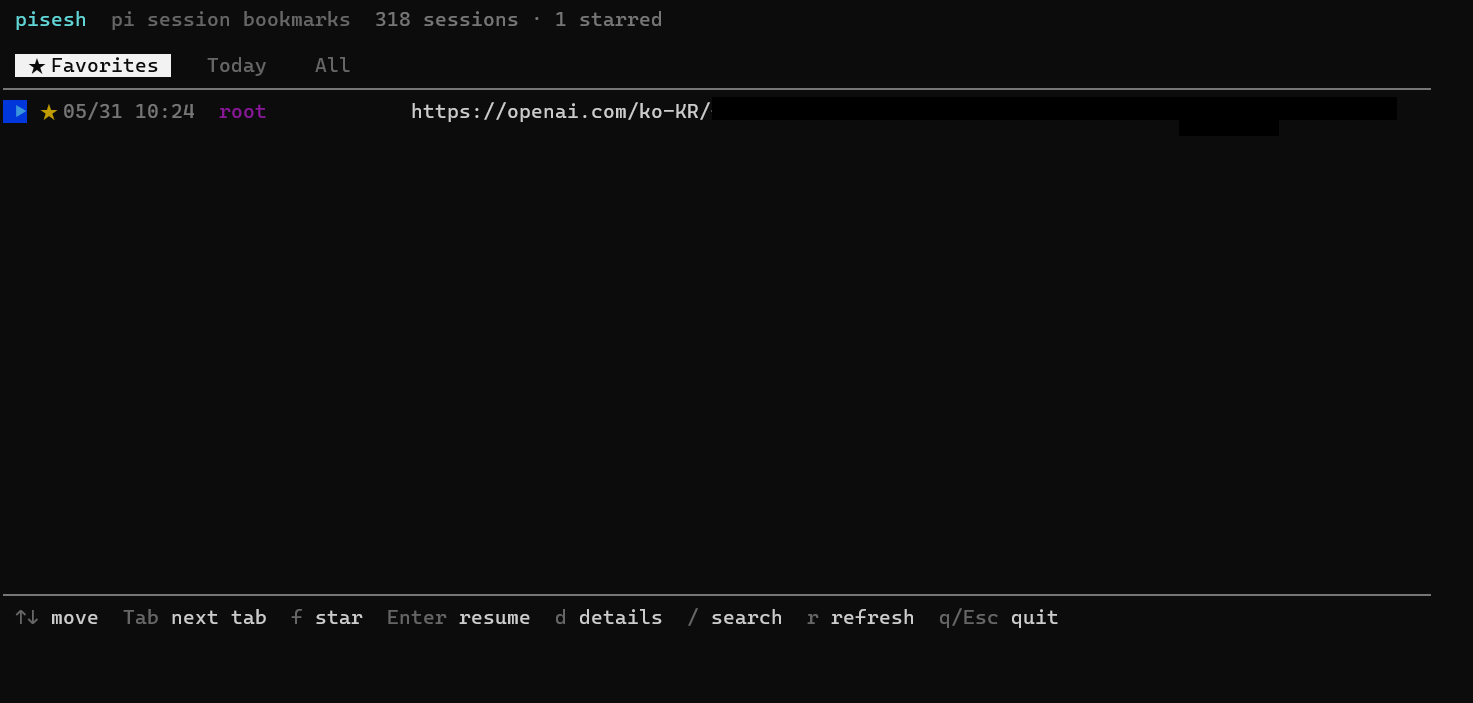
Real capture: ★ starred session at the top, the rest available behind the Today, Here, and All tabs. Tab cycles. f stars. Enter resumes.
## Terminal walkthrough
What the TUI looks like, screen by screen. The data below is made up, not real sessions.
**Main list.** The highlighted row is the current selection, and `Tab` cycles through the tabs. The green `[NOW]` badge marks the pi session you launched from, and the cyan `✎` marks a session you renamed yourself. CJK titles stay column-aligned:
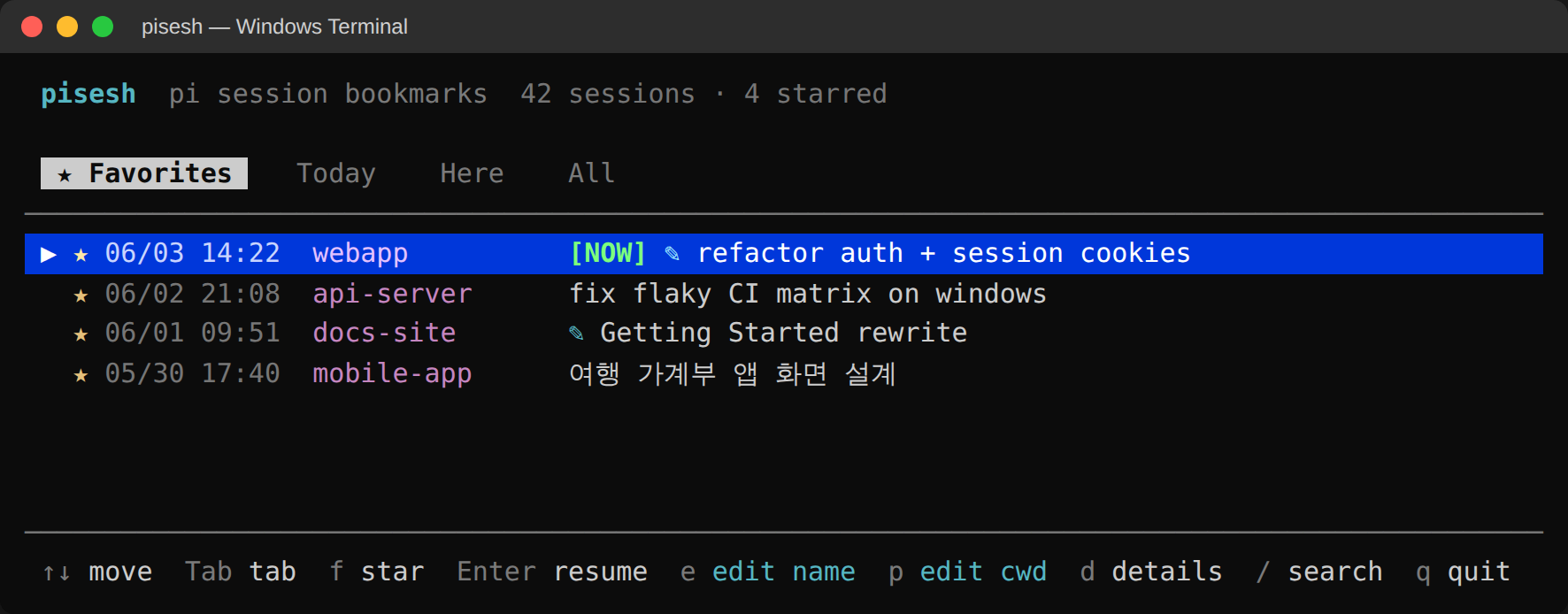
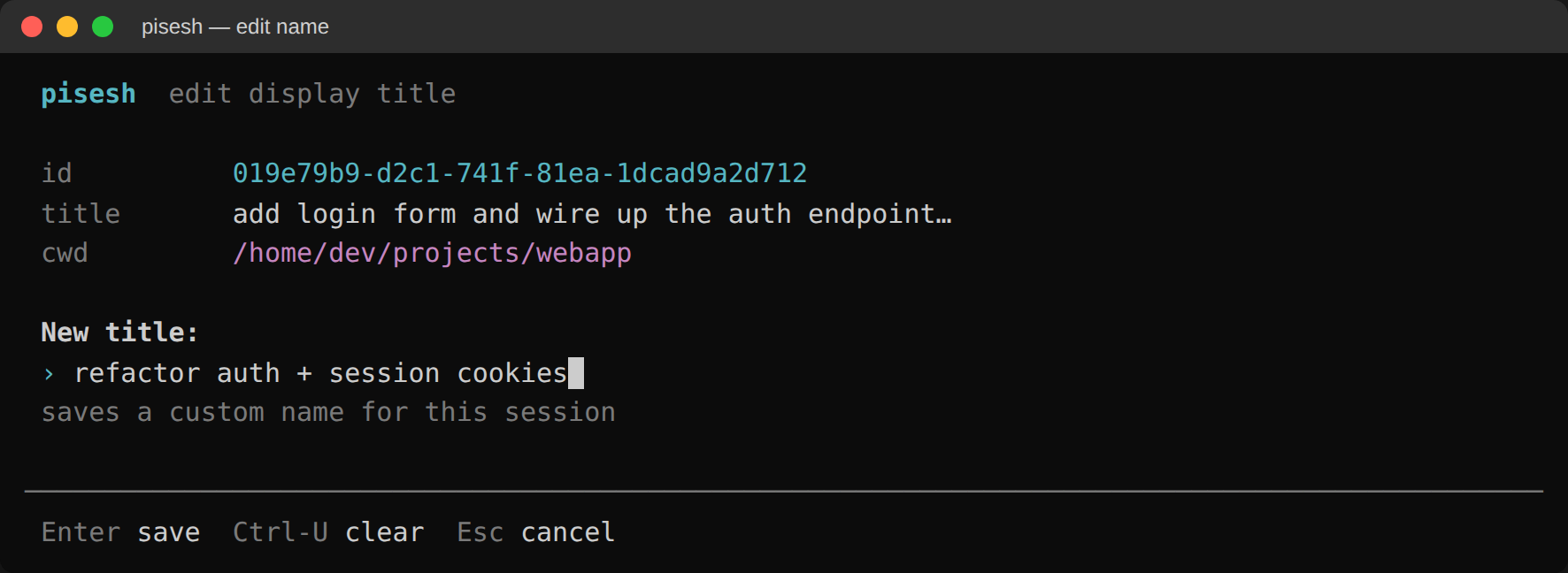
**`e` renames a session.** The first user prompt makes a poor title for a thread you keep coming back to, so press `e` to set your own. It's saved as an override (the session jsonl is never touched) and the session gets a `✎` marker in the list:
**`p` re-points the working directory** through an arrow-key directory browser. This is the cwd pi actually `cd`s into on resume, and it's also what the `Here` tab filters on. Press `s` to lock in the highlighted directory:
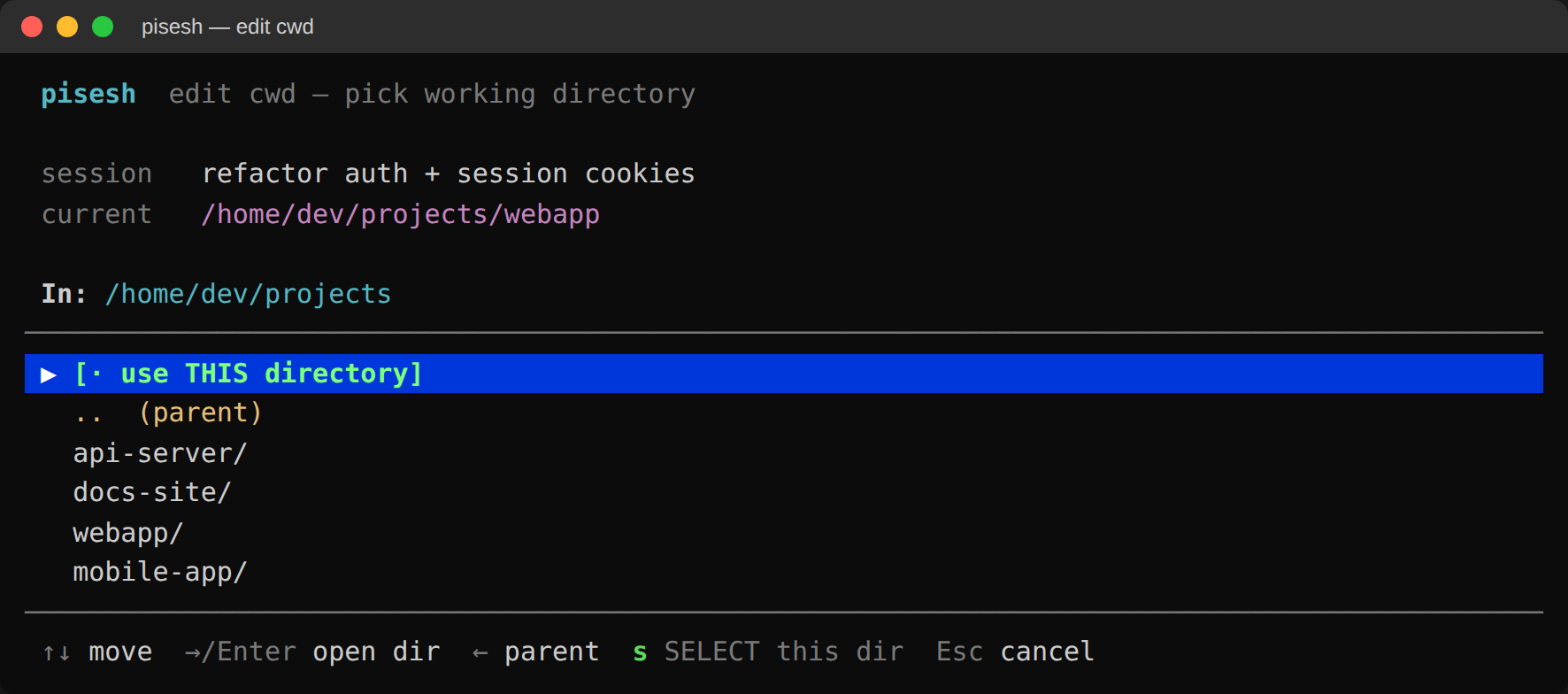
The **`Here` tab** shows only sessions whose effective cwd matches the directory you launched pisesh from. Inside a project you see just that project's threads, without scrolling past your home-dir scratch sessions.
## Why pisesh
Pi accumulates sessions across many working directories: your home, several project dirs, scratch tmux panes. The built-in resume picker is roughly alphabetical and forgets context. After a few weeks:
- You can't tell which session was "the one where you fixed the auth bug"
- You can't pin the 3-4 long-running threads you keep going back to
- You re-open the wrong session and pollute it with unrelated context
- You waste time searching by timestamp guessing
pisesh is a **single-file Node script** (no dependencies, ~1,600 LoC) that gives you everything `pi --resume` doesn't.
### Value at a glance
| Need | What you get |
| ------------------------------------------ | ---------------------------------------------------------------------------- |
| Mark important sessions | ⭐ Star/unstar with one keystroke; favorites persist to one global JSON |
| Give a thread a real name | `e` sets one manually; `g` generates one with a model you choose |
| See only the current project's sessions | `Here` tab filters to sessions whose cwd matches where you launched pisesh |
| Fix where a session resumes | `p` opens an arrow-key directory browser; sets the cwd pi `cd`s into |
| Find a session by what you said | `/` searches id + project + first user prompt + custom title |
| Know which session you're attached to | `[NOW]` badge on the live session (passed from pi via env var) |
| Keep your terminal clean | Alt-screen buffer, so quitting puts your terminal back the way it was (like vim) |
| Read Korean / Chinese / Japanese prompts | Display-width-aware truncation; columns never blow up on CJK |
| Open from anywhere | Run as standalone `pisesh` shell command, or `/sesh` inside pi |
| Zero install pain | No build step, no native deps, runs on Node 18+ everywhere |
| Trust it with your history | favorites and overrides stay in sidecar JSON; session history changes only for orphan-call repair |
## Getting started
### Install the `/sesh` command in pi (recommended)
```bash
pi install npm:pisesh
```
This registers pisesh as a pi extension. Inside any pi session, type `/sesh`. The extension runs its bundled CLI, so a global npm installation is not required.
### Install the standalone CLI
```bash
npm install -g pisesh
pisesh
```
The standalone `pisesh` shell command requires this global npm installation. It is separate from `pi install npm:pisesh`.
### From source (developers)
```bash
git clone https://github.com/Blue-B/pisesh.git
cd pisesh
npm link # symlink ./bin/pisesh into your global PATH
pisesh --help
```
For local pi testing, run `pi install .` from the cloned repository so the extension and its bundled CLI stay together.
## Keys
| Key | Action |
| ---------------------------- | ------------------------------------------------------------ |
| `↑` `↓` / `j` `k` | move cursor |
| `Tab` / `h` / `l` | switch tab (`★ Favorites` → `Today` → `Here` → `All`) |
| `f` / `Space` | star / unstar the selected session |
| `x` | remove favorites whose session files no longer exist |
| `Enter` | resume using the current default model and thinking settings |
| `o` | resume using the model and thinking recorded in the session |
| `e` | edit name: set a custom display title, shown with `✎` in the list |
| `g` | queue title generation with the saved model and effort; clear a manual title with `e` first |
| `G` | open title-generation settings to choose the saved model + effort |
| `p` | edit cwd with an arrow-key directory browser; sets the resume / `Here` dir |
| `d` | session details (full prompt, file, byte size, timestamps) |
| `/` | search by id / project / first user prompt / custom title |
| `Esc` / `q` | cancel generation or clear search first; press again to quit |
| `Ctrl-C` | cancel generation and quit immediately |
| `r` | rescan session files (after pi starts a new session) |
| `c` (in details view) | copy session id to clipboard (clip.exe / pbcopy / xclip) |
| `Home` `End` `PgUp` `PgDn` | jump to top / bottom / ±10 |
Title generation sends up to 16 KB of session text to the selected model provider and may incur provider charges. It excludes tool results and disables context files, skills, prompt templates, and tools.
## CLI (non-TUI) usage
For scripts and automation:
```bash
pisesh --list # print starred session IDs (one per line)
pisesh --json # full favorites file as JSON
pisesh --star # star a session from a script
pisesh --unstar # unstar
pisesh --clean-favorites # remove favorites whose sessions are gone
pisesh --version # print installed version
pisesh --help
```
## Tech Stack
[](https://nodejs.org/) [](https://developer.mozilla.org/docs/Web/JavaScript) [](https://www.typescriptlang.org/) [](https://github.com/earendil-works/pi)
| Area | Details |
| ------------------- | ------------------------------------------------------------------------------------------------ |
| Runtime | Node.js ≥ 18 (uses only built-in modules: `fs`, `path`, `os`, `child_process`, `readline`) |
| TUI rendering | Raw ANSI escape sequences (no `blessed` / `ink` / `chalk` dependency) |
| Alt screen buffer | `\x1b[?1049h` / `\x1b[?1049l`, the same primitive `vim`, `less`, `htop`, and droid CLI use |
| Input | Node's `readline.emitKeypressEvents` in raw mode |
| Width calculation | UAX #11 East Asian Width ranges, compressed to ~10 inline range checks |
| Pi extension | TypeScript factory using `@earendil-works/pi-coding-agent` extension API (`ui.custom`, `tui.stop`) |
| Storage | Two JSON files under `$PI_AGENT_DIR`: `favorites.json` and `pisesh-meta.json` |
| Session discovery | Direct filesystem scan of `~/.pi/agent/sessions//*.jsonl`; first 96 KB parsed |
| Process model | Slash command pauses pi's TUI, spawns pisesh with inherited stdio, restarts pi on exit |
| Resume settings | `Enter` uses current defaults; `o` preserves the model and thinking recorded in the session |
| Custom paths | Honors `PI_AGENT_DIR` and `PI_SESSION_DIR`, including a flat custom session directory |
| Title generation | Ephemeral `pi --print --no-session` call using the model and effort selected in pisesh |
### What it explicitly does **not** depend on
- No `npm install` for the bundled CLI runtime; it's genuinely zero-dependency
- No native binaries / GPU / ffmpeg / database
- No telemetry or analytics; title generation contacts only the provider for the model you select
- No daemon / background process
## Storage
| What | Where |
| ---------- | ----------------------------------------------------------- |
| Favorites | `$PI_AGENT_DIR/favorites.json` (defaults to `~/.pi/agent/favorites.json`) |
| Overrides | `$PI_AGENT_DIR/pisesh-meta.json` (per-session title / cwd plus the saved title model + effort preset) |
| Sessions | `$PI_SESSION_DIR`, or `$PI_AGENT_DIR/sessions` by default (repaired only when an orphaned tool call would break resume) |
Favorites file shape:
```json
{
"ids": [
"019e79b9-d2c1-741f-81ea-1dcad9a2d712",
"019e6355-9957-7a30-b4ce-b9db5e3c9ac6"
],
"updated": "2026-05-31T01:33:21.234Z"
}
```
It's a single global file (not per-project). Back it up by syncing one file.
## CJK-aware rendering
Korean / Chinese / Japanese / fullwidth characters render **2 cells wide** in terminals; pisesh measures display width (not JavaScript code-unit length) when truncating and padding. Korean prompts never wrap, columns stay aligned, and the layout looks identical whether the prompt is `hello world` or `안녕하세요 세상`.
```text
✓ webapp 로그인 폼 만들고 인증 엔드포인트 연결…
✓ 가계부앱 이번 달 지출 분석 화면 설계…
✓ docs-site 시작하기 가이드 다시 작성…
```
(Previously: Korean prompts overflowed to a second line and broke the table.)
## Requirements
- **Node.js ≥ 18 on `PATH`** (the `/sesh` extension uses `node` to run its bundled CLI)
- A terminal with ANSI escape and alternate screen buffer support, which covers basically every modern emulator:
- Windows: **Windows Terminal**, **WezTerm**, **Alacritty** ✅
- macOS: **iTerm2**, **Terminal.app**, **WezTerm**, **Alacritty**, **Kitty** ✅
- Linux: **GNOME Terminal**, **Konsole**, **xterm**, **Alacritty**, **Kitty** ✅
- [`pi`](https://www.npmjs.com/package/@earendil-works/pi-coding-agent) on `$PATH` for the `Enter`-to-resume action
## Contributing
```bash
git clone https://github.com/Blue-B/pisesh.git
cd pisesh
npm link
npm test # node --check + smoke test
```
Branch from `main` with a short-lived `feature/` or `fix/`, then squash-merge back.
Commits: [Conventional Commits](https://www.conventionalcommits.org/) style (`feat:`, `fix:`, `docs:`, `chore:`).
Open a PR. The CI matrix runs on Ubuntu, macOS, and Windows across Node 18, 20, and 22.
## Support
If pisesh saves you context-switching time or just makes pi nicer to live in, supporting it directly accelerates development:
- Your support helps: bug fixes, new keybindings, more search modes, integration with other pi extensions.
- Transparency: I don't sell data; funds go to development time and a coffee or two.
- One-time sponsors are credited in README and release notes (opt-out available).
- Monthly sponsors ($3/mo via GitHub Sponsors) get best-effort priority triage for "Sponsor Request" issues.
[](https://github.com/sponsors/Blue-B) [](https://buymeacoffee.com/beckycode7h) [](https://www.paypal.com/ncp/payment/ZEWFKDX595ESJ)
## Acknowledgments
- [pi-coding-agent](https://github.com/earendil-works/pi) by [@mariozechner](https://github.com/mariozechner), the agent and extension API that make `/sesh` possible.
- [interactive-shell example extension](https://github.com/earendil-works/pi/blob/main/packages/coding-agent/examples/extensions/interactive-shell.ts), the pattern reference for the `ui.custom` + `tui.stop` TTY handoff.
- Inspiration for the favorites + tabs UX: [droid CLI](https://github.com/factory-ai/droid) and tmux's [sesh](https://github.com/joshmedeski/sesh).
## Contributors
Thanks to everyone who helped make pisesh better 🙏
 ## Repository activity
## Star History
## Repository activity

## Star History
 ## License
MIT © [Blue-B](https://github.com/Blue-B). See [LICENSE](LICENSE).
The pi extension uses the `@earendil-works/pi-coding-agent` API; check pi's own license for that side. The CLI binary is pure Node and has no other licenses to worry about.
## License
MIT © [Blue-B](https://github.com/Blue-B). See [LICENSE](LICENSE).
The pi extension uses the `@earendil-works/pi-coding-agent` API; check pi's own license for that side. The CLI binary is pure Node and has no other licenses to worry about.