
# boneyard
Pixel-perfect skeleton loading screens, extracted from your real UI. No manual measurement, no hand-tuned placeholders.
Works with **React**, **Preact**, **Vue**, **Svelte 5**, **Angular**, and **React Native**.
## Quick start
```bash
npm install boneyard-js
```
### React
```tsx
import { Skeleton } from 'boneyard-js/react'
function BlogPage() {
const { data, isLoading } = useFetch('/api/post')
return (
{data && }
)
}
```
#### With `` / `useSuspenseQuery`
Drop in `` anywhere you'd use a `` boundary. The skeleton renders as the fallback at runtime, and the CLI captures bones from the resolved children at build time.
```tsx
import { BoneSuspense } from 'boneyard-js/react'
function Page() {
return (
{/* uses useSuspenseQuery */}
)
}
```
No `initialData` or `placeholderData` required — the build-time `--wait` window lets the query resolve naturally. Pass a `fixture` if the query can't finish in time.
### Vue
```vue
```
### Svelte 5
```svelte
```
### Preact
```tsx
import { Skeleton } from 'boneyard-js/preact'
function BlogPage() {
const { data, isLoading } = useFetch('/api/post')
return (
{data && }
)
}
```
### Angular
```typescript
import { SkeletonComponent } from 'boneyard-js/angular'
@Component({
imports: [SkeletonComponent],
template: `
`
})
```
### React Native
```tsx
import { Skeleton } from 'boneyard-js/native'
```
```bash
npx boneyard-js build --native --out ./bones
# Open your app on device — bones capture automatically
```
> **Dynamic Type:** Generate bones at default font scale. Boneyard automatically scales bone positions at runtime to match the user's text size setting.
## Generate bones
```bash
# CLI — works with any framework
npx boneyard-js build
# Watch mode — re-captures on HMR changes
npx boneyard-js build --watch
# React Native — scans from device
npx boneyard-js build --native
```
Then import the registry once in your app entry:
```ts
import './bones/registry'
```
### Vite plugin
For Vite-based projects (React, Preact, Vue, Svelte), use the plugin instead of the CLI — no second terminal needed:
```ts
// vite.config.ts
import { boneyardPlugin } from 'boneyard-js/vite'
export default defineConfig({
plugins: [boneyardPlugin()]
})
```
Bones are captured automatically when the dev server starts and re-captured on every HMR update.
## How it works
**Web:** The CLI (or Vite plugin) opens a headless browser, visits your app, finds every ``, and snapshots their layout at multiple breakpoints.
**React Native:** The `` component auto-scans in dev mode when the CLI is running. It walks the fiber tree, measures views via `UIManager`, and sends bone data to the CLI. Zero overhead in production.
All frameworks output the same `.bones.json` format — cross-platform compatible.
## CLI flags
| Flag | Default | Description |
|------|---------|-------------|
| `[url]` | auto-detected | URL to visit |
| `--breakpoints` | 375,768,1280 | Viewport widths, comma-separated |
| `--wait` | 800 | ms to wait after page load |
| `--out` | ./src/bones | Output directory |
| `--force` | — | Skip incremental cache |
| `--watch` | — | Re-capture on HMR changes |
| `--native` | — | React Native device scanning |
| `--no-scan` | — | Skip filesystem route scanning |
| `--cdp` | — | Connect to existing Chrome via debug port |
| `--env-file` | — | Load env vars from file |
## Props
| Prop | Type | Default | Description |
|------|------|---------|-------------|
| `loading` | boolean | — | Show skeleton or real content |
| `name` | string | — | Unique name (generates `name.bones.json`) |
| `color` | string | `rgba(0,0,0,0.08)` | Bone fill color |
| `darkColor` | string | `rgba(255,255,255,0.06)` | Bone color in dark mode |
| `animate` | `'pulse'` \| `'shimmer'` \| `'solid'` | `'pulse'` | Animation style |
| `stagger` | `number` \| `boolean` | `false` | Stagger delay between bones in ms (`true` = 80ms) |
| `transition` | `number` \| `boolean` | `false` | Fade out duration when loading ends (`true` = 300ms) |
| `boneClass` | string | — | CSS class applied to each bone element |
| `fixture` | ReactNode / Snippet / Slot | — | Mock content for CLI capture (dev only) |
| `initialBones` | ResponsiveBones | — | Pass bones directly (overrides registry) |
| `fallback` | ReactNode / Snippet / Slot | — | Shown when loading but no bones available |
## Config file
```json
{
"breakpoints": [375, 768, 1280],
"out": "./src/bones",
"wait": 800,
"color": "#e5e5e5",
"animate": "pulse"
}
```
Save as `boneyard.config.json`. Per-component props override config values.
## Package exports
| Import | Use |
|--------|-----|
| `boneyard-js` | `snapshotBones`, `renderBones`, `computeLayout` |
| `boneyard-js/react` | React `` |
| `boneyard-js/preact` | Preact `` (no compat needed) |
| `boneyard-js/vue` | Vue `` |
| `boneyard-js/svelte` | Svelte `` |
| `boneyard-js/angular` | Angular `` |
| `boneyard-js/native` | React Native `` |
| `boneyard-js/vite` | Vite plugin `boneyardPlugin()` |
## Links
- [Docs](https://boneyard.vercel.app/overview)
- [npm](https://www.npmjs.com/package/boneyard-js)
- [Twitter](https://x.com/0xGoodfuture/status/2039818750568878245)
## Star History
[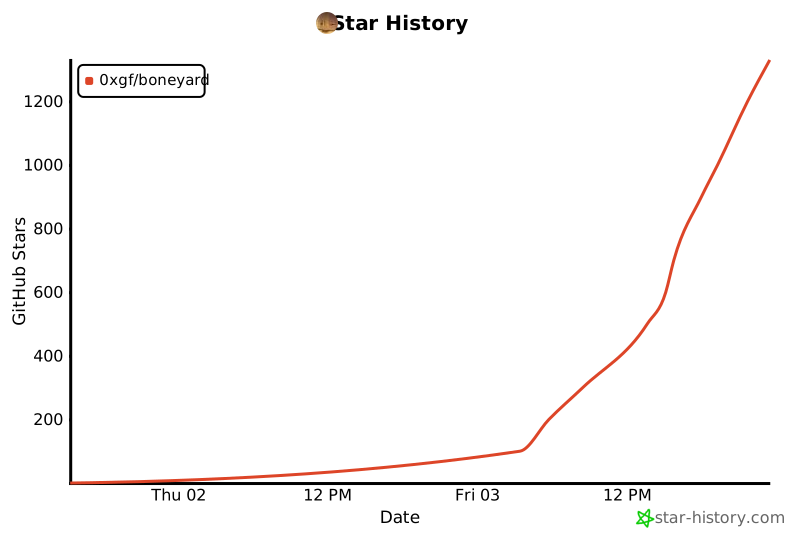](https://star-history.com/#0xGF/boneyard&Date)
## License
MIT